Address Book Example
The address book example shows how to use proxy models to display different views onto data from a single model.
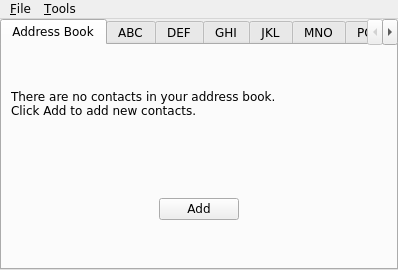
# Copyright (C) 2011 Arun Srinivasan <rulfzid@gmail.com>
# Copyright (C) 2026 The Qt Company Ltd.
# SPDX-License-Identifier: LicenseRef-Qt-Commercial OR BSD-3-Clause
from __future__ import annotations

import sys
from PySide6.QtCore import QStandardPaths, Qt, Slot
from PySide6.QtGui import QAction, QIcon, QKeySequence
from PySide6.QtWidgets import QMainWindow, QFileDialog, QApplication

from addresswidget import AddressWidget


FILTER = "Data files (*.dat)"


class MainWindow(QMainWindow):

    def __init__(self, parent=None):
        super().__init__(parent)

        self._address_widget = AddressWidget()
        self.setCentralWidget(self._address_widget)
        self.create_menus()
        self.setWindowTitle("Address Book")

    def create_menus(self):
        # Create the main menuBar menu items
        file_menu = self.menuBar().addMenu("&File")
        tool_menu = self.menuBar().addMenu("&Tools")

        # Populate the File menu
        self.open_action = QAction(QIcon.fromTheme(QIcon.ThemeIcon.DocumentOpen), "&Open...", self)
        self.open_action.setShortcut(QKeySequence(QKeySequence.StandardKey.Open))
        self.open_action.triggered.connect(self.open_file)
        file_menu.addAction(self.open_action)

        self.save_action = QAction(QIcon.fromTheme(QIcon.ThemeIcon.DocumentSave), "&Save As...",
                                   self)
        self.save_action.setShortcut(QKeySequence(QKeySequence.StandardKey.Save))
        self.save_action.triggered.connect(self.save_file)
        file_menu.addAction(self.save_action)
        file_menu.addSeparator()
        self.exit_action = QAction(QIcon.fromTheme(QIcon.ThemeIcon.ApplicationExit), "E&xit", self)
        self.exit_action.setShortcut(QKeySequence(QKeySequence.StandardKey.Quit))
        self.exit_action.triggered.connect(self.close)
        file_menu.addAction(self.exit_action)

        # Populate the Tools menu
        self.add_action = tool_menu.addAction("&Add Entry...", self._address_widget.add_entry)
        self.add_action.setShortcut(QKeySequence(Qt.KeyboardModifier.ControlModifier
                                                 | Qt.Key.Key_A))
        self._edit_action = tool_menu.addAction("&Edit Entry...", self._address_widget.edit_entry)
        tool_menu.addSeparator()
        self._remove_action = tool_menu.addAction("&Remove Entry",
                                                  self._address_widget.remove_entry)

        # Disable the edit and remove menu items initially, as there are
        # no items yet.
        self._edit_action.setEnabled(False)
        self._remove_action.setEnabled(False)

        # Wire up the updateActions slot
        self._address_widget.selection_changed.connect(self.update_actions)

    # Quick  gotcha:
    #
    # QFiledialog.getOpenFilename and QFileDialog.get.SaveFileName don't
    # behave in PySide6 as they do in Qt, where they return a QString
    # containing the filename.
    #
    # In PySide6, these functions return a tuple: (filename, filter)

    @Slot()
    def open_file(self):
        dir = QStandardPaths.writableLocation(QStandardPaths.StandardLocation.DocumentsLocation)
        filename, _ = QFileDialog.getOpenFileName(self, "Open File", dir, FILTER)
        if filename:
            self._address_widget.read_from_file(filename)
            self.statusBar().showMessage(f"Read {filename}")

    @Slot()
    def save_file(self):
        dir = QStandardPaths.writableLocation(QStandardPaths.StandardLocation.DocumentsLocation)
        filename, _ = QFileDialog.getSaveFileName(self, "Save File As", dir, FILTER)
        if filename:
            self._address_widget.write_to_file(filename)
            self.statusBar().showMessage(f"Wrote {filename}")

    def update_actions(self, selection):
        """ Only allow the user to remove or edit an item if an item
            is actually selected.
        """
        enabled = bool(selection.indexes())
        self._remove_action.setEnabled(enabled)
        self._edit_action.setEnabled(enabled)


if __name__ == "__main__":
    """ Run the application. """
    app = QApplication(sys.argv)
    mw = MainWindow()
    availableGeometry = mw.screen().availableGeometry()
    mw.resize(availableGeometry.width() / 3, availableGeometry.height() / 3)
    mw.show()
    sys.exit(app.exec())
# Copyright (C) 2011 Arun Srinivasan <rulfzid@gmail.com>
# Copyright (C) 2022 The Qt Company Ltd.
# SPDX-License-Identifier: LicenseRef-Qt-Commercial OR BSD-3-Clause
from __future__ import annotations

from PySide6.QtCore import (Qt, QAbstractTableModel, QModelIndex)


class TableModel(QAbstractTableModel):

    def __init__(self, addresses=None, parent=None):
        super().__init__(parent)
        self.addresses = addresses if addresses is not None else []

    def rowCount(self, index=QModelIndex()):
        """ Returns the number of rows the model holds. """
        return len(self.addresses)

    def columnCount(self, index=QModelIndex()):
        """ Returns the number of columns the model holds. """
        return 2

    def data(self, index, role=Qt.ItemDataRole.DisplayRole):
        """ Depending on the index and role given, return data. If not
            returning data, return None (PySide equivalent of Qt's
            "invalid QVariant").
        """
        if index.isValid() and role == Qt.ItemDataRole.DisplayRole:
            row = index.row()
            if 0 <= row < len(self.addresses):
                match index.column():
                    case 0:
                        return self.addresses[row]["name"]
                    case 1:
                        return self.addresses[row]["address"]
        return None

    def headerData(self, section, orientation, role=Qt.ItemDataRole.DisplayRole):
        """ Set the headers to be displayed. """
        if role == Qt.ItemDataRole.DisplayRole and orientation == Qt.Orientation.Horizontal:
            match section:
                case 0:
                    return "Name"
                case 1:
                    return "Address"
        return None

    def insertRows(self, position, rows=1, index=QModelIndex()):
        """ Insert a row into the model. """
        self.beginInsertRows(QModelIndex(), position, position + rows - 1)

        for row in range(rows):
            self.addresses.insert(position + row, {"name": "", "address": ""})

        self.endInsertRows()
        return True

    def removeRows(self, position, rows=1, index=QModelIndex()):
        """ Remove a row from the model. """
        self.beginRemoveRows(QModelIndex(), position, position + rows - 1)

        del self.addresses[position:position + rows]

        self.endRemoveRows()
        return True

    def setData(self, index, value, role=Qt.ItemDataRole.EditRole):
        """ Adjust the data (set it to <value>) depending on the given
            index and role.
        """
        if not index.isValid() or role != Qt.ItemDataRole.EditRole:
            return False

        row = index.row()
        if 0 <= row < len(self.addresses):
            address = self.addresses[row]
            match index.column():
                case 0:
                    address["name"] = value
                case 1:
                    address["address"] = value
            self.dataChanged.emit(index, index, [Qt.ItemDataRole.EditRole.value])
            return True

        return False

    def flags(self, index):
        """ Set the item flags at the given index. Seems like we're
            implementing this function just to see how it's done, as we
            manually adjust each tableView to have NoEditTriggers.
        """
        if not index.isValid():
            return Qt.ItemFlag.ItemIsEnabled
        return Qt.ItemFlags(QAbstractTableModel.flags(self, index)
                            | Qt.ItemFlag.ItemIsEditable)
# Copyright (C) 2011 Arun Srinivasan <rulfzid@gmail.com>
# Copyright (C) 2022 The Qt Company Ltd.
# SPDX-License-Identifier: LicenseRef-Qt-Commercial OR BSD-3-Clause
from __future__ import annotations

from PySide6.QtCore import Slot
from PySide6.QtWidgets import (QDialog, QFormLayout, QPlainTextEdit, QLineEdit,
                               QDialogButtonBox, QVBoxLayout)


class AddDialogWidget(QDialog):
    """ A dialog to add a new address to the addressbook. """

    def __init__(self, parent=None):
        super().__init__(parent)

        self._button_box = QDialogButtonBox(QDialogButtonBox.StandardButton.Ok
                                            | QDialogButtonBox.StandardButton.Cancel)

        self._name_text = QLineEdit()
        self._address_text = QPlainTextEdit()

        formLayout = QFormLayout()
        formLayout.addRow("Name", self._name_text)
        formLayout.addRow("Address", self._address_text)

        layout = QVBoxLayout(self)
        layout.addLayout(formLayout)
        layout.addWidget(self._button_box)

        self.setWindowTitle("Add a Contact")

        self._button_box.accepted.connect(self.accept)
        self._button_box.rejected.connect(self.reject)
        self._name_text.textChanged.connect(self._updateEnabled)
        self._address_text.textChanged.connect(self._updateEnabled)

        self._updateEnabled()

    @Slot()
    def _updateEnabled(self):
        name = self.name
        address = self.address
        enabled = bool(name) and name[:1].isalpha() and bool(address)
        self._button_box.button(QDialogButtonBox.StandardButton.Ok).setEnabled(enabled)

    # These properties make using this dialog a little cleaner. It's much
    # nicer to type "addDialog.address" to retrieve the address as compared
    # to "addDialog.addressText.toPlainText()"
    @property
    def name(self):
        return self._name_text.text()

    @name.setter
    def name(self, n):
        self._name_text.setText(n)

    @property
    def name_enabled(self):
        return self._name_text.isEnabled()

    @name_enabled.setter
    def name_enabled(self, e):
        self._name_text.setEnabled(e)

    @property
    def address(self):
        return self._address_text.toPlainText()

    @address.setter
    def address(self, a):
        self._address_text.setPlainText(a)
# Copyright (C) 2011 Arun Srinivasan <rulfzid@gmail.com>
# Copyright (C) 2022 The Qt Company Ltd.
# SPDX-License-Identifier: LicenseRef-Qt-Commercial OR BSD-3-Clause
from __future__ import annotations

try:
    import cpickle as pickle
except ImportError:
    import pickle

from PySide6.QtCore import (QItemSelection, QRegularExpression, QSortFilterProxyModel,
                            Qt, Signal, Slot)
from PySide6.QtWidgets import QAbstractItemView, QDialog, QMessageBox, QTableView, QTabWidget

from tablemodel import TableModel
from newaddresstab import NewAddressTab
from adddialogwidget import AddDialogWidget


class AddressWidget(QTabWidget):
    """ The central widget of the application. Most of the addressbook's
        functionality is contained in this class.
    """

    selection_changed = Signal(QItemSelection)

    def __init__(self, parent=None):
        """ Initialize the AddressWidget. """
        super().__init__(parent)

        self._table_model = TableModel()
        self._new_address_tab = NewAddressTab()
        self._new_address_tab.triggered.connect(self.add_entry)

        self.addTab(self._new_address_tab, "Address Book")

        self.setup_tabs()

    @Slot()
    def add_entry(self):
        """ Add an entry to the addressbook. """
        add_dialog = AddDialogWidget(self)
        if add_dialog.exec() != QDialog.Accepted:
            return

        name = add_dialog.name
        address = {"name": name, "address": add_dialog.address}
        addresses = self._table_model.addresses[:]

        # The Qt docs for this example state that what we're doing here
        # is checking if the entered name already exists. What they
        # (and we here) are actually doing is checking if the whole
        # name/address pair exists already - ok for the purposes of this
        # example, but obviously not how a real addressbook application
        # should behave.
        try:
            addresses.remove(address)
            QMessageBox.information(self, "Duplicate Name",
                                    f'The name "{name}" already exists.')
        except ValueError:
            # The address didn't already exist, so let's add it to the model.

            self._add_entry(address)

            # Remove the newAddressTab, as we now have at least one
            # address in the model.
            self.removeTab(self.indexOf(self._new_address_tab))

            first_char = name[0:1].upper()
            for t in range(self.count()):
                if first_char in self.tabText(t)[0:1]:
                    self.setCurrentIndex(t)
                    break

    def _add_entry(self, address):
        # Step 1: create the  row
        self._table_model.insertRows(0)

        # Step 2: get the index of the newly created row and use it.
        # to set the name
        ix = self._table_model.index(0, 0)
        self._table_model.setData(ix, address["name"], Qt.ItemDataRole.EditRole)

        # Step 3: lather, rinse, repeat for the address.
        ix = self._table_model.index(0, 1)
        self._table_model.setData(ix, address["address"], Qt.ItemDataRole.EditRole)

    @Slot()
    def edit_entry(self):
        """ Edit an entry in the addressbook. """
        table_view = self.currentWidget()
        proxy_model = table_view.model()
        selection_model = table_view.selectionModel()

        # Get the name and address of the currently selected row.
        indexes = selection_model.selectedRows()
        if len(indexes) != 1:
            return

        row = proxy_model.mapToSource(indexes[0]).row()
        ix = self._table_model.index(row, 0)
        name = self._table_model.data(ix, Qt.ItemDataRole.DisplayRole)
        ix = self._table_model.index(row, 1)
        address = self._table_model.data(ix, Qt.ItemDataRole.DisplayRole)

        # Open an addDialogWidget, and only allow the user to edit the address.
        add_dialog = AddDialogWidget(self)
        add_dialog.setWindowTitle("Edit a Contact")

        add_dialog.name_enabled = False
        add_dialog.name = name
        add_dialog.address = address

        # If the address is different, add it to the model.
        if add_dialog.exec():
            new_address = add_dialog.address
            if new_address != address:
                ix = self._table_model.index(row, 1)
                self._table_model.setData(ix, new_address, Qt.ItemDataRole.EditRole)

    @Slot()
    def remove_entry(self):
        """ Remove an entry from the addressbook. """
        table_view = self.currentWidget()
        proxy_model = table_view.model()
        selection_model = table_view.selectionModel()

        # Just like editEntry, but this time remove the selected row.
        indexes = selection_model.selectedRows()
        if len(indexes) != 1:
            return

        row = proxy_model.mapToSource(indexes[0]).row()
        self._table_model.removeRows(row)

        # If we've removed the last address in the model, display the
        # newAddressTab
        if self._table_model.rowCount() == 0:
            self.insertTab(0, self._new_address_tab, "Address Book")

    def setup_tabs(self):
        """ Setup the various tabs in the AddressWidget. """
        groups = ["ABC", "DEF", "GHI", "JKL", "MNO", "PQR", "STU", "VW", "XYZ"]

        for group in groups:
            proxy_model = QSortFilterProxyModel(self)
            proxy_model.setSourceModel(self._table_model)
            proxy_model.setDynamicSortFilter(True)

            table_view = QTableView()
            table_view.setModel(proxy_model)
            table_view.setSortingEnabled(True)
            table_view.setSelectionBehavior(QAbstractItemView.SelectionBehavior.SelectRows)
            table_view.horizontalHeader().setStretchLastSection(True)
            table_view.verticalHeader().hide()
            table_view.setEditTriggers(QAbstractItemView.EditTrigger.NoEditTriggers)
            table_view.setSelectionMode(QAbstractItemView.SelectionMode.SingleSelection)

            # This here be the magic: we use the group name (e.g. "ABC") to
            # build the regex for the QSortFilterProxyModel for the group's
            # tab. The regex will end up looking like "^[ABC].*", only
            # allowing this tab to display items where the name starts with
            # "A", "B", or "C". Notice that we set it to be case-insensitive.
            re = QRegularExpression(f"^[{group}].*")
            assert re.isValid()
            re.setPatternOptions(QRegularExpression.PatternOption.CaseInsensitiveOption)
            proxy_model.setFilterRegularExpression(re)
            proxy_model.setFilterKeyColumn(0)  # Filter on the "name" column
            proxy_model.sort(0, Qt.SortOrder.AscendingOrder)

            table_view.selectionModel().selectionChanged.connect(self.selection_changed)

            self.addTab(table_view, group)

    # Note: the Qt example uses a QDataStream for the saving and loading.
    # Here we're using a python dictionary to store the addresses, which
    # can't be streamed using QDataStream, so we just use cpickle for this
    # example.
    def read_from_file(self, filename):
        """ Read contacts in from a file. """
        try:
            f = open(filename, "rb")
            addresses = pickle.load(f)
        except IOError:
            QMessageBox.information(self, f"Unable to open file: {filename}")
        finally:
            f.close()

        for address in addresses:
            self._add_entry(address)

        if addresses:
            self.removeTab(self.indexOf(self._new_address_tab))
        else:
            QMessageBox.information(self, f"No contacts in file: {filename}")

    def write_to_file(self, filename):
        """ Save all contacts in the model to a file. """
        try:
            f = open(filename, "wb")
            pickle.dump(self._table_model.addresses, f)

        except IOError:
            QMessageBox.information(self, f"Unable to open file: {filename}")
        finally:
            f.close()
# Copyright (C) 2011 Arun Srinivasan  <rulfzid@gmail.com>
# Copyright (C) 2022 The Qt Company Ltd.
# SPDX-License-Identifier: LicenseRef-Qt-Commercial OR BSD-3-Clause
from __future__ import annotations

from PySide6.QtCore import Qt, Signal
from PySide6.QtWidgets import QWidget, QLabel, QPushButton, QVBoxLayout


class NewAddressTab(QWidget):
    """ An extra tab that prompts the user to add new contacts.
        To be displayed only when there are no contacts in the model.
    """

    triggered = Signal()

    def __init__(self, parent=None):
        super().__init__(parent)

        description_label = QLabel("There are no contacts in your address book."
                                   "\nClick Add to add new contacts.")

        add_button = QPushButton("Add")

        layout = QVBoxLayout(self)
        layout.addWidget(description_label, 0, Qt.AlignmentFlag.AlignCenter)
        layout.addWidget(add_button, 0, Qt.AlignmentFlag.AlignCenter)

        add_button.clicked.connect(self.triggered)