
5.3.2. Installation and Update with Update Site
We recommend to install the Axivion Eclipse Plugin from an HTTPS server. If you, however, are
restrained to a HTTP (without S) server,
newer Eclipse versions automatically use HTTPS despite the URL being explicitly HTTP.
They can be configured to not do this rewrite: Window -
Preferences - Install/Update - Trust -
Authorities. At the bottom of the dialogue, Protocol Rules,
set http to Allow.
The Axivion Eclipse Plugin can be obtained through an Eclipse update site. The URL for the update
site can be retrieved from the Axivion Dashboard Server. Log into the Axivion Dashboard Server on the web using
your browser. The menu at the right upper corner of the browser gives you access to the
documentation and the plugins (Eclipse and Visual Studio). Select the menu item
Eclipse Plugin. This will open a web page listing the URL for the update
site of Axivion Eclipse Plugin. It is usually the Axivion Dashboard Server base URL with
/axivion-eclipse-plugin/repository appended.
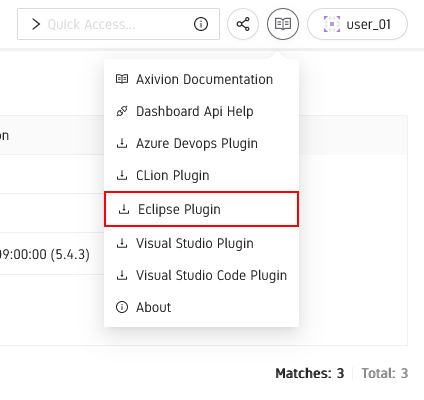
Navigating to the Eclipse Plugin Update Site
Given this URL, you can install the Axivion Eclipse Plugin in the standard way Eclipse provides for
new plugins. To do so, select the menu Help > Install New Software within
Eclipse. Doing so will open an update dialog. You can enter the retrieved URL of the update
site in the text field Work with and press enter. Eclipse will determine the name of
the site automatically. Select the Axivion Eclipse Plugin and complete the installation dialog.
In order to receive updates of Axivion Eclipse Plugin, select the menu item Help > Check
for Updates in Eclipse and follow the instructions given by the subsequent update
dialog.
To access the information from the Axivion Dashboard Server, the Axivion Suite does not need to be installed on your machine. However, to perform local analyses, the Axivion Suite is needed.