
Qt Quick 3D - Exemple de texture procédurale
Démontre comment fournir des données de texture personnalisées à partir de C++ ou QML.
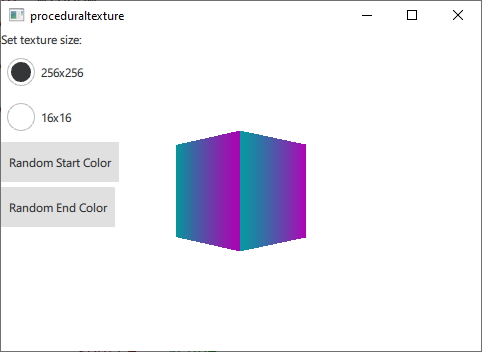
Cet exemple utilise QQuick3DTextureData et the textureData property of Texture pour fournir des données de texture générées dynamiquement au moment de l'exécution au lieu de les charger à partir d'une ressource statique. À des fins de démonstration, cet exemple génère deux textures dégradées en C++ et en QML respectivement.
Tout d'abord, nous définissons une classe C++ pour nos données de texture. Nous en faisons une sous-classe de QQuick3DTextureData. Ce n'est pas strictement nécessaire, puisqu'il n'y a pas de fonctions virtuelles, mais il est beaucoup plus pratique de tout avoir dans une seule classe. Nous définissons les propriétés que nous allons utiliser et ajoutons QML_NAMED_ELEMENT pour les rendre disponibles à partir de QML :
class GradientTexture : public QQuick3DTextureData
{
    Q_OBJECT
    Q_PROPERTY(int height READ height WRITE setHeight NOTIFY heightChanged)
    Q_PROPERTY(int width READ width WRITE setWidth NOTIFY widthChanged)
    Q_PROPERTY(QColor startColor READ startColor WRITE setStartColor NOTIFY startColorChanged)
    Q_PROPERTY(QColor endColor READ endColor WRITE setEndColor NOTIFY endColorChanged)
    QML_NAMED_ELEMENT(GradientTexture)
    ...
Nous ajoutons une fonction pour mettre à jour la texture. Elle utilise setSize et setFormat pour configurer la texture, et setTextureData pour définir les données de l'image :
void GradientTexture::updateTexture()
{
    setSize(QSize(m_width, m_height));
    setFormat(QQuick3DTextureData::RGBA8);
    setHasTransparency(false);
    setTextureData(generateTexture());
}
La fonction generateTexture crée un site QByteArray de la bonne taille et le remplit avec les données de l'image :
QByteArray GradientTexture::generateTexture()
{
    QByteArray imageData;
    // Create a horizontal gradient between startColor and endColor

    // Create a single scanline and reuse that data for each
    QByteArray gradientScanline;
    gradientScanline.resize(m_width * 4); // RGBA8

    for (int x = 0; x < m_width; ++x) {
        QColor color = linearInterpolate(m_startColor, m_endColor, x / float(m_width));
        int offset = x * 4;
        gradientScanline.data()[offset + 0] = char(color.red());
        gradientScanline.data()[offset + 1] = char(color.green());
        gradientScanline.data()[offset + 2] = char(color.blue());
        gradientScanline.data()[offset + 3] = char(255);
    }

    for (int y = 0; y < m_height; ++y)
        imageData += gradientScanline;

    return imageData;
}
Nous appelons updateTexture chaque fois qu'une propriété est modifiée :
void GradientTexture::setStartColor(QColor startColor)
{
    if (m_startColor == startColor)
        return;

    m_startColor = startColor;
    emit startColorChanged(m_startColor);
    updateTexture();
}
Enfin, nous pouvons utiliser notre nouvelle texture à partir de QML :
Texture {
    id: textureFromCpp

    minFilter: applicationState.filterMode
    magFilter: applicationState.filterMode
    textureData: gradientTexture

    GradientTexture {
        id: gradientTexture
        startColor: applicationState.startColor
        endColor: applicationState.endColor
        width: applicationState.size
        height: width
    }
}
Il est également possible de générer les mêmes données de texture en QML. Dans ce cas, nous utilisons le composant ProceduralTextureData:
Texture {
    id: textureFromQML
    minFilter: applicationState.filterMode
    magFilter: applicationState.filterMode
    textureData: gradientTextureDataQML

    ProceduralTextureData {
        id: gradientTextureDataQML

        property color startColor: applicationState.startColor
        property color endColor: applicationState.endColor
        width: applicationState.size
        height: width
        textureData: generateTextureData()

        function linearInterpolate(startColor : color, endColor : color, fraction : real) : color{
            return Qt.rgba(
                        startColor.r + (endColor.r - startColor.r) * fraction,
                        startColor.g + (endColor.g - startColor.g) * fraction,
                        startColor.b + (endColor.b - startColor.b) * fraction,
                        startColor.a + (endColor.a - startColor.a) * fraction
                        );
        }

        function generateTextureData() {
            let dataBuffer = new ArrayBuffer(width * height * 4)
            let data = new Uint8Array(dataBuffer)

            let gradientScanline = new Uint8Array(width * 4);

            for (let x = 0; x < width; ++x) {
                let color = linearInterpolate(startColor, endColor, x / width);
                let offset = x * 4;
                gradientScanline[offset + 0] = color.r * 255;
                gradientScanline[offset + 1] = color.g * 255;
                gradientScanline[offset + 2] = color.b * 255;
                gradientScanline[offset + 3] = color.a * 255;
            }

            for (let y = 0; y < height; ++y) {
                data.set(gradientScanline, y * width * 4);
            }

            return dataBuffer;
        }
    }
}
Tout comme en C++, nous remplissons un site QByteArray avec des données d'image qui reflètent la taille et le format de la texture. Lorsque vous effectuez cette opération à partir de QML, utilisez le type ArrayBuffer afin d'éviter toute conversion de type inutile.
© 2025 The Qt Company Ltd. Documentation contributions included herein are the copyrights of their respective owners. The documentation provided herein is licensed under the terms of the GNU Free Documentation License version 1.3 as published by the Free Software Foundation. Qt and respective logos are trademarks of The Qt Company Ltd. in Finland and/or other countries worldwide. All other trademarks are property of their respective owners.
