
カーコンフィギュレーター
カメラと拡張シーン環境 Qt Quick 3Dカメラ、拡張シーン環境、Qt Quick 3D 。
例の実行
から例を実行します。 Qt Creatorからサンプルを実行するには、Welcome モードを開き、Examples からサンプルを選択します。詳細については、Qt Creator: チュートリアル を参照してください:ビルドと実行
概要
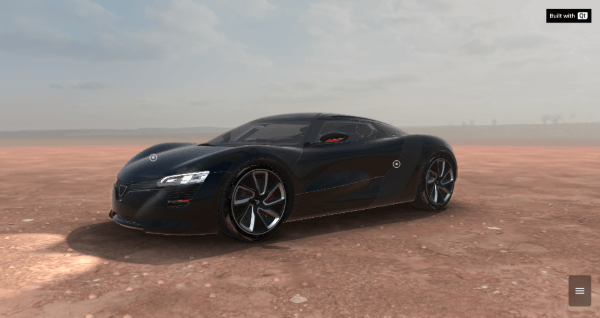
Car Configuratorは、異なるシーン環境と異なる色で車を表示します。QMLで実装され、多くのQtモジュールに依存しています。 Qt Quickそして Qt Quick 3D.
注意: このサンプルは、実行時にインターネットサーバーからいくつかのアセットをダウンロードします。そのため、初回起動時にはインターネット接続が必要です。
車のモデルは2つのモードで操作できます:
- デモモード
- ユーザーモード
デモモード
カメラの視点がさまざまな経路を移動し、車のさまざまなビューを表示します。
カメラのリセット
カメラが初期位置に戻ります。
シーン環境
この例で使用できるシーン環境は4つあります:
- 砂漠
- ガレージ
- スタジオ
- アニメーション
車の色
車の色は4色あります:
- ホワイト
- 黒
- イエロー
- レッド
ライト
車のライトをオン・オフできます。
© 2026 The Qt Company Ltd. Documentation contributions included herein are the copyrights of their respective owners. The documentation provided herein is licensed under the terms of the GNU Free Documentation License version 1.3 as published by the Free Software Foundation. Qt and respective logos are trademarks of The Qt Company Ltd. in Finland and/or other countries worldwide. All other trademarks are property of their respective owners.
