
安装Qt Quick 特效制作工具
您可以将Qt Quick Effect Maker 作为独立工具运行,但它也包含在 Qt Design Studio.
独立安装Qt Quick 特效制作工具
使用统一 Qt 安装程序安装Qt Quick Effect Maker。
- 登录Qt 账户 下载。
- 下载Unified Qt Installer 。
- 打开安装程序。
- 继续Installation Folder 并选择Custom installation 。
- 选择Next 。
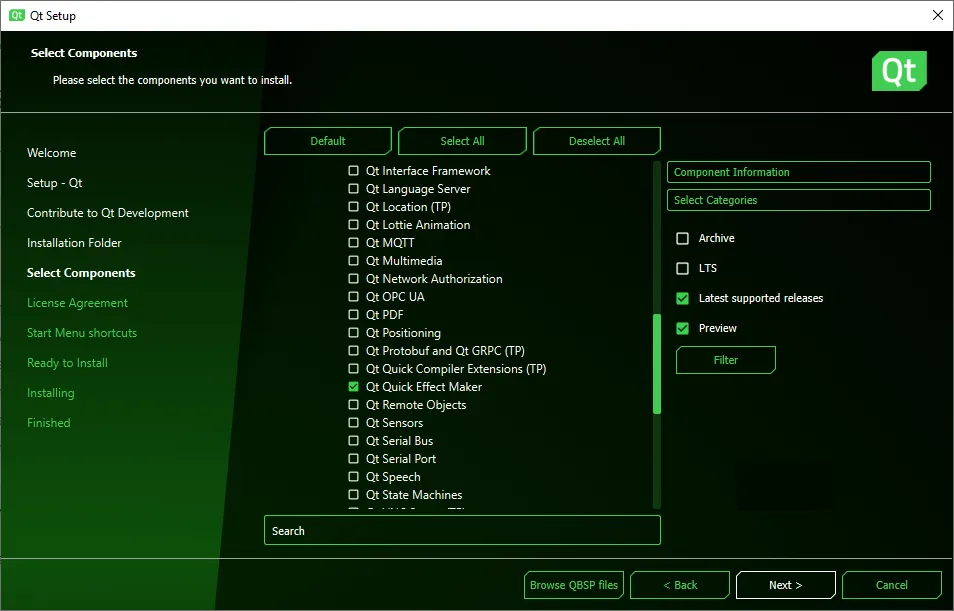
- 转到Qt >Qt 6.5 (或更新版本) >Additional Libraries 并选择 Qt Quick Effect Maker.
- 完成安装并关闭统一 Qt 安装程序。
打开Qt Quick Effect Maker 单机版
要打开Qt Quick Effect Maker,请运行位于 Qt 安装的bin 文件夹中的qqem.exe ,例如C:\Qt\6.8.7\msvc2019_64\bin。
打开Qt Quick Effect Maker 文件Qt Design Studio
要在Qt Quick Effect Maker 中从Qt Design Studio 打开Qt Quick Effect Maker 文件,请在Assets 视图中双击该文件。
创建效果文件Qt Design Studio
在Qt Design Studio 中创建Qt Quick Effect Maker 特效 (.qep) 文件,然后在Qt Quick Effect Maker 中编辑它们。
创建特效文件:
- 在Qt Design Studio 中,在Assets 视图中单击右键,然后选择New Effect 。Qt Design Studio 可创建效果文件,并在Qt Quick Effect Maker 中打开。
- 在Qt Quick Effect Maker 中:
- 编辑特效。
- 选择File >Save 。
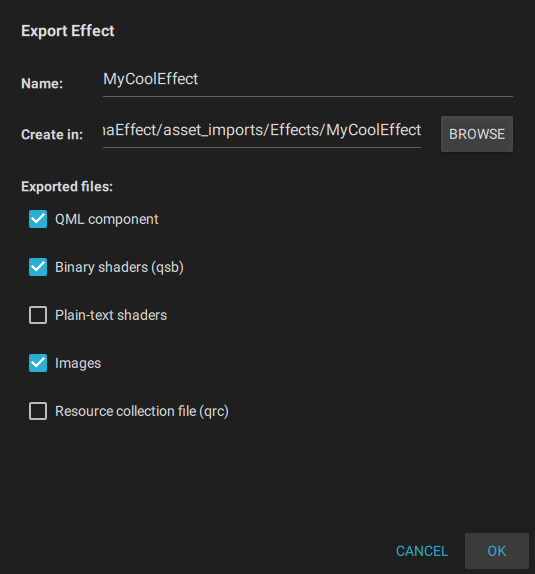
- 选择File >Export 。
- 使用默认设置,选择OK 。
现在,关闭Qt Quick Effect Maker 并返回Qt Design Studio 。
© 2026 The Qt Company Ltd. Documentation contributions included herein are the copyrights of their respective owners. The documentation provided herein is licensed under the terms of the GNU Free Documentation License version 1.3 as published by the Free Software Foundation. Qt and respective logos are trademarks of The Qt Company Ltd. in Finland and/or other countries worldwide. All other trademarks are property of their respective owners.
