
在 Android Studio 项目中使用 QtAbstractItemModel
Qt Quick for Android API 示例以 Android Studio 项目的形式提供。项目文件夹位于 Qt 安装位置。
例如,在默认的 Windows 安装路径下,可在此处找到:
C:\Qt\Examples\Qt-/1\platforms\android
概述
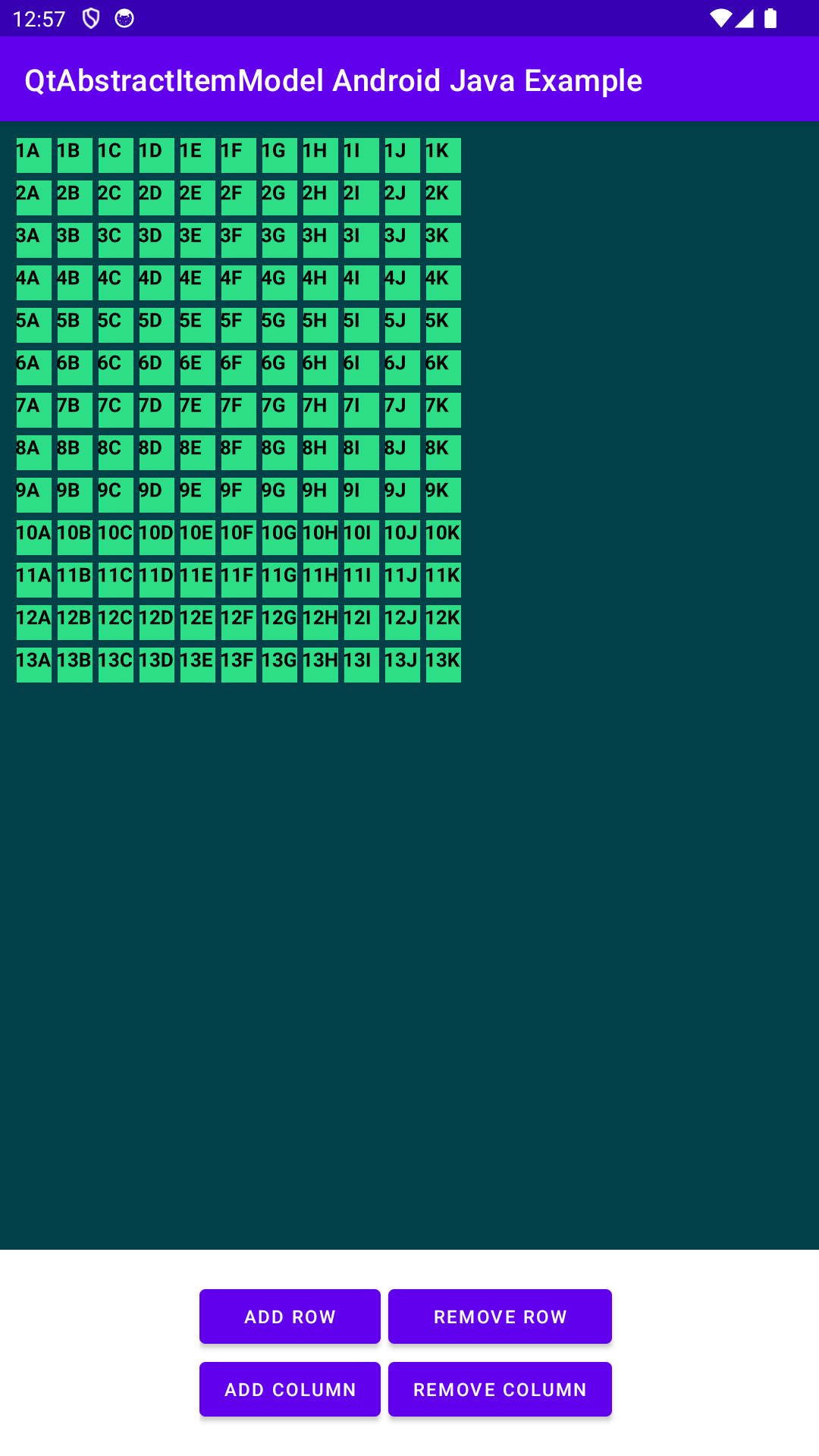
本示例由两个项目组成:一个 Android Studio 项目 (qtabstractitemmodel_java) 和一个 QML 项目 (qtabstractitemmodel)。您可以将 QML 项目导入 Android 项目。
该示例展示了如何在 Java 和 QML 之间处理复杂的数据类型。它演示了如何使用QtAbstractItemModel 和QtModelIndex Java API 类。在 QML 中,数据使用通过TableView 项目演示。在 Java 中,用嵌套 ArrayList 项的行和列模型演示了数据用法。有关 QML 工作原理的更多信息,请参阅 Qt Qml.
运行示例
要运行此示例,您需要在标准 Qt for Android 安装基础上安装 Android Studio 和Qt Tools for Android Studio。在 Android Studio 中打开 qtabstractitemmodel_java,并按照Qt Tools for Android Studio中的说明导入qtabstractitemmodel.
QML 项目
在 QML 项目方面,该示例使用Rectangle 作为根对象。dataModel 属性变量包含从 Java 端创建和交付的数据模型。
Rectangle {
    id: mainRectangle

    property AbstractItemModel dataModel
TableView 显示我们的数据模型。在delegate 属性中,示例用Text 定义了模型的每个单元项。
    TableView {
        id: tableView

        model: mainRectangle.dataModel

        anchors {fill: parent; margins: 20}
        columnSpacing: 4
        rowSpacing: 6
        boundsBehavior: TableView.OvershootBounds
        clip: true

        ScrollBar.vertical: ScrollBar {
           policy: ScrollBar.AsNeeded
        }
        ScrollBar.horizontal: ScrollBar{
           policy: ScrollBar.AsNeeded
        }
在委托中,示例通过模型的QHash<int, QByteArray> QAbstractItemModel::roleNames() const 和QtModelIndex index(int row, int column, QtModelIndex parent) 以及Object data(QtModelIndex qtModelIndex, int role) 方法设置row 和column 属性。
从 QML 调用这些方法意味着在 Qt qtMainLoopThread 线程上下文中执行。
    TableView {
        id: tableView

        model: mainRectangle.dataModel

        anchors {fill: parent; margins: 20}
        columnSpacing: 4
        rowSpacing: 6
        boundsBehavior: TableView.OvershootBounds
        clip: true

        ScrollBar.vertical: ScrollBar {
           policy: ScrollBar.AsNeeded
        }
        ScrollBar.horizontal: ScrollBar{
           policy: ScrollBar.AsNeeded
        }
Android Studio 项目
Android Studio 项目 (qtabstractitemmodel_java) 包含一个 Activity 类MainActivity 和MyDataModel 类。
数据模型
数据模型 c MyDataModel 扩展了QtAbstractItemModel 类。QtAbstractItemModel 是QAbstractItemModel 的包装器。
由于MyDataModel 类的方法在 Qt Qml 和 Android 两端都会调用,因此会在两个线程上下文(Qt qtMainLoopThread 和 Android 主线程上下文)中执行。访问MyDataModel 类方法中的成员变量时,必须确保同步。
首先,该示例使用简单的行和列模拟数据集初始化模型。请注意,该构造方法是在 Android 主线程上下文中调用的。
/*
* Initializes the two-dimensional array list with following content:
* [] [] [] [] 1A 1B 1C 1D
* [] [] [] [] 2A 2B 2C 2D
* [] [] [] [] 3A 3B 3C 3D
* [] [] [] [] 4A 4B 4C 4D
* Threading: called in Android main thread context.
*/
public MyDataModel() {该示例出于不同目的重写了QtAbstractItemModel 方法。columnCount() 和 rowCount() 方法返回模型中每个列的数量。每个 rowCount() 的执行都在两个线程上下文(Qt qtMainLoopThread 和 Android 主线程上下文)中进行。
/*
* Returns the count of columns.
* Threading: called in Android main thread context.
* Threading: called in Qt qtMainLoopThread thread context.
*/
@Override
synchronized public int columnCount(QtModelIndex qtModelIndex) {
    return m_columns;
}

/*
* Returns the count of rows.
* Threading: called in Android main thread context.
* Threading: called in Qt qtMainLoopThread thread context.
*/
@Override
synchronized public int rowCount(QtModelIndex qtModelIndex) {
    return m_dataList.size();
}
方法 data() 根据从 Java 到 QML 的角色和索引提供模型数据。roleNames() 方法会返回一个哈希值,将数字角色值与字符串名称相匹配;在 QML 中,我们使用这些角色名称从模型中获取相应数据。index() 方法返回新的模型索引。方法 parent() 应返回索引的父索引。不过,由于本示例的重点是没有父索引的数据,我们重写了该方法并返回一个空的 QtModelIndex()。由于方法是从 QML 调用的,因此执行发生在 Qt qtMainLoopThread 线程上下文中。
/*
* Returns the data to QML based on the roleNames
* Threading: called in Qt qtMainLoopThread thread context.
*/
@Override
synchronized public Object data(QtModelIndex qtModelIndex, int role) {
    switch (role) {
        case ROLE_ROW:
            Cell elementForRow = m_dataList.get(qtModelIndex.row()).get(qtModelIndex.column());
            String row = String.valueOf(elementForRow.getRow());
            return row;
        case ROLE_COLUMN:
            Cell elementForColumn = m_dataList.get(qtModelIndex.row()).get(qtModelIndex.column());
            String column = elementForColumn.getColumn();
            return column;
        default:
            Log.w(TAG, "data unrecognized role: " + role);
            return null;
    }
}

/*
* Defines what string i.e. role in QML side gets the data from Java side.
* Threading: called in Qt qtMainLoopThread thread context.
*/
@Override
synchronized public HashMap<Integer, String> roleNames() {
    HashMap<Integer, String> roles = new HashMap<>();
    roles.put(ROLE_ROW, "row");
    roles.put(ROLE_COLUMN, "column");
    return roles;
}

/*
* Returns a new index model.
* Threading: called in Qt qtMainLoopThread thread context.
*/
@Override
synchronized public QtModelIndex index(int row, int column, QtModelIndex parent) {
    return createIndex(row, column, 0);
}

/*
* Returns a parent model.
* Threading: not used called in this example.
*/
@Override
synchronized public QtModelIndex parent(QtModelIndex qtModelIndex) {
    return new QtModelIndex();
}该示例在模型侧实现了MainActivity UI 交互方法,以添加和删除行和列。调用 begin、end、insert 和 remove 行来更新模型索引,如 beginInsertRow()。由于示例使用了QtAbstractItemModel ,因此每次向模型插入新行时都必须调用 beginInsertRows() 和 endInsertRows()。删除也是如此。由于这些方法是从 Android 端调用的,因此在 Android 主线程上下文中执行。
/*
* Adds a row.
* Threading: called in Android main thread context.
*/
synchronized public void addRow() {
    if (m_columns > 0 && m_dataList.size() < MAX_ROWS_AND_COLUMNS) {
        beginInsertRows(new QtModelIndex(), m_dataList.size(), m_dataList.size());
        m_dataList.add(generateRow());
        endInsertRows();
    }
}

/*
* Removes a row.
* Threading: called in Android main thread context.
*/
synchronized public void removeRow() {
    if (m_dataList.size() > 1) {
        beginRemoveRows(new QtModelIndex(), m_dataList.size() - 1, m_dataList.size() - 1);
        m_dataList.remove(m_dataList.size() - 1);
        endRemoveRows();
    }
}该示例在模型侧实现了MainActivity UI 交互方法,用于添加和删除列。调用 begin、end、insert 和 remove 列来更新模型索引,如 beginRemoveColumn()。与添加和删除行方法一样,上下文意识也适用。
/*
* Adds a column.
* Threading: called in Android main thread context.
*/
synchronized public void addColumn() {
    if (!m_dataList.isEmpty() && m_columns < MAX_ROWS_AND_COLUMNS) {
        beginInsertColumns(new QtModelIndex(), m_columns, m_columns);
        generateColumn();
        m_columns += 1;
        endInsertColumns();
    }
}

/*
* Removes a column.
* Threading: called in Android main thread context.
*/
synchronized public void removeColumn() {
    if (m_columns > 1) {
        int columnToRemove = m_columns - 1;
        beginRemoveColumns(new QtModelIndex(), columnToRemove, columnToRemove);
        m_columns -= 1;
        endRemoveColumns();
    }
}
主活动
MainActivity 实现QtQmlStatusChangeListener 接口,以便在加载 QML 时获取状态更新。它也是主要的 Android 活动。
该示例创建并初始化了数据模型。另请参阅QtQuickView
private final MyDataModel m_model = new MyDataModel();
示例设置了 UI 按钮及其监听器,以便用户通过 UI 与模型交互。
/*
* Returns the count of columns.
* Threading: called in Android main thread context.
* Threading: called in Qt qtMainLoopThread thread context.
*/
@Override
synchronized public int columnCount(QtModelIndex qtModelIndex) {
    return m_columns;
}

/*
* Returns the count of rows.
* Threading: called in Android main thread context.
* Threading: called in Qt qtMainLoopThread thread context.
*/
@Override
synchronized public int rowCount(QtModelIndex qtModelIndex) {
    return m_dataList.size();
}
示例开始加载 QML 内容。加载在后台进行,直到ready 状态更新。
/*
* Returns the data to QML based on the roleNames
* Threading: called in Qt qtMainLoopThread thread context.
*/
@Override
synchronized public Object data(QtModelIndex qtModelIndex, int role) {
    switch (role) {
        case ROLE_ROW:
            Cell elementForRow = m_dataList.get(qtModelIndex.row()).get(qtModelIndex.column());
            String row = String.valueOf(elementForRow.getRow());
            return row;
        case ROLE_COLUMN:
            Cell elementForColumn = m_dataList.get(qtModelIndex.row()).get(qtModelIndex.column());
            String column = elementForColumn.getColumn();
            return column;
        default:
            Log.w(TAG, "data unrecognized role: " + role);
            return null;
    }
}

/*
* Defines what string i.e. role in QML side gets the data from Java side.
* Threading: called in Qt qtMainLoopThread thread context.
*/
@Override
synchronized public HashMap<Integer, String> roleNames() {
    HashMap<Integer, String> roles = new HashMap<>();
    roles.put(ROLE_ROW, "row");
    roles.put(ROLE_COLUMN, "column");
    return roles;
}

/*
* Returns a new index model.
* Threading: called in Qt qtMainLoopThread thread context.
*/
@Override
synchronized public QtModelIndex index(int row, int column, QtModelIndex parent) {
    return createIndex(row, column, 0);
}

/*
* Returns a parent model.
* Threading: not used called in this example.
*/
@Override
synchronized public QtModelIndex parent(QtModelIndex qtModelIndex) {
    return new QtModelIndex();
}
加载 QML 内容且状态就绪后,示例将设置数据模型。
/*
* Adds a row.
* Threading: called in Android main thread context.
*/
synchronized public void addRow() {
    if (m_columns > 0 && m_dataList.size() < MAX_ROWS_AND_COLUMNS) {
        beginInsertRows(new QtModelIndex(), m_dataList.size(), m_dataList.size());
        m_dataList.add(generateRow());
        endInsertRows();
    }
}

/*
* Removes a row.
* Threading: called in Android main thread context.
*/
synchronized public void removeRow() {
    if (m_dataList.size() > 1) {
        beginRemoveRows(new QtModelIndex(), m_dataList.size() - 1, m_dataList.size() - 1);
        m_dataList.remove(m_dataList.size() - 1);
        endRemoveRows();
    }
}
© 2026 The Qt Company Ltd. Documentation contributions included herein are the copyrights of their respective owners. The documentation provided herein is licensed under the terms of the GNU Free Documentation License version 1.3 as published by the Free Software Foundation. Qt and respective logos are trademarks of The Qt Company Ltd. in Finland and/or other countries worldwide. All other trademarks are property of their respective owners.
