
Personalización de gráficos
Nota: Esto forma parte del ejemplo de la Galería de Gráficos con Widgets.
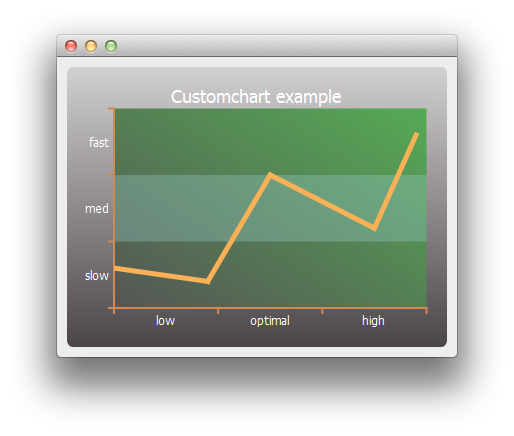
Comenzamos creando una serie lineal simple y un objeto gráfico.
auto series = new QLineSeries;
*series << QPointF(0, 6) << QPointF(9, 4) << QPointF(15, 20) << QPointF(25, 12) << QPointF(29, 26);
auto chart = new QChart;
chart->legend()->hide();
chart->addSeries(series);
Primero personalizamos la serie y el título y fondo del gráfico.
// Customize series
QPen pen(QRgb(0xfdb157));
pen.setWidth(5);
series->setPen(pen);

// Customize chart title
QFont font;
font.setPixelSize(18);
chart->setTitleFont(font);
chart->setTitleBrush(QBrush(Qt::white));
chart->setTitle("Custom Chart");

// Customize chart background
QLinearGradient backgroundGradient;
backgroundGradient.setStart(QPointF(0, 0));
backgroundGradient.setFinalStop(QPointF(0, 1));
backgroundGradient.setColorAt(0.0, QRgb(0xd2d0d1));
backgroundGradient.setColorAt(1.0, QRgb(0x4c4547));
backgroundGradient.setCoordinateMode(QGradient::ObjectBoundingMode);
chart->setBackgroundBrush(backgroundGradient);

// Customize plot area background
QLinearGradient plotAreaGradient;
plotAreaGradient.setStart(QPointF(0, 1));
plotAreaGradient.setFinalStop(QPointF(1, 0));
plotAreaGradient.setColorAt(0.0, QRgb(0x555555));
plotAreaGradient.setColorAt(1.0, QRgb(0x55aa55));
plotAreaGradient.setCoordinateMode(QGradient::ObjectBoundingMode);
chart->setPlotAreaBackgroundBrush(plotAreaGradient);
chart->setPlotAreaBackgroundVisible(true);
Luego personalizamos los ejes.
auto axisX = new QCategoryAxis;
auto axisY = new QCategoryAxis;

// Customize axis label font
QFont labelsFont;
labelsFont.setPixelSize(12);
axisX->setLabelsFont(labelsFont);
axisY->setLabelsFont(labelsFont);

// Customize axis colors
QPen axisPen(QRgb(0xd18952));
axisPen.setWidth(2);
axisX->setLinePen(axisPen);
axisY->setLinePen(axisPen);

// Customize axis label colors
QBrush axisBrush(Qt::white);
axisX->setLabelsBrush(axisBrush);
axisY->setLabelsBrush(axisBrush);

// Customize grid lines and shades
axisX->setGridLineVisible(false);
axisY->setGridLineVisible(false);
axisY->setShadesPen(Qt::NoPen);
axisY->setShadesBrush(QBrush(QColor(0x99, 0xcc, 0xcc, 0x55)));
axisY->setShadesVisible(true);
A continuación, los valores y rangos de las etiquetas de los ejes. Una vez listos los ejes, los configuramos para que sean utilizados por el gráfico.
axisX->append("low", 10);
axisX->append("optimal", 20);
axisX->append("high", 30);
axisX->setRange(0, 30);

axisY->append("slow", 10);
axisY->append("med", 20);
axisY->append("fast", 30);
axisY->setRange(0, 30);

chart->addAxis(axisX, Qt::AlignBottom);
chart->addAxis(axisY, Qt::AlignLeft);
series->attachAxis(axisX);
series->attachAxis(axisY);
Por último, creamos una vista que contiene el gráfico.
createDefaultChartView(chart);
Ahora estamos listos para mostrar el gráfico en una ventana principal.
© 2026 The Qt Company Ltd. Documentation contributions included herein are the copyrights of their respective owners. The documentation provided herein is licensed under the terms of the GNU Free Documentation License version 1.3 as published by the Free Software Foundation. Qt and respective logos are trademarks of The Qt Company Ltd. in Finland and/or other countries worldwide. All other trademarks are property of their respective owners.
