
Qt Quick Publicación
Utilice Qt Quick Controls para crear una aplicación que pueda publicar en temas MQTT.
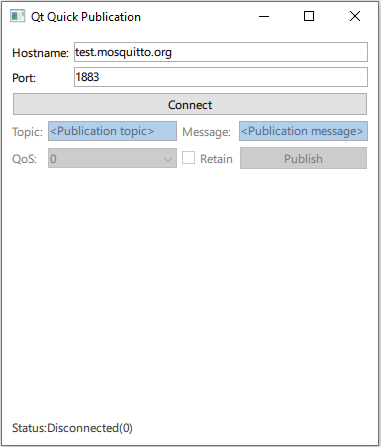
Qt Quick La publicación demuestra cómo registrar QMqttClient como un tipo QML y utilizarlo en una aplicación Qt Quick.
Qt MQTT no proporciona una API QML en su versión actual. Sin embargo, puede hacer que las clases C++ del módulo estén disponibles para QML.
Creación de un cliente
Cree la clase envolvente QmlMqttClient que tiene QMqttClient como miembro:
private:
    Q_DISABLE_COPY(QmlMqttClient)
    QMqttClient m_client;
};
Conecta los métodos del wrapper a los métodos de QMqttClient en el constructor:
QmlMqttClient::QmlMqttClient(QObject *parent)
    : QObject(parent)
{
    connect(&m_client, &QMqttClient::hostnameChanged, this, &QmlMqttClient::hostnameChanged);
    connect(&m_client, &QMqttClient::portChanged, this, &QmlMqttClient::portChanged);
    connect(&m_client, &QMqttClient::stateChanged, this, &QmlMqttClient::stateChanged);
}
Un método envoltorio tiene el mismo nombre que el método envuelto. En el caso más sencillo, se trata de una única llamada a un método:
void QmlMqttClient::connectToHost()
{
    m_client.connectToHost();
}
También es posible personalizar un método envoltorio ampliándolo con alguna funcionalidad adicional:
void QmlMqttClient::setPort(int newPort) { if (newPort < 0 || newPort > std::numeric_limits<quint16>::max()) {        qWarning() << "Trying to set invalid port number";
       return; } m_client.setPort(static_cast<quint16>(nuevoPuerto));
Registro de clases en QML
En el archivo main.cpp, carga el tipo Main de QML desde la publicación del módulo:
    QGuiApplication app(argc, argv);
    QQmlApplicationEngine engine;

    QObject::connect(
            &engine, &QQmlApplicationEngine::objectCreationFailed, &app,
            []() { QCoreApplication::exit(EXIT_FAILURE); }, Qt::QueuedConnection);

    engine.loadFromModule(u"publication"_s, u"Main"_s);
Ahora utiliza el tipo MqttClient en el archivo Main.qml para crear un cliente MQTT:
    MqttClient {
        id: client
        hostname: hostnameField.text
        port: portField.text
    }
Ficheros:
© 2026 The Qt Company Ltd. Documentation contributions included herein are the copyrights of their respective owners. The documentation provided herein is licensed under the terms of the GNU Free Documentation License version 1.3 as published by the Free Software Foundation. Qt and respective logos are trademarks of The Qt Company Ltd. in Finland and/or other countries worldwide. All other trademarks are property of their respective owners.
