
Suscripciones MQTT
Creación de una aplicación que se comunica con un broker MQTT.
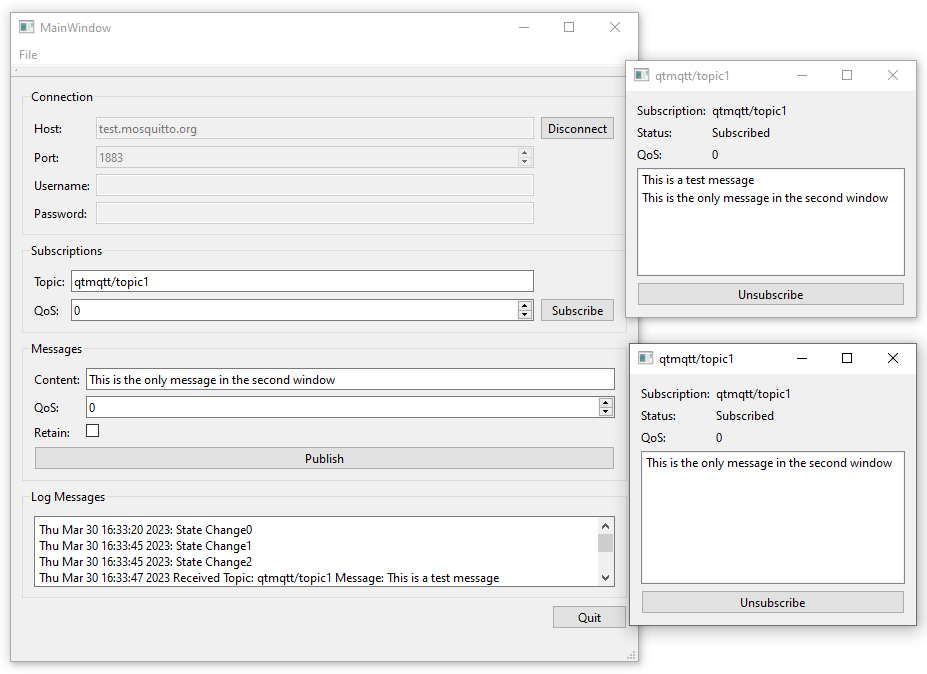
Suscripciones MQTT muestra cómo crear una aplicación que se comunica con un broker MQTT. Se abre un nuevo diálogo para cada suscripción, donde puede ver los mensajes en los temas suscritos.
Creando un Cliente
Usamos la clase QMqttClient para crear un cliente MQTT y establecer el nombre de host del broker y el puerto a usar para la conexión:
    m_client = new QMqttClient(this);
    m_client->setHostname(ui->lineEditHost->text());
    m_client->setPort(static_cast<quint16>(ui->spinBoxPort->value()));
Suscripción a temas
Cuando los usuarios se suscriben a temas en el cliente, se crea un nuevo objeto de suscripción:
void MainWindow::on_buttonSubscribe_clicked()
{
    auto subscription = m_client->subscribe(ui->lineEditTopic->text(),
                                            static_cast<quint8>(ui->spinQoS->text().toUInt()));
    if (!subscription) {
        QMessageBox::critical(this, u"Error"_s,
                              u"Could not subscribe. Is there a valid connection?"_s);
        return;
    }
    auto subWindow = new SubscriptionWindow(subscription);
    subWindow->setWindowTitle(subscription->topic().filter());
    subWindow->show();
}
Utilizamos la clase QMqttSubscription para almacenar el tema, el estado y el nivel de QoS de una suscripción:
SubscriptionWindow::SubscriptionWindow(QMqttSubscription *sub, QWidget *parent) :
    QWidget(parent),
    ui(new Ui::SubscriptionWindow),
    m_sub(sub)
{
    ui->setupUi(this);

    ui->labelSub->setText(m_sub->topic().filter());
    ui->labelQoS->setText(QString::number(m_sub->qos()));
    updateStatus(m_sub->state());
    connect(m_sub, &QMqttSubscription::messageReceived, this, &SubscriptionWindow::updateMessage);
    connect(m_sub, &QMqttSubscription::stateChanged, this, &SubscriptionWindow::updateStatus);
    connect(m_sub, &QMqttSubscription::qosChanged, [this](quint8 qos) {
        ui->labelQoS->setText(QString::number(qos));
    });
    connect(ui->pushButton, &QAbstractButton::clicked, m_sub, &QMqttSubscription::unsubscribe);
}
El nivel de calidad de servicio puede establecerse por separado para un mensaje y para una suscripción. El nivel de QoS establecido para una suscripción determina el nivel mínimo de QoS. Si se envía un mensaje con un nivel de QoS superior, el agente aumenta la QoS de ese mensaje al nivel superior. Por ejemplo, si el cliente A se suscribe al tema con QoS 1, y el cliente B publica un mensaje sobre el tema, con QoS 0, el broker incrementará automáticamente la QoS del mensaje a 1. Si el cliente B publica un mensaje sobre el tema con QoS 2, el broker lo enviará con QoS 2.
Recepción de mensajes
Cuando el cliente recibe un mensaje, se utiliza la clase QMqttMessage para almacenar la carga útil real del mensaje:
void SubscriptionWindow::updateMessage(const QMqttMessage &msg)
{
    ui->listWidget->addItem(msg.payload());
}
Archivos:
© 2026 The Qt Company Ltd. Documentation contributions included herein are the copyrights of their respective owners. The documentation provided herein is licensed under the terms of the GNU Free Documentation License version 1.3 as published by the Free Software Foundation. Qt and respective logos are trademarks of The Qt Company Ltd. in Finland and/or other countries worldwide. All other trademarks are property of their respective owners.
