
Qt Quick Ejemplos - Canvas
Esta es una colección de ejemplos QML Canvas.
Canvas es una colección de pequeños ejemplos QML relacionados con el tipo Canvas. Cada ejemplo es un pequeño archivo QML que enfatiza un tipo o característica en particular.
Ejecutar el ejemplo
Para ejecutar el ejemplo de Qt Creator, abra el modo Welcome y seleccione el ejemplo de Examples. Para más información, consulte Qt Creator: Tutorial: Construir y ejecutar.
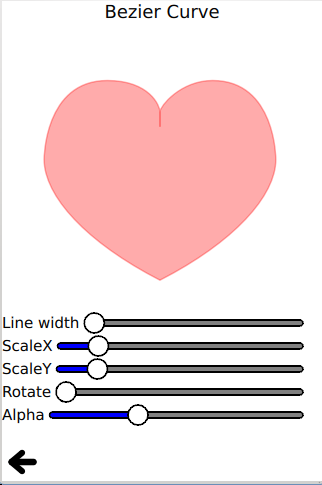
Corazón rojo
Corazón rojo utiliza la API de curvas bezier para trazar y rellenar un corazón rojo.
ctx.beginPath()
ctx.moveTo(75,40)
ctx.bezierCurveTo(75,37,70,25,50,25)
ctx.bezierCurveTo(20,25,20,62.5,20,62.5)
ctx.bezierCurveTo(20,80,40,102,75,120)
ctx.bezierCurveTo(110,102,130,80,130,62.5)
ctx.bezierCurveTo(130,62.5,130,25,100,25)
ctx.bezierCurveTo(85,25,75,37,75,40)
ctx.closePath()
Burbuja de conversación
Laburbuja de conversación utiliza la API quadraticCurveTo() para trazar y rellenar una burbuja de conversación personalizada:
ctx.beginPath()
ctx.moveTo(75, 25)
ctx.quadraticCurveTo(25, 25, 25, 62.5)
ctx.quadraticCurveTo(25, 100, 50, 100)
ctx.quadraticCurveTo(50, 120, 30, 125)
ctx.quadraticCurveTo(60, 120, 65, 100)
ctx.quadraticCurveTo(125, 100, 125, 62.5)
ctx.quadraticCurveTo(125, 25, 75, 25)
ctx.closePath()
Este ejemplo también muestra la API fillText():
ctx.fillStyle = "white"
ctx.font = "bold 17px sans-serif"
ctx.fillText("Qt Quick", 40, 70)
Squircle
Squircle utiliza una colección de APIs de trazado simples moveTo() y lineTo() para dibujar una ardilla suave.
Rectángulo redondeado
Rectángulo redondeado utiliza una colección de APIs de trazado lineTo() y arcTo() para dibujar un rectángulo redondeado.
Cara sonriente
Cara sonriente utiliza varios trazados para dibujar y rellenar una cara sonriente.
Recortar
Clip utiliza la API clip para recortar una imagen dada.
ctx.clip()
ctx.drawImage(canvas.imagefile, 0, 0)
Tigre
Tiger utiliza la API de rutas SVG para dibujar un tigre con una colección de cadenas de rutas SVG.
for (let i = 0; i < Tiger.tiger.length; i++) {
    if (Tiger.tiger[i].width !== undefined)
        ctx.lineWidth = Tiger.tiger[i].width

    if (Tiger.tiger[i].path !== undefined)
        ctx.path = Tiger.tiger[i].path

    if (Tiger.tiger[i].fill !== undefined) {
        ctx.fillStyle = Tiger.tiger[i].fill
        ctx.fill()
    }

    if (Tiger.tiger[i].stroke !== undefined) {
        ctx.strokeStyle = Tiger.tiger[i].stroke
        ctx.stroke()
    }
}
© 2026 The Qt Company Ltd. Documentation contributions included herein are the copyrights of their respective owners. The documentation provided herein is licensed under the terms of the GNU Free Documentation License version 1.3 as published by the Free Software Foundation. Qt and respective logos are trademarks of The Qt Company Ltd. in Finland and/or other countries worldwide. All other trademarks are property of their respective owners.
