
Qt Quick Ejemplos - Arrastrar y soltar
Esta es una colección de ejemplos QML de arrastrar y soltar.
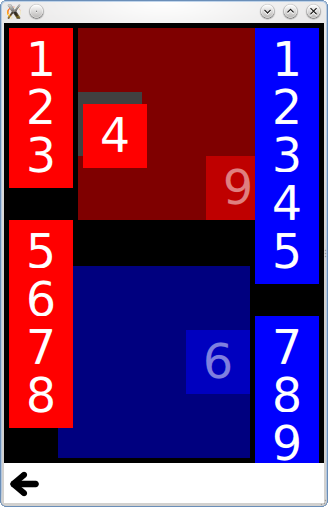
Arrastrar ysoltar es una colección de pequeños ejemplos QML relacionados con la funcionalidad de arrastrar y soltar. Para más información, visita la página Arrastrar y soltar.
Ejecutar el ejemplo
Para ejecutar el ejemplo desde Qt Creatorabra el modo Welcome y seleccione el ejemplo de Examples. Para más información, consulte Qt Creator: Tutorial: Construir y ejecutar.
Azulejos
Tiles añade la función de arrastrar y soltar a rectángulos simples, que puedes arrastrar a una rejilla específica.
Tiene un componente DragTile que utiliza un MouseArea para mover un elemento cuando se arrastra:
Item {
    id: root

    required property string colorKey
    required property int modelData

    width: 64
    height: 64

    MouseArea {
        id: mouseArea

        width: 64
        height: 64
        anchors.centerIn: parent

        drag.target: tile

        onReleased: parent = tile.Drag.target !== null ? tile.Drag.target : root

        Rectangle {
            id: tile

            width: 64
            height: 64
            anchors {
                verticalCenter: parent.verticalCenter
                horizontalCenter: parent.horizontalCenter
            }

            color: root.colorKey

            Drag.keys: [ root.colorKey ]
            Drag.active: mouseArea.drag.active
            Drag.hotSpot.x: 32
            Drag.hotSpot.y: 32
            states: State {
                when: mouseArea.drag.active
                AnchorChanges {
                    target: tile
                    anchors {
                        verticalCenter: undefined
                        horizontalCenter: undefined
                    }
                }
            }
        }
    }
}
Y un componente DropTile sobre el que se pueden soltar los azulejos arrastrados:
DropArea {
    id: dragTarget

    property string colorKey

    width: 64
    height: 64
    keys: [ colorKey ]

    Rectangle {
        id: dropRectangle

        anchors.fill: parent
        color: dragTarget.containsDrag ? "grey" : dragTarget.colorKey
    }
}
La propiedad keys de DropArea sólo permitirá soltar un elemento sobre él si tiene una clave coincidente en su propiedad Drag.keys.
Ejemplo de GridView
El ejemplo deGridView añade la función de arrastrar y soltar a un GridView, lo que permite reordenar visualmente los delegados sin cambiar el ListModel subyacente. Utiliza un DelegateModel para mover un elemento delegado a la posición de otro elemento sobre el que se arrastra.
    model: DelegateModel {
        delegate: DropArea {
            id: delegateRoot
            required property color color

            width: 80
            height: 80

            onEntered: function(drag) {
                visualModel.items.move((drag.source as Icon).visualIndex, icon.visualIndex)
            }

            property int visualIndex: DelegateModel.itemsIndex

            Icon {
                id: icon
                dragParent: root
                visualIndex: delegateRoot.visualIndex
                color: delegateRoot.color
            }
        }
© 2026 The Qt Company Ltd. Documentation contributions included herein are the copyrights of their respective owners. The documentation provided herein is licensed under the terms of the GNU Free Documentation License version 1.3 as published by the Free Software Foundation. Qt and respective logos are trademarks of The Qt Company Ltd. in Finland and/or other countries worldwide. All other trademarks are property of their respective owners.
