
Gráfico de escena - Material personalizado
Muestra cómo implementar un material personalizado en Qt Quick Scene Graph.
El ejemplo de material personalizado muestra cómo implementar un elemento que se renderiza utilizando un material con un sombreador de vértices y fragmentos personalizado.
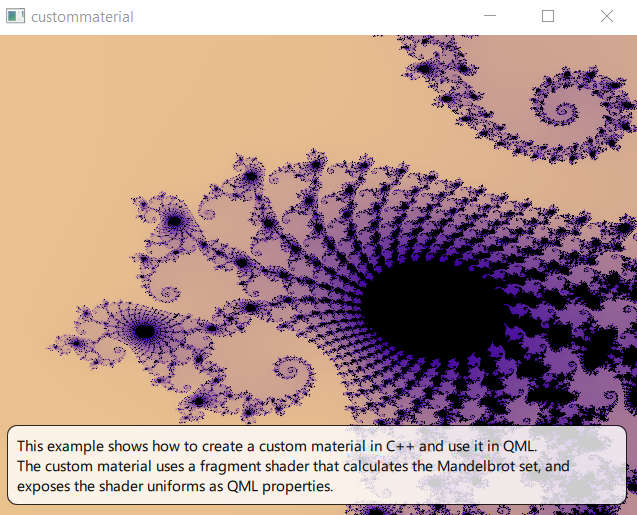
Shader y material
La funcionalidad principal se encuentra en el fragment shader
// Copyright (C) 2023 The Qt Company Ltd.
// SPDX-License-Identifier: LicenseRef-Qt-Commercial OR BSD-3-Clause

#version 440

layout(location = 0) in vec2 vTexCoord;

layout(location = 0) out vec4 fragColor;

// uniform block: 84 bytes
layout(std140, binding = 0) uniform buf {
    mat4 qt_Matrix; // offset 0
    float qt_Opacity; // offset 64
    float zoom; // offset 68
    vec2 center; // offset 72
    int limit; // offset 80
} ubuf;

void main()
{
    vec4 color1 = vec4(1.0, 0.85, 0.55, 1);
    vec4 color2 = vec4(0.226, 0.0, 0.615, 1);

    float aspect_ratio = -ubuf.qt_Matrix[0][0]/ubuf.qt_Matrix[1][1];
    vec2 z, c;

    c.x = (vTexCoord.x - 0.5) / ubuf.zoom + ubuf.center.x;
    c.y = aspect_ratio * (vTexCoord.y - 0.5) / ubuf.zoom + ubuf.center.y;

    int iLast;
    z = c;
    for (int i = 0; i < 1000000; i++) {
        if (i >= ubuf.limit)
        {
            iLast = i;
            break;
        }
        float x = (z.x * z.x - z.y * z.y) + c.x;
        float y = (z.y * z.x + z.x * z.y) + c.y;

        if ((x * x + y * y) > 4.0)
        {
            iLast = i;
            break;
        }
        z.x = x;
        z.y = y;
    }

    if (iLast == ubuf.limit) {
        fragColor = vec4(0.0, 0.0, 0.0, 1.0);
    } else {
        float f = (iLast * 1.0) / ubuf.limit;
        fragColor = mix(color1, color2, sqrt(f));
    }
}
Los sombreadores de fragmentos y vértices se combinan en una subclase QSGMaterialShader.
class CustomShader : public QSGMaterialShader
{
public:
    CustomShader()
    {
        setShaderFileName(VertexStage, QLatin1String(":/scenegraph/custommaterial/shaders/mandelbrot.vert.qsb"));
        setShaderFileName(FragmentStage, QLatin1String(":/scenegraph/custommaterial/shaders/mandelbrot.frag.qsb"));
    }
    bool updateUniformData(RenderState &state,
                           QSGMaterial *newMaterial, QSGMaterial *oldMaterial) override;
};
Una subclase de QSGMaterial encapsula el shader junto con el estado de renderizado. En este ejemplo, añadimos la información de estado correspondiente a los uniformes del shader. El material es responsable de crear el shader reimplementando QSGMaterial::createShader().
class CustomMaterial : public QSGMaterial
{
public:
    CustomMaterial();
    QSGMaterialType *type() const override;
    int compare(const QSGMaterial *other) const override;

    QSGMaterialShader *createShader(QSGRendererInterface::RenderMode) const override
    {
        return new CustomShader;
    }

    struct {
        float center[2];
        float zoom;
        int limit;
        bool dirty;
    } uniforms;
};
Para actualizar los datos de los uniformes, reimplementamos QSGMaterialShader::updateUniformData().
bool CustomShader::updateUniformData(RenderState &state, QSGMaterial *newMaterial, QSGMaterial *oldMaterial)
{
    bool changed = false;
    QByteArray *buf = state.uniformData();
    Q_ASSERT(buf->size() >= 84);

    if (state.isMatrixDirty()) {
        const QMatrix4x4 m = state.combinedMatrix();
        memcpy(buf->data(), m.constData(), 64);
        changed = true;
    }

    if (state.isOpacityDirty()) {
        const float opacity = state.opacity();
        memcpy(buf->data() + 64, &opacity, 4);
        changed = true;
    }

    auto *customMaterial = static_cast<CustomMaterial *>(newMaterial);
    if (oldMaterial != newMaterial || customMaterial->uniforms.dirty) {
        memcpy(buf->data() + 68, &customMaterial->uniforms.zoom, 4);
        memcpy(buf->data() + 72, &customMaterial->uniforms.center, 8);
        memcpy(buf->data() + 80, &customMaterial->uniforms.limit, 4);
        customMaterial->uniforms.dirty = false;
        changed = true;
    }
    return changed;
}
Item y nodo
Creamos un item personalizado para mostrar nuestro nuevo material:
#include <QQuickItem>

class CustomItem : public QQuickItem
{
    Q_OBJECT
    Q_PROPERTY(qreal zoom READ zoom WRITE setZoom NOTIFY zoomChanged)
    Q_PROPERTY(int iterationLimit READ iterationLimit WRITE setIterationLimit NOTIFY iterationLimitChanged)
    Q_PROPERTY(QPointF center READ center WRITE setCenter NOTIFY centerChanged)
    QML_ELEMENT

public:
    explicit CustomItem(QQuickItem *parent = nullptr);

    qreal zoom() const
    {
        return m_zoom;
    }

    int iterationLimit() const
    {
        return m_limit;
    }

    QPointF center() const
    {
        return m_center;
    }

public slots:
    void setZoom(qreal zoom);

    void setIterationLimit(int iterationLimit);

    void setCenter(QPointF center);

signals:
    void zoomChanged(qreal zoom);

    void iterationLimitChanged(int iterationLimit);

    void centerChanged(QPointF center);

protected:
    QSGNode *updatePaintNode(QSGNode *, UpdatePaintNodeData *) override;
    void geometryChange(const QRectF &newGeometry, const QRectF &oldGeometry) override;

private:
    bool m_geometryChanged = true;
    qreal m_zoom;
    bool m_zoomChanged = true;
    int m_limit;
    bool m_limitChanged = true;
    QPointF m_center;
    bool m_centerChanged = true;
};
La declaración CustomItem añade tres propiedades correspondientes a los uniformes que queremos exponer a QML.
    Q_PROPERTY(qreal zoom READ zoom WRITE setZoom NOTIFY zoomChanged)
    Q_PROPERTY(int iterationLimit READ iterationLimit WRITE setIterationLimit NOTIFY iterationLimitChanged)
    Q_PROPERTY(QPointF center READ center WRITE setCenter NOTIFY centerChanged)
Como con cada ítem personalizado Qt Quick, la implementación se divide en dos: además de CustomItem, que vive en el hilo GUI, creamos una subclase QSGNode que vive en el hilo de renderizado.
class CustomNode : public QSGGeometryNode { public: CustomNode() { auto *m = new CustomMaterial; setMaterial(m); setFlag(OwnsMaterial, true); QSGGeometry *g = new QSGGeometry(QSGGeometry::defaultAttributes_TexturedPoint2D(), 4); QSGGeometry::updateTexturedRectGeometry(g, QRect(), QRect()); setGeometry(g); setFlag(OwnsGeometry, true); } void setRect(const QRectF &bounds) { QSGGeometry::updateTexturedRectGeometry(geometry(), bounds, QRectF(0, 0, 1, 1)); markDirty(QSGNode::DirtyGeometry); } void setZoom(qreal zoom) { auto *m = static_cast<CustomMaterial *>(material()); m->uniforms.zoom = zoom; m->uniforms.dirty = true; markDirty(DirtyMaterial); } void setLimit(int limit) { auto *m = static_cast<CustomMaterial *>(material()); m->uniforms.limit = limit; m->uniforms.dirty = true; markDirty(DirtyMaterial); } void setCenter(const QPointF ¢er) { auto *m = static_cast<CustomMaterial *>(material()); m->uniforms.center[0] = center.x(); m->uniforms.center[1] = center.y(); m->uniforms.dirty = true; markDirty(DirtyMaterial); } };
El nodo posee una instancia del material y tiene lógica para actualizar el estado del material. El item mantiene las propiedades QML correspondientes. Necesita duplicar la información del material ya que el item y el material viven en hilos diferentes.
void CustomItem::setZoom(qreal zoom)
{
    if (qFuzzyCompare(m_zoom, zoom))
        return;

    m_zoom = zoom;
    m_zoomChanged = true;
    emit zoomChanged(m_zoom);
    update();
}

void CustomItem::setIterationLimit(int limit)
{
    if (m_limit == limit)
        return;

    m_limit = limit;
    m_limitChanged = true;
    emit iterationLimitChanged(m_limit);
    update();
}

void CustomItem::setCenter(QPointF center)
{
    if (m_center == center)
        return;

    m_center = center;
    m_centerChanged = true;
    emit centerChanged(m_center);
    update();
}
La información se copia del item al grafo de la escena en una reimplementación de QQuickItem::updatePaintNode(). Los dos hilos están en un punto de sincronización cuando se llama a la función, por lo que es seguro acceder a ambas clases.
QSGNode *CustomItem::updatePaintNode(QSGNode *old, UpdatePaintNodeData *)
{
    auto *node = static_cast<CustomNode *>(old);

    if (!node)
        node = new CustomNode;

    if (m_geometryChanged)
        node->setRect(boundingRect());
    m_geometryChanged = false;

    if (m_zoomChanged)
        node->setZoom(m_zoom);
    m_zoomChanged = false;

    if (m_limitChanged)
        node->setLimit(m_limit);
    m_limitChanged = false;

    if (m_centerChanged)
        node->setCenter(m_center);
    m_centerChanged = false;

    return node;
}
El resto del ejemplo
La aplicación es una aplicación QML directa, con un QGuiApplication y un QQuickView al que pasamos un fichero .qml.
En el fichero QML, creamos el customitem que anclamos para rellenar la raíz.
    CustomItem {
        property real t: 1
        anchors.fill: parent
        center: Qt.point(-0.748, 0.1);
        iterationLimit: 3 * (zoom + 30)
        zoom: t * t / 10
        NumberAnimation on t {
            from: 1
            to: 60
            duration: 30*1000;
            running: true
            loops: Animation.Infinite
        }
    }
Para hacer el ejemplo un poco más interesante añadimos una animación para cambiar el nivel de zoom y el límite de iteración. El centro permanece constante.
© 2026 The Qt Company Ltd. Documentation contributions included herein are the copyrights of their respective owners. The documentation provided herein is licensed under the terms of the GNU Free Documentation License version 1.3 as published by the Free Software Foundation. Qt and respective logos are trademarks of The Qt Company Ltd. in Finland and/or other countries worldwide. All other trademarks are property of their respective owners.
