
Tipos visuales
Tipo rectángulo
Para los visuales más básicos, Qt Quick proporciona un tipo Rectangle para dibujar rectángulos. Estos rectángulos se pueden colorear con un color o un degradado vertical. El tipo Rectangle también puede dibujar bordes en el rectángulo.
Para dibujar formas personalizadas más allá de los rectángulos, consulte el tipo Canvas o muestre una imagen pre-renderizada utilizando el tipo Image.
import QtQuick

Item {

    width: 320
    height: 480

    Rectangle {
        color: "#272822"
        width: 320
        height: 480
    }

    // This element displays a rectangle with a gradient and a border
    Rectangle {
        x: 160
        y: 20
        width: 100
        height: 100
        radius: 8 // This gives rounded corners to the Rectangle
        gradient: Gradient { // This sets a vertical gradient fill
            GradientStop { position: 0.0; color: "aqua" }
            GradientStop { position: 1.0; color: "teal" }
        }
        border { width: 3; color: "white" } // This sets a 3px wide black border to be drawn
    }

    // This rectangle is a plain color with no border
    Rectangle {
        x: 40
        y: 20
        width: 100
        height: 100
        color: "red"
    }
}

El tipo Imagen
Qt Quick proporciona un tipo Image que puede utilizarse para mostrar imágenes. El tipo Image tiene una propiedad source cuyo valor puede ser una URL remota o local, o la URL de un archivo de imagen incrustado en un archivo de recursos compilado.
// This element displays an image. Because the source is online, it may take some time to fetch
Image {
    x: 40
    y: 20
    width: 61
    height: 73
    source: "http://codereview.qt-project.org/static/logo_qt.png"
}
Para imágenes más complejas existen otros tipos similares a Image. BorderImage dibuja una imagen con escala de cuadrícula, adecuada para imágenes utilizadas como bordes. AnimatedImage reproduce imágenes .gif y .mng animadas. AnimatedSprite y SpriteSequence reproducen animaciones compuestas por múltiples fotogramas almacenados adyacentemente en un formato de imagen no animado.
Para visualizar archivos de vídeo y datos de cámara, véase el módulo Qt Multimedia módulo.
Propiedades visuales compartidas
Todos los elementos visuales proporcionados por Qt Quick se basan en el tipo Elemento, que proporciona un conjunto común de atributos para los elementos visuales, incluidos los atributos de opacidad y transformación.
Opacidad y visibilidad
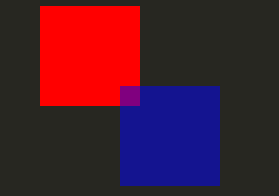
Los tipos de objeto QML proporcionados por Qt Quick son compatibles con opacity. La opacidad puede animarse para permitir transiciones suaves hacia o desde un estado transparente. La visibilidad también puede gestionarse con la propiedad visible de forma más eficiente, pero a costa de no poder animarla.
import QtQuick

Item {

    width: 320
    height: 480

    Rectangle {
        color: "#272822"
        width: 320
        height: 480
    }

    Item {
        x: 20
        y: 270
        width: 200
        height: 200
        MouseArea {
            anchors.fill: parent
            onClicked: topRect.visible = !topRect.visible
        }
        Rectangle {
            x: 20
            y: 20
            width: 100
            height: 100
            color: "red"
        }
        Rectangle {
            id: topRect
            opacity: 0.5

            x: 100
            y: 100
            width: 100
            height: 100
            color: "blue"
        }
    }
}
Transformaciones
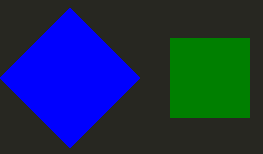
Qt Quick Los tipos tienen soporte incorporado para transformaciones. Si deseas que tu contenido visual rote o escale, puedes establecer la propiedad Item::rotation o Item::scale. Estas también pueden ser animadas.
import QtQuick

Item {

    width: 320
    height: 480

    Rectangle {
        color: "#272822"
        width: 320
        height: 480
    }

    Rectangle {
        rotation: 45 // This rotates the Rectangle by 45 degrees
        x: 20
        y: 160
        width: 100
        height: 100
        color: "blue"
    }
    Rectangle {
        scale: 0.8 // This scales the Rectangle down to 80% size
        x: 160
        y: 160
        width: 100
        height: 100
        color: "green"
    }
}
Para transformaciones más complejas, consulte la propiedad Item::transform.
© 2026 The Qt Company Ltd. Documentation contributions included herein are the copyrights of their respective owners. The documentation provided herein is licensed under the terms of the GNU Free Documentation License version 1.3 as published by the Free Software Foundation. Qt and respective logos are trademarks of The Qt Company Ltd. in Finland and/or other countries worldwide. All other trademarks are property of their respective owners.
