
Calculadora SCXML
Una aplicación que implementa el ejemplo de Calculadora presentado en la Especificación SCXML.
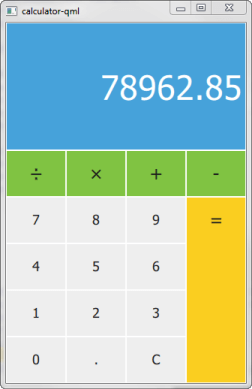
Calculator utiliza Qt SCXML para implementar el ejemplo de calculadora presentado en la especificación SCXML.
La máquina de estados se especifica en el archivo statemachine.scxml y se compila en la clase CalculatorStateMachine. La interfaz de usuario se crea utilizando Qt Quick.
Ejecución del ejemplo
Para ejecutar el ejemplo desde Qt Creatorabra el modo Welcome y seleccione el ejemplo de Examples. Para más información, consulte Qt Creator: Tutorial: Construir y ejecutar.
Instanciando la Máquina de Estado
Hacemos que la clase CalculatorStateMachine generada esté disponible para QML declarándola como un tipo QML en el archivo calculator-qml.h:
struct CalculatorStateMachineRegistration
{
    Q_GADGET
    QML_FOREIGN(CalculatorStateMachine)
    QML_NAMED_ELEMENT(CalculatorStateMachine)
    QML_ADDED_IN_VERSION(1, 0)
};
Instanciamos una CalculatorStateMachine y escuchamos el evento updateDisplay. Cuando se produce, cambiamos el texto de la pantalla de la calculadora:
    CalculatorStateMachine {
        id: statemachine
        running: true
        EventConnection {
            events: ["updateDisplay"]
            onOccurred: (event)=> resultText.text = event.data.display
        }
    }
Cuando los usuarios presionan los botones de la calculadora, los botones envían eventos a la máquina de estado:
        Button {
            id: resultButton
            x: 3 * width
            y: parent.height / 5
            textHeight: y - 2
            fontHeight: 0.4
            width: parent.width / 4
            height: y * 4
            color: pressed ? "#e0b91c" : "#face20"
            text: "="
            onClicked: statemachine.submitEvent("EQUALS")
        }
© 2026 The Qt Company Ltd. Documentation contributions included herein are the copyrights of their respective owners. The documentation provided herein is licensed under the terms of the GNU Free Documentation License version 1.3 as published by the Free Software Foundation. Qt and respective logos are trademarks of The Qt Company Ltd. in Finland and/or other countries worldwide. All other trademarks are property of their respective owners.
