
Semáforo
El ejemplo del Semáforo muestra cómo utilizar Qt State Machine Overview para implementar el flujo de control de un semáforo.
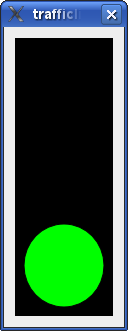
En este ejemplo escribimos una clase TrafficLightWidget. El semáforo tiene tres luces: Roja, amarilla y verde. El semáforo pasa de una luz a otra (rojo a amarillo a verde a amarillo a rojo otra vez) en ciertos intervalos.
class LightWidget : public QWidget
{
    Q_OBJECT
    Q_PROPERTY(bool on READ isOn WRITE setOn)
public:
    explicit LightWidget(const QColor &color, QWidget *parent = nullptr)
        : QWidget(parent), m_color(color)
    {
    }

    bool isOn() const { return m_on; }

    void setOn(bool on)
    {
        if (on == m_on)
            return;
        m_on = on;
        update();
    }

public slots:
    void turnOff() { setOn(false); }
    void turnOn() { setOn(true); }

protected:
    void paintEvent(QPaintEvent *) override
    {
        if (!m_on)
            return;
        QPainter painter(this);
        painter.setRenderHint(QPainter::Antialiasing);
        painter.setBrush(m_color);
        painter.drawEllipse(rect());
    }

private:
    QColor m_color;
    bool m_on = false;
};
La clase LightWidget representa una única luz del semáforo. Proporciona una propiedad on y dos ranuras, turnOn() y turnOff(), para encender y apagar la luz, respectivamente. El widget se pinta en el color que se pasa al constructor.
class TrafficLightWidget : public QWidget
{
    Q_OBJECT
public:
    explicit TrafficLightWidget(QWidget *parent = nullptr) : QWidget(parent)
    {
        auto vbox = new QVBoxLayout(this);
        m_red = new LightWidget(Qt::red);
        vbox->addWidget(m_red);
        m_yellow = new LightWidget(Qt::yellow);
        vbox->addWidget(m_yellow);
        m_green = new LightWidget(Qt::green);
        vbox->addWidget(m_green);
        auto pal = palette();
        pal.setColor(QPalette::Window, Qt::black);
        setPalette(pal);
        setAutoFillBackground(true);
    }

    LightWidget *redLight() const { return m_red; }
    LightWidget *yellowLight() const { return m_yellow; }
    LightWidget *greenLight() const { return m_green; }

private:
    LightWidget *m_red;
    LightWidget *m_yellow;
    LightWidget *m_green;
};
La clase TrafficLightWidget representa la parte visual del semáforo; es un widget que contiene tres luces dispuestas verticalmente, y proporciona funciones de acceso para éstas.
QState *createLightState(LightWidget *light, int duration, QState *parent = nullptr)
{
    auto lightState = new QState(parent);
    auto timer = new QTimer(lightState);
    timer->setInterval(duration);
    timer->setSingleShot(true);
    auto timing = new QState(lightState);
    QObject::connect(timing, &QAbstractState::entered, light, &LightWidget::turnOn);
    QObject::connect(timing, &QAbstractState::entered, timer, QOverload<>::of(&QTimer::start));
    QObject::connect(timing, &QAbstractState::exited, light, &LightWidget::turnOff);
    auto done = new QFinalState(lightState);
    timing->addTransition(timer, &QTimer::timeout, done);
    lightState->setInitialState(timing);
    return lightState;
}
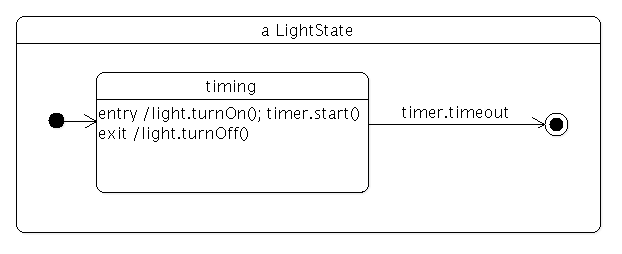
La función createLightState() crea un estado que enciende una luz cuando se entra en el estado, y la apaga cuando se sale de él. El estado utiliza un temporizador, y como veremos el tiempo de espera se utiliza para la transición de un LightState a otro. Este es el diagrama de estado para el estado luz:
class TrafficLight : public QWidget
{
    Q_OBJECT
public:
    explicit TrafficLight(QWidget *parent = nullptr) : QWidget(parent)
    {
        auto vbox = new QVBoxLayout(this);
        auto widget = new TrafficLightWidget;
        vbox->addWidget(widget);
        vbox->setContentsMargins(QMargins());

        auto machine = new QStateMachine(this);
        auto redGoingYellow = createLightState(widget->redLight(), 3000);
        redGoingYellow->setObjectName("redGoingYellow");
        auto yellowGoingGreen = createLightState(widget->yellowLight(), 1000);
        yellowGoingGreen->setObjectName("yellowGoingGreen");
        redGoingYellow->addTransition(redGoingYellow, &QState::finished, yellowGoingGreen);
        auto greenGoingYellow = createLightState(widget->greenLight(), 3000);
        greenGoingYellow->setObjectName("greenGoingYellow");
        yellowGoingGreen->addTransition(yellowGoingGreen, &QState::finished, greenGoingYellow);
        auto yellowGoingRed = createLightState(widget->yellowLight(), 1000);
        yellowGoingRed->setObjectName("yellowGoingRed");
        greenGoingYellow->addTransition(greenGoingYellow, &QState::finished, yellowGoingRed);
        yellowGoingRed->addTransition(yellowGoingRed, &QState::finished, redGoingYellow);

        machine->addState(redGoingYellow);
        machine->addState(yellowGoingGreen);
        machine->addState(greenGoingYellow);
        machine->addState(yellowGoingRed);
        machine->setInitialState(redGoingYellow);
        machine->start();
    }
};
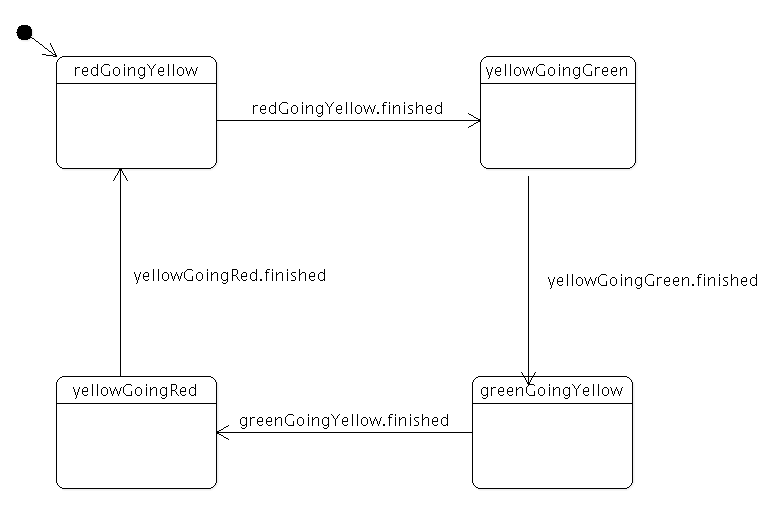
La clase TrafficLight combina el TrafficLightWidget con una máquina de estados. El gráfico de estado tiene cuatro estados: rojo-amarillo, amarillo-verde, verde-amarillo y amarillo-rojo. El estado inicial es rojo-amarillo; cuando el temporizador del estado se agota, la máquina de estados pasa a amarillo-verde. El mismo proceso se repite en los demás estados. Este es el aspecto del diagrama de estados:
int main(int argc, char **argv)
{
    QApplication app(argc, argv);

    TrafficLight widget;
    widget.resize(110, 300);
    widget.show();

    return app.exec();
}
La función main() construye un Semáforo y lo muestra.
© 2026 The Qt Company Ltd. Documentation contributions included herein are the copyrights of their respective owners. The documentation provided herein is licensed under the terms of the GNU Free Documentation License version 1.3 as published by the Free Software Foundation. Qt and respective logos are trademarks of The Qt Company Ltd. in Finland and/or other countries worldwide. All other trademarks are property of their respective owners.
