
Ejemplo sencillo de diseño con anclajes
Muestra el diseño de anclajes en una escena de vista gráfica.
El ejemplo «Diseño sencillo con anclajes» muestra el uso básico de la clase QGraphicsAnchorLayout.
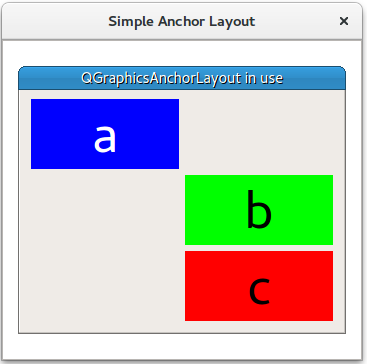
El ejemplo comienza creando un ` QGraphicsScene ` (scene), tres widgets (a, b y c) y un `QGraphicsAnchorLayout` (layout).
    QGraphicsScene scene;

    Widget *a = new Widget(Qt::blue, Qt::white, "a");
    a->setPreferredSize(100, 100);
    Widget *b = new Widget(Qt::green, Qt::black, "b");
    b->setPreferredSize(100, 100);
    Widget *c = new Widget(Qt::red, Qt::black, "c");
    c->setPreferredSize(100, 100);

    QGraphicsAnchorLayout *layout = new QGraphicsAnchorLayout;
En primer lugar, fija la esquina superior izquierda del elemento a a la esquina superior izquierda de layout. Esto se puede hacer en dos pasos:
    layout->addAnchor(a, Qt::AnchorTop, layout, Qt::AnchorTop);
    layout->addAnchor(a, Qt::AnchorLeft, layout, Qt::AnchorLeft);
O en un solo paso:
A continuación, el anclaje derecho de a se fija al anclaje izquierdo de b, y la parte superior del elemento b se fija a la parte inferior de a.
    layout->addAnchor(b, Qt::AnchorLeft, a, Qt::AnchorRight);
    layout->addAnchor(b, Qt::AnchorTop, a, Qt::AnchorBottom);
Coloca un tercer widget c debajo del widget b:
Los elementos b y c están anclados entre sí horizontalmente:
layout->addAnchors(b, c, Qt::Horizontal);El elemento c está anclado al punto inferior derecho de layout
Por último, QGraphicsWidget w se muestra en QGraphicsView view .
    auto w = new QGraphicsWidget(nullptr, Qt::Window | Qt::CustomizeWindowHint | Qt::WindowTitleHint);
    w->setPos(20, 20);
    w->setMinimumSize(100, 100);
    w->setPreferredSize(320, 240);
    w->setLayout(layout);
    w->setWindowTitle(QApplication::translate("simpleanchorlayout", "QGraphicsAnchorLayout in use"));
    scene.addItem(w);

    QGraphicsView view;
    view.setScene(&scene);
    view.setWindowTitle(QApplication::translate("simpleanchorlayout", "Simple Anchor Layout"));

    view.resize(360, 320);
    view.show();

return app.exec();© 2026 The Qt Company Ltd. Documentation contributions included herein are the copyrights of their respective owners. The documentation provided herein is licensed under the terms of the GNU Free Documentation License version 1.3 as published by the Free Software Foundation. Qt and respective logos are trademarks of The Qt Company Ltd. in Finland and/or other countries worldwide. All other trademarks are property of their respective owners.
