
Qt para Windows - SDK de aplicaciones Windows
Configuración
Para utilizar Windows App SDK en aplicaciones Qt, configure la ruta del SDK.
Utilizando Qt Creator
Para configurar el SDK de Windows App en Qt Creator, vaya a Preferences > SDKs.
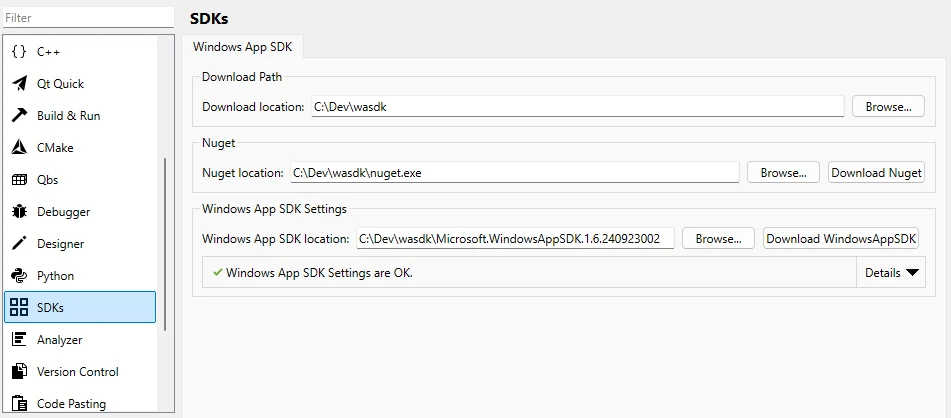
Para obtener más información, consulte Qt Creator Documentación.
Desde la línea de comandos
- Vaya a un directorio vacío.
Ejemplo:
mkdir C:\Dev\wasdk
cd C:\Dev\wasdk
- Descargue NuGet en ese directorio.
Por ejemplo, para descargar con PowerShell desde la línea de comandos:
powershell.exe -Command "& {Invoke-WebRequest https://dist.nuget.org/win-x86-commandline/latest/nuget.exe -OutFile nuget.exe}" - Descargue el SDK de Windows App con NuGet.
nuget.exe install Microsoft.WindowsAppSDK -OutputDirectory ./
- Establezca la variable de entorno
WIN_APP_SDK_ROOTen el directorio de Windows APP SDK, normalmente denominadoMicrosoft.WindowsAppSDK.{Version}.Por ejemplo, utilizando la línea de comandos:
cd Microsoft.WindowsAppSDK.*
set WIN_APP_SDK_ROOT=%cd%
setX WIN_APP_SDK_ROOT %cd%
Uso del SDK de Windows App en aplicaciones Qt
Llama a la función CMake qt_add_win_app_sdk(ProjectName) en el archivo CMake del proyecto. Sustituya ProjectName por el nombre de su proyecto.
Utilice una condición para asegurarse de que la construcción es sólo para MSVC construye:
if (MSVC)
    qt_add_win_app_sdk(ProjectName)
endif()
© 2026 The Qt Company Ltd. Documentation contributions included herein are the copyrights of their respective owners. The documentation provided herein is licensed under the terms of the GNU Free Documentation License version 1.3 as published by the Free Software Foundation. Qt and respective logos are trademarks of The Qt Company Ltd. in Finland and/or other countries worldwide. All other trademarks are property of their respective owners.
