
Qt Canvas Painter - Exemple de galerie
Présente les fonctionnalités de QCanvasPainter dans une application Qt Quick.
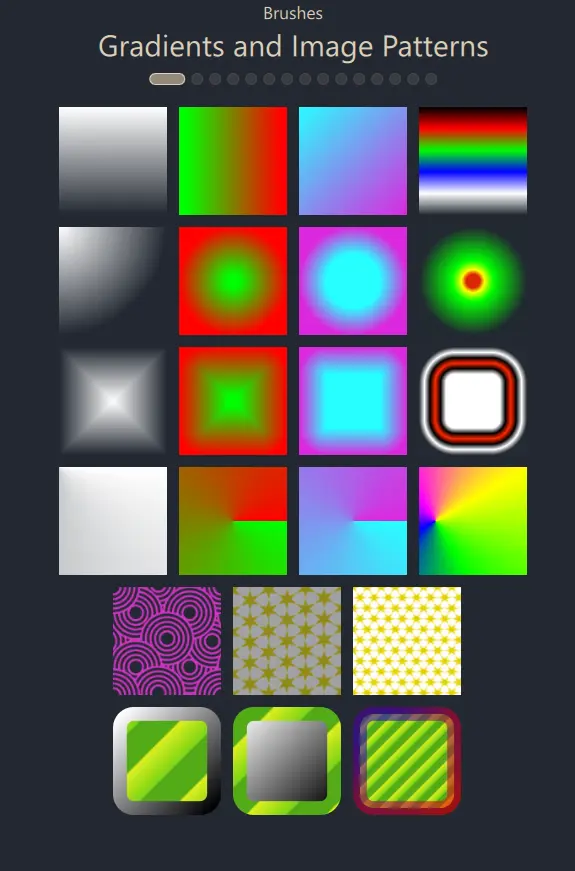
L'exemple de galerie est une application Qt Quick qui met en avant la grande variété de fonctionnalités offertes par QCanvasPainter.
L’interface utilisateur est essentiellement une instance de ` ListView`, dont le délégué est ` GalleryItem`, un type implémenté en C++ et exposé à QML.
class GalleryItem : public QCanvasPainterItem
{
    Q_OBJECT
    QML_NAMED_ELEMENT(GalleryItem)
    Q_PROPERTY(int galleryView READ galleryView WRITE setGalleryView NOTIFY galleryViewChanged)
    Q_PROPERTY(float animationTime READ animationTime WRITE setAnimationTime NOTIFY animationTimeChanged)
    Q_PROPERTY(float animationSine READ animationSine WRITE setAnimationSine NOTIFY animationSineChanged)
    Q_PROPERTY(float animState READ animState WRITE setAnimState NOTIFY animStateChanged)
Avec Qt 5 et OpenGL, `GalleryItem` aurait pu être une sous-classe de ` QQuickPaintedItem`. Avec Qt 6 et Canvas Painter, nous allons créer une sous-classe de ` QCanvasPainterItem`, qui fournit un rendu accéléré via ` QCanvasPainter`, au lieu d’utiliser le simple rendu logiciel de ` QQuickPaintedItem ` et `QPainter`.
L’implémentation de `GalleryItem` est simple. En réimplémentant la fonction virtuelle ` createItemRenderer()`, nous créons une instance de `GalleryItemRenderer`, qui est une sous-classe de ` QCanvasPainterItemRenderer`.
GalleryItem::GalleryItem(QQuickItem *parent)
:  QCanvasPainterItem(parent)
{
}

QCanvasPainterItemRenderer* GalleryItem::createItemRenderer() const
{
    return new GalleryItemRenderer();
}
Le dessin proprement dit est implémenté dans cette classe :
class GalleryItemRenderer : public QCanvasPainterItemRenderer
{
public:
    explicit GalleryItemRenderer();
    ~GalleryItemRenderer();

    void initializeResources(QCanvasPainter *painter) override;
    void synchronizeData(QCanvasPainterItem *item) override;
    void paint(QCanvasPainter *painter) override;
initializeResources() enregistre les images, chargées via QImage, ainsi que les shaders pour les pinceaux personnalisés.
void GalleryItemRenderer::initializeResources(QCanvasPainter *painter)
{
    QCanvasPainter::ImageFlags flags = QCanvasPainter::ImageFlag::Repeat | QCanvasPainter::ImageFlag::GenerateMipmaps;
    m_patternImage = painter->addImage(QImage(":/images/pattern1.png"), flags);
    m_patternImage2 = painter->addImage(QImage(":/images/pattern2.png"), flags);
    m_patternImage3 = painter->addImage(QImage(":/images/pattern3.png"), flags);
    m_testImage = painter->addImage(QImage(":/images/qt_development_white.png"));
    m_gradientImage1 = painter->addImage(QImage(":/images/gradient1.png"));
    m_gradientImage2 = painter->addImage(QImage(":/images/gradient2.png"));
    m_gradientImage3 = painter->addImage(QImage(":/images/gradient3.png"));
    image3Gray = painter->addImage(QImage(":/images/face-smile-bw.png"));
    image3Plain = painter->addImage(QImage(":/images/pattern2.png"));
    image3Nearest = painter->addImage(QImage(":/images/pattern2.png"),
                                        QCanvasPainter::ImageFlag::Nearest);
    image3Mips = painter->addImage(QImage(":/images/pattern2.png"),
                                     QCanvasPainter::ImageFlag::GenerateMipmaps);
    image3NearestMips = painter->addImage(QImage(":/images/pattern2.png"),
                                            QCanvasPainter::ImageFlag::Nearest | QCanvasPainter::ImageFlag::GenerateMipmaps);
    m_customBrush.setFragmentShader(":/qcgalleryexample/brush1.frag.qsb");
    m_customBrush2.setFragmentShader(":/qcgalleryexample/brush2.frag.qsb");
    m_customBrush3.setFragmentShader(":/qcgalleryexample/brush3.frag.qsb");
    m_customBrush3.setVertexShader(":/qcgalleryexample/brush3.vert.qsb");
    m_customBrush4.setFragmentShader(":/qcgalleryexample/brush4.frag.qsb");
    // Enable iTime animations
    m_customBrush.setAnimationRunning(true);
    m_customBrush2.setAnimationRunning(true);
    m_customBrush3.setAnimationRunning(true);
    m_customBrush4.setAnimationRunning(true);
}
synchronizeData() se charge de copier les données GalleryItem afin qu’elles soient accessibles en toute sécurité ultérieurement sur le thread de rendu du graphe de scène d’Qt Quick :
void GalleryItemRenderer::synchronizeData(QCanvasPainterItem *item)
{
    // Setting values here synchronized
    GalleryItem *realItem = static_cast<GalleryItem*>(item);
    if (realItem) {
        m_animationTime = realItem->animationTime();
        m_animationSine = realItem->animationSine();
        m_animState = realItem->animState();
        m_viewIndex = realItem->galleryView();
        if (!qFuzzyCompare(m_previousWidth, width()) ||
            !qFuzzyCompare(m_previousHeight, height())) {
            m_sizeChanged = true;
            m_previousWidth = width();
            m_previousHeight = height();
        } else {
            m_sizeChanged = false;
        }
        loadTigerPath();
    }

}
L’implémentation de paint() effectue le rendu à l’aide d’ QCanvasPainter, en fonction de l’index actuel fourni par l’ ListView:
void GalleryItemRenderer::paint(QCanvasPainter *painter)
{
    Q_UNUSED(painter)

    // Views not currently centered to have reduced
    // alpha and saturation.
    m_viewAlpha = 0.2 + 0.8 * m_animState;
    m_viewSaturation = m_animState;
    painter->setGlobalAlpha(m_viewAlpha);
    painter->setGlobalSaturation(m_viewSaturation);
    m_topMargin = height() * 0.02f;
    switch (m_viewIndex) {
    case 0:
        drawRectsWithLinearGradient();
        drawRectsWithRadialGradient();
        drawRectsWithBoxGradient();
        drawRectsWithConicalGradients();
        drawRectsWithImagePattern();
        drawRectsWithBrushStroke();
        break;
    case 1:
        drawImages();
        break;
    case 2:
        drawGridPatterns();
        break;
Les fonctions appelées à partir de là utilisent l’API QCanvasPainter pour effectuer le rendu. Par exemple :
void GalleryItemRenderer::drawRectsWithBrushStroke()
{
    int rects = 3;
    float margin = width()*0.02f;
    float border = margin + margin * m_animationSine;
    float w = (width() - margin) / (rects+2) - margin;
    float w2 = w - border;
    float posX = w + 2 * margin + border/2;
    float posY = m_topMargin + 5*(w+margin) + border/2;

    QRectF rect1(posX,posY,w2,w2);
    painter()->setLineWidth(border);
    painter()->setFillStyle(QCanvasImagePattern(m_patternImage3));
    QCanvasLinearGradient g1(posX, posY, posX+w2, posY+w2);
    g1.setStartColor("#ffffff");
    g1.setEndColor("#000000");
    painter()->setStrokeStyle(g1);
    painter()->beginPath();
    painter()->roundRect(rect1, border);
    painter()->fill();
    painter()->stroke();
    posX += w + margin;
Consultez le code source complet de l’exemple accessible via le lien ci-dessous pour plus de détails.
© 2026 The Qt Company Ltd. Documentation contributions included herein are the copyrights of their respective owners. The documentation provided herein is licensed under the terms of the GNU Free Documentation License version 1.3 as published by the Free Software Foundation. Qt and respective logos are trademarks of The Qt Company Ltd. in Finland and/or other countries worldwide. All other trademarks are property of their respective owners.
