
Personnalisation des graphiques
Remarque : ceci fait partie de l'exemple « Galerie de graphiques avec widgets ».
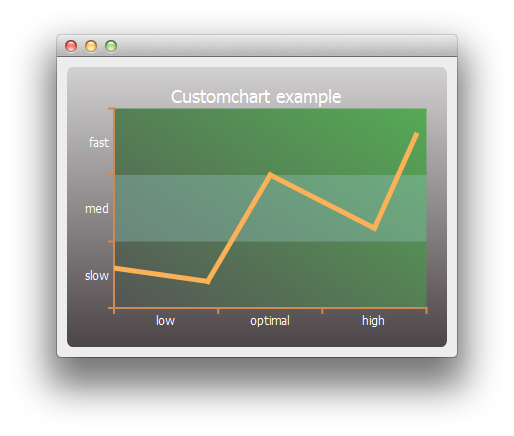
Nous commençons par créer une série de lignes simple et un objet graphique.
auto series = new QLineSeries;
*series << QPointF(0, 6) << QPointF(9, 4) << QPointF(15, 20) << QPointF(25, 12) << QPointF(29, 26);
auto chart = new QChart;
chart->legend()->hide();
chart->addSeries(series);
Nous personnalisons d'abord la série, ainsi que le titre et l'arrière-plan du graphique.
// Customize series
QPen pen(QRgb(0xfdb157));
pen.setWidth(5);
series->setPen(pen);

// Customize chart title
QFont font;
font.setPixelSize(18);
chart->setTitleFont(font);
chart->setTitleBrush(QBrush(Qt::white));
chart->setTitle("Custom Chart");

// Customize chart background
QLinearGradient backgroundGradient;
backgroundGradient.setStart(QPointF(0, 0));
backgroundGradient.setFinalStop(QPointF(0, 1));
backgroundGradient.setColorAt(0.0, QRgb(0xd2d0d1));
backgroundGradient.setColorAt(1.0, QRgb(0x4c4547));
backgroundGradient.setCoordinateMode(QGradient::ObjectBoundingMode);
chart->setBackgroundBrush(backgroundGradient);

// Customize plot area background
QLinearGradient plotAreaGradient;
plotAreaGradient.setStart(QPointF(0, 1));
plotAreaGradient.setFinalStop(QPointF(1, 0));
plotAreaGradient.setColorAt(0.0, QRgb(0x555555));
plotAreaGradient.setColorAt(1.0, QRgb(0x55aa55));
plotAreaGradient.setCoordinateMode(QGradient::ObjectBoundingMode);
chart->setPlotAreaBackgroundBrush(plotAreaGradient);
chart->setPlotAreaBackgroundVisible(true);
Ensuite, nous personnalisons les axes.
auto axisX = new QCategoryAxis;
auto axisY = new QCategoryAxis;

// Customize axis label font
QFont labelsFont;
labelsFont.setPixelSize(12);
axisX->setLabelsFont(labelsFont);
axisY->setLabelsFont(labelsFont);

// Customize axis colors
QPen axisPen(QRgb(0xd18952));
axisPen.setWidth(2);
axisX->setLinePen(axisPen);
axisY->setLinePen(axisPen);

// Customize axis label colors
QBrush axisBrush(Qt::white);
axisX->setLabelsBrush(axisBrush);
axisY->setLabelsBrush(axisBrush);

// Customize grid lines and shades
axisX->setGridLineVisible(false);
axisY->setGridLineVisible(false);
axisY->setShadesPen(Qt::NoPen);
axisY->setShadesBrush(QBrush(QColor(0x99, 0xcc, 0xcc, 0x55)));
axisY->setShadesVisible(true);
Puis les valeurs et les plages des étiquettes d’axe. Une fois les axes prêts, nous les configurons pour qu’ils soient utilisés par le graphique.
axisX->append("low", 10);
axisX->append("optimal", 20);
axisX->append("high", 30);
axisX->setRange(0, 30);

axisY->append("slow", 10);
axisY->append("med", 20);
axisY->append("fast", 30);
axisY->setRange(0, 30);

chart->addAxis(axisX, Qt::AlignBottom);
chart->addAxis(axisY, Qt::AlignLeft);
series->attachAxis(axisX);
series->attachAxis(axisY);
Enfin, nous créons une vue contenant le graphique.
createDefaultChartView(chart);Nous sommes désormais prêts à afficher le graphique dans une fenêtre principale.
© 2026 The Qt Company Ltd. Documentation contributions included herein are the copyrights of their respective owners. The documentation provided herein is licensed under the terms of the GNU Free Documentation License version 1.3 as published by the Free Software Foundation. Qt and respective logos are trademarks of The Qt Company Ltd. in Finland and/or other countries worldwide. All other trademarks are property of their respective owners.
