
Utilisation des axes avec QML
Remarque : ceci fait partie de l'exemple « Charts with QML Gallery ».
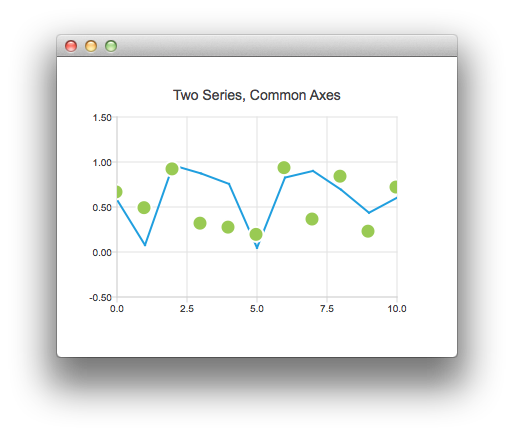
Nous commençons par un graphique comportant une série de lignes et une série de points avec des données aléatoires. Nous obtenons alors un graphique avec deux séries partageant un axe commun.
ChartView {
    title: "Two Series, Common Axes"
    anchors.fill: parent
    legend.visible: false
    antialiasing: true

    ValueAxis {
        id: axisX
        min: 0
        max: 10
        tickCount: 5
    }

    ValueAxis {
        id: axisY
        min: -0.5
        max: 1.5
    }

    LineSeries {
        id: series1
        axisX: axisX
        axisY: axisY
    }

    ScatterSeries {
        id: series2
        axisX: axisX
        axisY: axisY
    }

    // Add data dynamically to the series
    Component.onCompleted: {
        for (var i = 0; i <= 10; i++) {
            series1.append(i, Math.random());
            series2.append(i, Math.random());
        }
    }
}
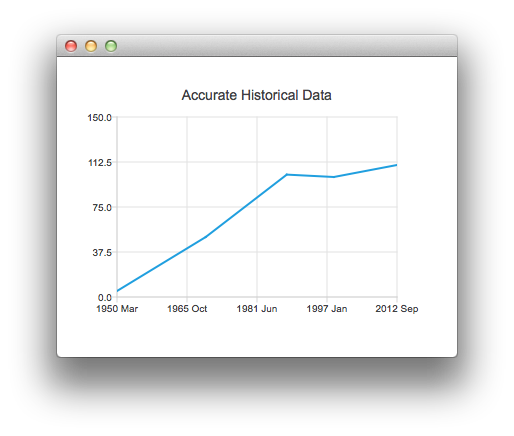
Ce graphique présente des données historiques précises. Il est créé à l'aide de l'extrait de code suivant, qui utilise un DateTimeAxis.
ChartView {
    id: root
    title: "Accurate Historical Data"
    anchors.fill: parent
    legend.visible: false
    antialiasing: true

    LineSeries {
        axisX: DateTimeAxis {
            format: "yyyy MMM"
            tickCount: 5
        }
        axisY: ValueAxis {
            min: 0
            max: 150
        }

        // Please note that month in JavaScript months are zero based, so 2 means March
        XYPoint { x: root.toMsecsSinceEpoch(new Date(1950, 2, 15)); y: 5 }
        XYPoint { x: root.toMsecsSinceEpoch(new Date(1970, 0, 1)); y: 50 }
        XYPoint { x: root.toMsecsSinceEpoch(new Date(1987, 12, 31)); y: 102 }
        XYPoint { x: root.toMsecsSinceEpoch(new Date(1998, 7, 1)); y: 100 }
        XYPoint { x: root.toMsecsSinceEpoch(new Date(2012, 8, 2)); y: 110 }
    }

    // DateTimeAxis is based on QDateTimes so we must convert our JavaScript dates to
    // milliseconds since epoch to make them match the DateTimeAxis values
    function toMsecsSinceEpoch(date) {
        var msecs = date.getTime();
        return msecs;
    }
}
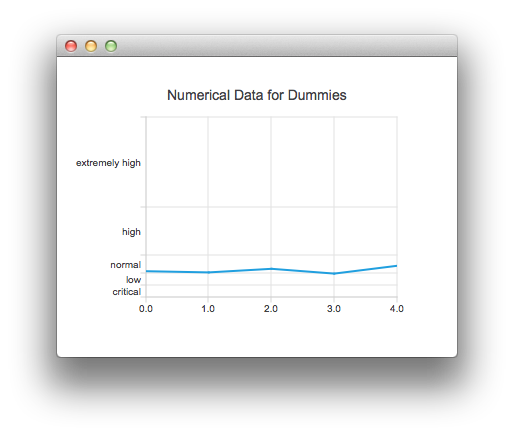
Le graphique suivant est créé à l'aide d'un CategoryAxis afin de faciliter la compréhension des données.
ChartView {
    title: "Numerical Data for Dummies"
    anchors.fill: parent
    legend.visible: false
    antialiasing: true

    LineSeries {
        axisY: CategoryAxis {
            min: 0
            max: 30
            CategoryRange {
                label: "critical"
                endValue: 2
            }
            CategoryRange {
                label: "low"
                endValue: 4
            }
            CategoryRange {
                label: "normal"
                endValue: 7
            }
            CategoryRange {
                label: "high"
                endValue: 15
            }
            CategoryRange {
                label: "extremely high"
                endValue: 30
            }
        }

        XYPoint { x: 0; y: 4.3 }
        XYPoint { x: 1; y: 4.1 }
        XYPoint { x: 2; y: 4.7 }
        XYPoint { x: 3; y: 3.9 }
        XYPoint { x: 4; y: 5.2 }
    }
}
© 2026 The Qt Company Ltd. Documentation contributions included herein are the copyrights of their respective owners. The documentation provided herein is licensed under the terms of the GNU Free Documentation License version 1.3 as published by the Free Software Foundation. Qt and respective logos are trademarks of The Qt Company Ltd. in Finland and/or other countries worldwide. All other trademarks are property of their respective owners.
