
Qml Weather
Il s'agit d'une démonstration basique montrant comment utiliser les différents types de graphiques à l'aide de QML.
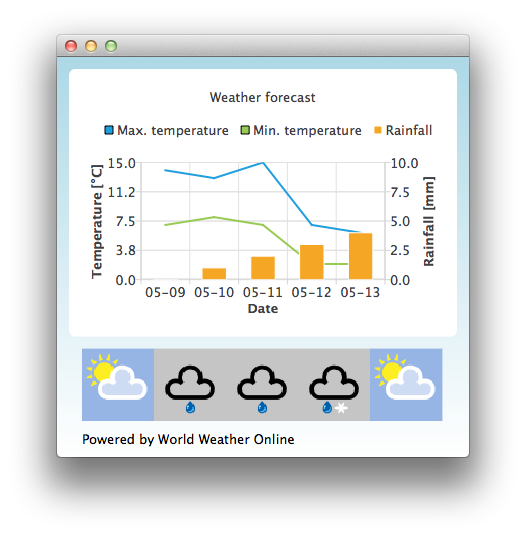
Par défaut, l’application utilise des données de test statiques pour simuler des prévisions météorologiques. Vous pouvez également obtenir un identifiant d’application sur http://www.worldweatheronline.com/ afin d’accéder à l’API météo fournie par World Weather Online. Vous pouvez ensuite passer votre identifiant d’application en paramètre à l’exécutable Qml Weather pour qu’il utilise des données en temps réel.
Par exemple :
bin\qmlweather.exe 1234567890abcdef123456Exécution de l’exemple
Vous pouvez exécuter l’exemple à partir de :
- Qt Creator
Ouvrez le mode « Welcome » et sélectionnez l’exemple à l’adresse Examples. Pour plus d’informations, consultez Qt Creator: Tutoriel : Compiler et exécuter.
- Qt Extension for Visual Studio Code
Exécutez la commande « Qt: Open Qt examples » à partir de Command Palette, puis sélectionnez l’exemple dans la liste. Pour plus d’informations, consultez Qt Extension for Visual Studio Code: Tutoriel : Compiler et exécuter.
Utilisation des graphiques dans les applications Qt Quick
L’application d’exemple utilise un ChartView et plusieurs séries pour visualiser des données météorologiques :
ChartView {
    id: chartView
    title: "Weather forecast"
    BarCategoryAxis {
        id: barCategoriesAxis
        titleText: "Date"
    }

    ValueAxis{
        id: valueAxisY2
        min: 0
        max: 10
        titleText: "Rainfall [mm]"
    }

    ValueAxis {
        id: valueAxisX
        // Hide the value axis; it is only used to map the line series to bar categories axis
        visible: false
        min: 0
        max: 5
    }

    ValueAxis{
        id: valueAxisY
        min: 0
        max: 15
        titleText: "Temperature [°C]"
    }

    LineSeries {
        id: maxTempSeries
        axisX: valueAxisX
        axisY: valueAxisY
        name: "Max. temperature"
    }

    LineSeries {
        id: minTempSeries
        axisX: valueAxisX
        axisY: valueAxisY
        name: "Min. temperature"
    }

    BarSeries {
        id: myBarSeries
        axisX: barCategoriesAxis
        axisYRight: valueAxisY2
        BarSet {
            id: rainfallSet
            label: "Rainfall"
        }
    }
Pour récupérer les données de prévisions météorologiques, nous effectuons une requête HTTP GET auprès de World Weather Online. Nous demandons que la réponse soit fournie au format JSON.
// Make HTTP GET request and parse the result
var xhr = new XMLHttpRequest;
xhr.open("GET",
         "http://free.worldweatheronline.com/feed/weather.ashx?q=Jyv%c3%a4skyl%c3%a4,Finland&format=json&num_of_days=5&key="
         + weatherAppKey);
xhr.onreadystatechange = function() {
    if (xhr.readyState == XMLHttpRequest.DONE) {
        var a = JSON.parse(xhr.responseText);
        parseWeatherData(a);
    }
}
xhr.send();
La réponse JSON contient un tableau de données de prévisions :
// Loop through the parsed JSON
for (var i in weatherData.data.weather) {
    var weatherObj = weatherData.data.weather[i];
Celles-ci sont ensuite utilisées comme données d’entrée pour nos séries et un ListModel qui sert de conteneur pour les URL des icônes météo :
// Store temperature values, rainfall and weather icon.
// The temperature values begin from 0.5 instead of 0.0 to make the start from the
// middle of the rainfall bars. This makes the temperature lines visually better
// synchronized with the rainfall bars.
maxTempSeries.append(Number(i) + 0.5, weatherObj.tempMaxC);
minTempSeries.append(Number(i) + 0.5, weatherObj.tempMinC);
rainfallSet.append(weatherObj.precipMM);
weatherImageModel.append({"imageSource":weatherObj.weatherIconUrl[0].value});© 2026 The Qt Company Ltd. Documentation contributions included herein are the copyrights of their respective owners. The documentation provided herein is licensed under the terms of the GNU Free Documentation License version 1.3 as published by the Free Software Foundation. Qt and respective logos are trademarks of The Qt Company Ltd. in Finland and/or other countries worldwide. All other trademarks are property of their respective owners.
