
Échange de langages Qt pour Android
Illustre l'appel de code Java et Kotlin depuis Qt, ainsi que de code Qt depuis Java et Kotlin, dans une application Android.
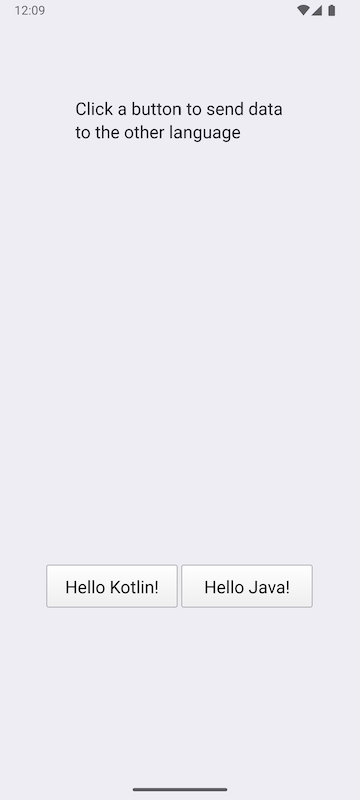
Cliquez sur l'un des boutons pour envoyer une chaîne de caractères aux classes Java et Kotlin et obtenir en retour une chaîne modifiée.
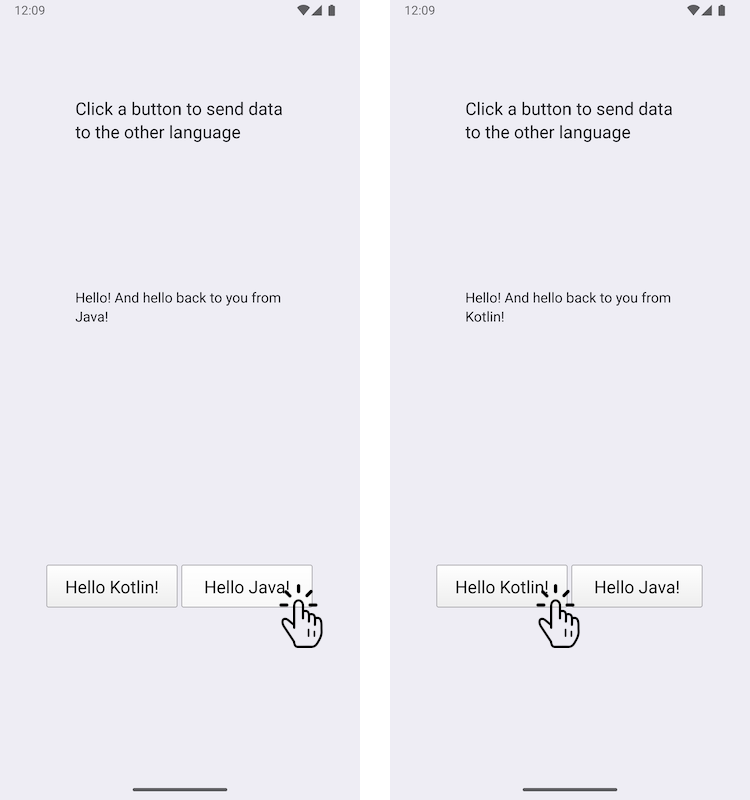
Cet exemple montre comment ajouter une classe Java personnalisée et une classe Kotlin personnalisée à une application Android, et comment les appeler à l'aide des API de commodité JNI de Qt. Dans l'autre sens, les classes Java et Kotlin appellent des fonctions Qt.
Exécution de l’exemple
Vous pouvez exécuter l’exemple à partir de :
- Qt Creator
Ouvrez le mode « Welcome » et sélectionnez l’exemple à l’adresse Examples. Pour plus d’informations, consultez Qt Creator: Tutoriel : Compiler et exécuter.
- Qt Extension for Visual Studio Code
Exécutez la commande « Qt: Open Qt examples » à partir de Command Palette, puis sélectionnez l’exemple dans la liste. Pour plus d’informations, consultez Qt Extension for Visual Studio Code: Tutoriel : Compiler et exécuter.
Remarque : cet exemple ne peut être exécuté que sur des appareils Android.
Échange de données entre C++ et Java/Kotlin à l'aide des signaux Qt
Nous définissons une classe Java personnalisée nommée JavaExchanger dans le fichier JavaExchanger.java:
package org.qtproject.example.androidlanguageexchange;

public class JavaExchanger
{
    private long mCppExchanger;

    private native void connectToCppExchanger(long cppExchanger);
    private native void fromOther(long cppExchanger, String str);

    public JavaExchanger(long cppExchanger) {
        mCppExchanger = cppExchanger;
        connectToCppExchanger(cppExchanger);
    }
    public void fromCpp(int type, String str) {
        if (type == OtherLanguageType.Java.getCode()) {
            String msg = str + " And hello back to you from\nJava!";
            fromOther(mCppExchanger, msg);
        }
    }
}
Nous définissons une classe Kotlin personnalisée nommée « KotlinExchanger » dans le fichier « KotlinExchanger.kt » :
package org.qtproject.example.androidlanguageexchange;

class KotlinExchanger(private val cppExchanger: Long) {

    private external fun connectToCppExchanger(cppExchanger: Long)
    private external fun fromOther(cppExchanger: Long, str: String)

    init {
        connectToCppExchanger(cppExchanger)
    }

    fun fromCpp(type: Int, str: String) {
        if (type == OtherLanguageType.Kotlin.code) {
            val msg = "$str And hello back to you from\nKotlin!"
            fromOther(cppExchanger, msg)
        }
    }
}
Ces deux classes acceptent un entier long qui n’est autre qu’un QObject* converti en long, et lorsque les fonctions fromCpp sont appelées à la suite de l’appel de la fonction connectToCppExchanger, elles modifient la chaîne reçue et la renvoient à fromOther avec l’entier long.
Dans le fichier d’en-tête de la classe C++ DataExchanger, dataexchanger.h, nous déclarons une API C++ simple permettant d’échanger des données entre C++ et Kotlin/Java. Elle se compose d’un signal « QObject » ( fromCpp ) envoyé depuis le code C++ en réponse aux boutons, et d’un signal « fromOther » ( ) que le code Java/Kotlin utilise pour envoyer une chaîne de caractères au code C++, comme décrit précédemment.
// A simple data exchanger. All this class does is convey semi-abstract data
// back and forth. For the purposes of this example, treat it as an opaque
// and not necessarily modifiable engine object that just happens to have
// a signal that's directly consumable by the code in other languages. The
// rest of the glue is done in OtherLanguageHandler.
class DataExchanger : public QObject
{
    Q_OBJECT
public:
    explicit DataExchanger(QObject *parent = nullptr);

    enum OtherLanguageType {Java, Kotlin};
signals:
    void fromCpp(OtherLanguageType type, const QString& str);
    void fromOther(const QString& str);
};
L’appel à la méthode Java utilise ` QJniObject `, qui s’appuie sur les API de l’interface native Java (JNI) pour communiquer avec Java/Kotlin. L’argument de type entier long est converti en type ` DataExchanger `, puis le signal ` fromCpp ` est connecté à un lambda qui appelle la fonction Java/Kotlin ` fromCpp `.
// We provide this function so that the Java/Kotlin objects can register themselves
// as signal observers. The C++ code doesn't decide where and when that happens.
void connectToCppExchanger(JNIEnv* /*env*/, jobject thiz, jlong cppExchanger)
{
    DataExchanger* exchanger = reinterpret_cast<DataExchanger*>(cppExchanger);
    QJniObject androidExchanger(thiz);
    QObject::connect(exchanger, &DataExchanger::fromCpp, exchanger,
                     // Intentional, and important capture by value of the QJniObject.
                     // This keeps the underlying Java/Kotlin object alive until the call
                     // to it is performed.
                     [androidExchanger](DataExchanger::OtherLanguageType type, const QString& str) {
                         androidExchanger.callMethod("fromCpp",
                                                     static_cast<int>(type), str);
                     });
}
L’appel d’une méthode native de la classe Java/Kotlin est transmis à la classe DataExchanger, en convertissant à nouveau l’entier long en DataExchanger, puis en appelant le signal fromOther de ce type.
// The Java/Kotlin code calls this. The C++ code doesn't decide where and when
// it is called.
// Note that the function must be registered with the Qt native method
// registration facilities because it relies on the Qt wrapping that knows how to
// convert a jstring to a QString.
void fromOther(JNIEnv* /*env*/, jobject /*thiz*/,
                       jlong cppExchanger, const QString &str)
{
    DataExchanger* exchanger = reinterpret_cast<DataExchanger*>(cppExchanger);
    exchanger->fromOther(str);
}
Pour nous assurer que nos boutons fonctionnent comme prévu, nous ajoutons le code suivant afin de déclencher l’envoi d’une chaîne de caractères vers Java/Kotlin et de récupérer la chaîne modifiée :
    QObject::connect(&javaButton, &QPushButton::clicked, &javaButton, [&]() {
        dataExchanger.fromCpp(DataExchanger::Java, "Hello!");
    });

    QObject::connect(&kotlinButton, &QPushButton::clicked, &kotlinButton, [&]() {
        dataExchanger.fromCpp(DataExchanger::Kotlin, "Hello!");
    });
    QObject::connect(&dataExchanger, &DataExchanger::fromOther,
                     &dataExchanger, [&](const QString& str) {
        fromOtherLabel.setText(str);
});Voir également Qt pour Android.
© 2026 The Qt Company Ltd. Documentation contributions included herein are the copyrights of their respective owners. The documentation provided herein is licensed under the terms of the GNU Free Documentation License version 1.3 as published by the Free Software Foundation. Qt and respective logos are trademarks of The Qt Company Ltd. in Finland and/or other countries worldwide. All other trademarks are property of their respective owners.
