
Notificateur Qt pour Android
Illustre l'appel de code Java depuis Qt dans une application Android.
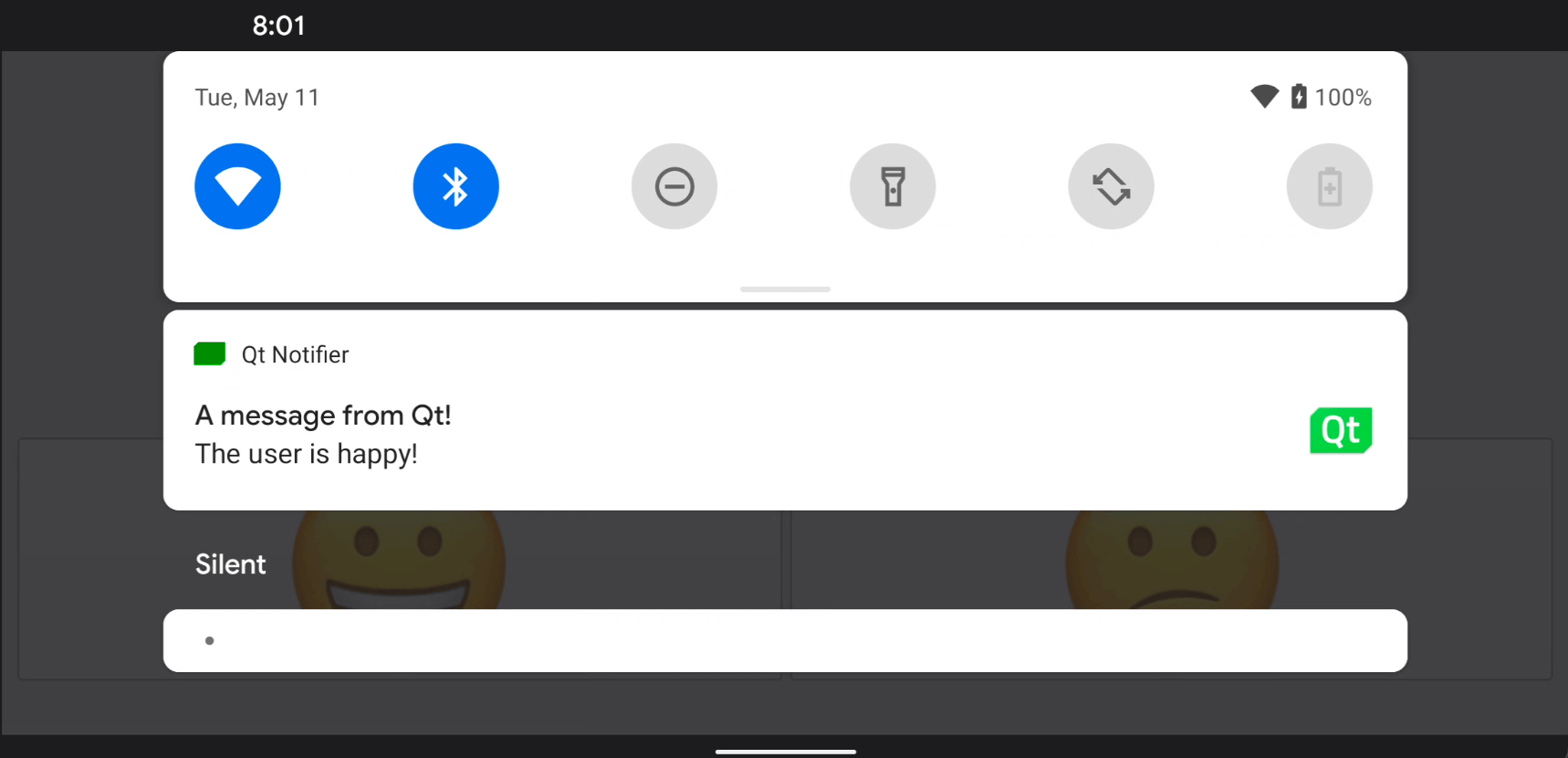
Cet exemple montre comment ajouter une classe Java personnalisée à une application Android et comment l'appeler à l'aide des API de commodité JNI de Qt.
Cliquez sur l'un des smileys pour envoyer une notification dans la barre d'état de l'écran Android.
Exécution de l'exemple
Vous pouvez exécuter l'exemple à partir de :
- Qt Creator
Ouvrez le mode « Welcome » et sélectionnez l'exemple dans « Examples ». Pour plus d'informations, consultez Qt Creator: Tutoriel : Compiler et exécuter.
- Qt Extension for Visual Studio Code
Exécutez la commande « Qt: Open Qt examples » à partir de Command Palette, puis sélectionnez l'exemple dans la liste. Pour plus d'informations, consultez Qt Extension for Visual Studio Code: Tutoriel : Compiler et exécuter.
Appel de méthodes Java à partir de code C++
Nous définissons une classe Java personnalisée appelée NotificationClient dans le fichier NotificationClient.java :
package org.qtproject.example.androidnotifier;

import android.app.Notification;
import android.app.NotificationManager;
import android.content.Context;
import android.graphics.Bitmap;
import android.graphics.Color;
import android.graphics.BitmapFactory;
import android.app.NotificationChannel;

public class NotificationClient
{
    public static void notify(Context context, String message) {
        try {
            NotificationManager m_notificationManager = (NotificationManager)
                    context.getSystemService(Context.NOTIFICATION_SERVICE);

            Notification.Builder m_builder;
            if (android.os.Build.VERSION.SDK_INT >= android.os.Build.VERSION_CODES.O) {
                int importance = NotificationManager.IMPORTANCE_DEFAULT;
                NotificationChannel notificationChannel;
                notificationChannel = new NotificationChannel("Qt", "Qt Notifier", importance);
                m_notificationManager.createNotificationChannel(notificationChannel);
                m_builder = new Notification.Builder(context, notificationChannel.getId());
            } else {
                m_builder = new Notification.Builder(context);
            }

            Bitmap icon = BitmapFactory.decodeResource(context.getResources(), R.drawable.icon);
            m_builder.setSmallIcon(R.drawable.icon)
                    .setLargeIcon(icon)
                    .setContentTitle("A message from Qt!")
                    .setContentText(message)
                    .setDefaults(Notification.DEFAULT_SOUND)
                    .setColor(Color.GREEN)
                    .setAutoCancel(true);

            m_notificationManager.notify(0, m_builder.build());
        } catch (Exception e) {
            e.printStackTrace();
        }
    }
}
Dans le fichier d'en-tête de la classe C++ NotificationClient, notificationclient.h, nous déclarons une API C++ simple permettant d'afficher des notifications sur un appareil Android. Elle se compose d’une seule propriété de type chaîne, notification, et d’un slot, updateAndroidNotification(), qui appelle le code Java :
class NotificationClient : public QObject
{
Q_OBJECT
public:
explicit NotificationClient(QObject *parent = 0);
void setNotification(const QString ¬ification);
QString notification() const;
signals:
void notificationChanged();
private slots:
void updateAndroidNotification();
private:
QString m_notification;
};Nous connectons le signal notificationChanged() au slot updateAndroidNotification() afin de mettre à jour le texte de la notification lorsque le texte de notification change :
    m_notification = notification;
    emit notificationChanged();
La fonction ` updateAndroidNotification() ` appelle la méthode Java chargée d’envoyer la notification à partir des API de la plateforme Android. Tout d’abord, nous construisons une chaîne Java ` jstring ` à partir de la chaîne de notification, puis nous transmettons l’objet ` jstring ` en tant que paramètre à la méthode ` notify() ` en Java :
void NotificationClient::updateAndroidNotification()
{
    QJniObject javaNotification = QJniObject::fromString(m_notification);
    QJniObject::callStaticMethod<void>(
                    "org/qtproject/example/androidnotifier/NotificationClient",
                    "notify",
                    "(Landroid/content/Context;Ljava/lang/String;)V",
                    QNativeInterface::QAndroidApplication::context(),
                    javaNotification.object<jstring>());
}
L’appel à la méthode Java utilise QJniObject, qui s’appuie sur les API JNI (Java Native Interface) pour communiquer avec Java. De plus, dans l’extrait de code précédent, nous transmettons l’objet context de l’application, que le code Java statique peut utiliser pour accéder aux propriétés et API spécifiques de l’application.
Pour nous assurer que nos boutons « smiley » fonctionnent comme prévu, nous ajoutons le code suivant afin de modifier le texte de la notification lorsque l’un d’entre eux est cliqué :
    QObject::connect(&happyButton, &QPushButton::clicked, &happyButton, []() {
        NotificationClient().setNotification("The user is happy!");
    });

    QObject::connect(&sadButton, &QPushButton::clicked, &happyButton, []() {
        NotificationClient().setNotification("The user is sad!");
});Voir également Qt pour Android.
© 2026 The Qt Company Ltd. Documentation contributions included herein are the copyrights of their respective owners. The documentation provided herein is licensed under the terms of the GNU Free Documentation License version 1.3 as published by the Free Software Foundation. Qt and respective logos are trademarks of The Qt Company Ltd. in Finland and/or other countries worldwide. All other trademarks are property of their respective owners.
