
Qt Quick Abonnement
Utilisez Qt Quick Controls pour créer une application capable de s'abonner à des sujets MQTT.
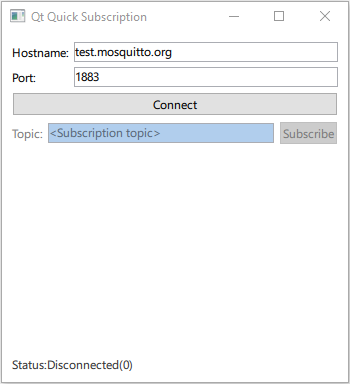
Qt Quick L'exemple « Subscription » montre comment enregistrer QMqttClient en tant que type QML et l'utiliser dans une application Qt Quick.
Qt MQTT ne fournit pas d’API QML dans sa version actuelle. Cependant, vous pouvez rendre les classes C++ du module accessibles à QML.
Création d’un client
Connectez-vous à QMqttSubscription::messageReceived( ) pour recevoir tous les messages envoyés au courtier :
QmlMqttSubscription::QmlMqttSubscription(QMqttSubscription *s, QmlMqttClient *c)
    : sub(s)
    , client(c)
{
    connect(sub, &QMqttSubscription::messageReceived, this, &QmlMqttSubscription::handleMessage);
}
Créez une classe ` QmlMqttClient ` en utilisant la classe ` QMqttClient ` comme classe de base :
QmlMqttClient::QmlMqttClient(QObject *parent)
    : QObject(parent)
{
    connect(&m_client, &QMqttClient::hostnameChanged, this, &QmlMqttClient::hostnameChanged);
    connect(&m_client, &QMqttClient::portChanged, this, &QmlMqttClient::portChanged);
    connect(&m_client, &QMqttClient::stateChanged, this, &QmlMqttClient::stateChanged);
}
Utilisez la fonction ` subscribe() ` pour créer un objet d'abonnement :
QmlMqttSubscription* QmlMqttClient::subscribe(const QString &topic)
{
    auto sub = m_client.subscribe(topic, 0);
    auto result = new QmlMqttSubscription(sub, this);
    return result;
}
Utilisez un objet ` QMqttMessage ` pour stocker la charge utile d’un message reçu :
void QmlMqttSubscription::handleMessage(const QMqttMessage &qmsg)
{
    emit messageReceived(qmsg.payload());
}
Enregistrement des classes dans QML
Dans le fichier ` main.cpp `, chargez le type QML `Main` à partir du module `subscription` :
    QGuiApplication app(argc, argv);
    QQmlApplicationEngine engine;

    QObject::connect(
            &engine, &QQmlApplicationEngine::objectCreationFailed, &app,
            []() { QCoreApplication::exit(EXIT_FAILURE); }, Qt::QueuedConnection);

    engine.loadFromModule(u"subscription"_s, u"Main"_s);
Utilisez ensuite le type MqttClient dans le fichier Main.qml pour créer un client MQTT :
    MqttClient {
        id: client
        hostname: hostnameField.text
        port: portField.text
    }
Fichiers :
© 2026 The Qt Company Ltd. Documentation contributions included herein are the copyrights of their respective owners. The documentation provided herein is licensed under the terms of the GNU Free Documentation License version 1.3 as published by the Free Software Foundation. Qt and respective logos are trademarks of The Qt Company Ltd. in Finland and/or other countries worldwide. All other trademarks are property of their respective owners.
