
Exemple de visionneuse PDF à page unique
Une visionneuse PDF Qt Quick qui affiche une page à la fois.
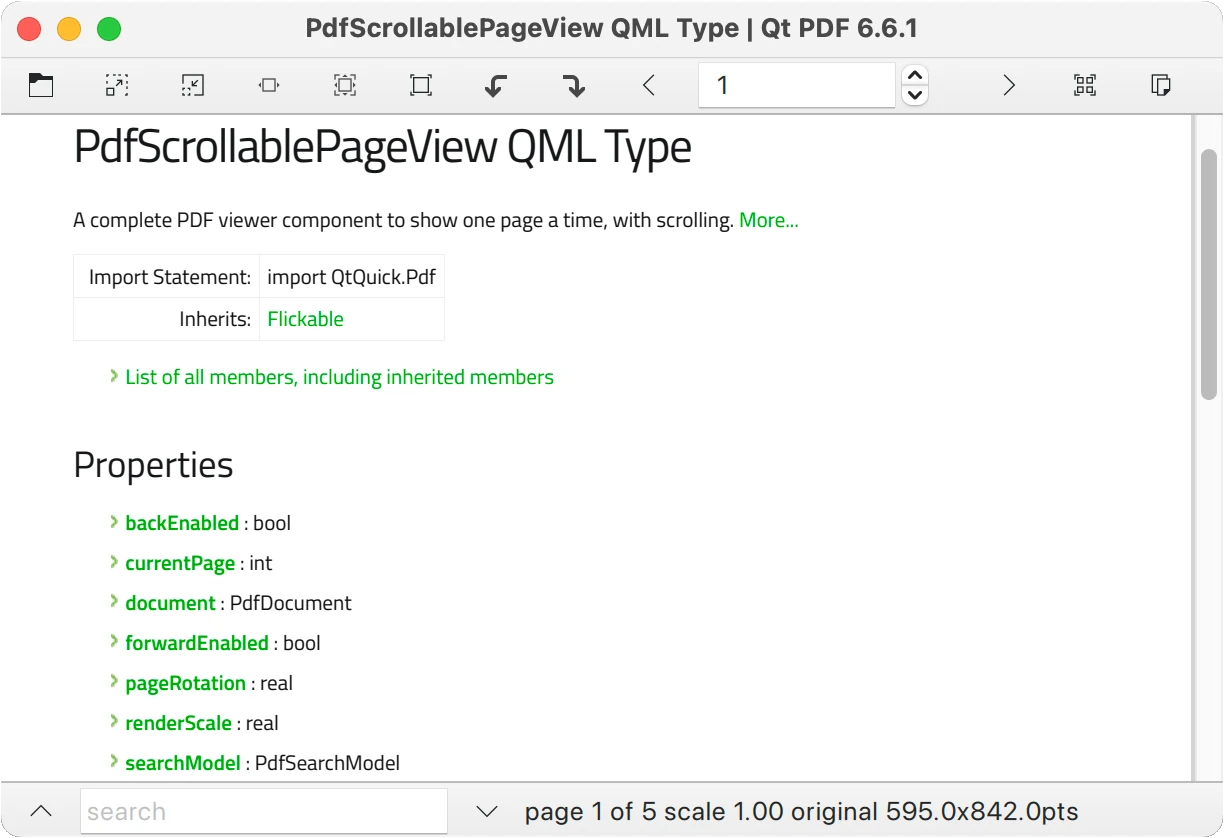
L'exemple de visionneuse PDF à page unique montre comment utiliser le composant PdfScrollablePageView pour afficher des documents PDF et y rechercher du texte.
Exécution de l'exemple
Pour exécuter l'exemple à partir de Qt CreatorOuvrez le mode Welcome et sélectionnez l'exemple à partir de Examples. Pour plus d'informations, voir Qt Creator: Tutoriel : Construire et exécuter.
Création de la fenêtre principale
Instanciez une fenêtre ApplicationWindow, associez son titre au titre du document PDF et créez une barre d'outils :
ApplicationWindow {
    id: root
    width: 800
    height: 1024
    color: "lightgrey"
    title: document.title
    visible: true
    required property url source // for main.cpp
    property real scaleStep: Math.sqrt(2)

    header: ToolBar {
        RowLayout {
            anchors.fill: parent
            anchors.rightMargin: 6
La barre d'outils comporte des boutons pour la plupart des actions courantes, ainsi qu'une page SpinBox pour afficher et contrôler le numéro de la page en cours :
            ToolButton {
                action: Action {
                    shortcut: StandardKey.Open
                    icon.source: "qrc:/qt/qml/SinglePageModule/resources/document-open.svg"
                    onTriggered: fileDialog.open()
                }
            }
            ToolButton {
                action: Action {
                    shortcut: StandardKey.ZoomIn
                    enabled: view.sourceSize.width < 10000
                    icon.source: "qrc:/qt/qml/SinglePageModule/resources/zoom-in.svg"
                    onTriggered: view.renderScale *= root.scaleStep
                }
            }
            ToolButton {
                action: Action {
                    shortcut: StandardKey.ZoomOut
    ...
            SpinBox {
                id: currentPageSB
                from: 1
                to: document.pageCount
                editable: true
                value: view.currentPage + 1
    ...
Ajoutez des boîtes de dialogue pour informer l'utilisateur en cas d'erreur et pour demander un mot de passe si nécessaire :
    Dialog {
        id: passwordDialog
        title: "Password"
        standardButtons: Dialog.Ok | Dialog.Cancel
        modal: true
        closePolicy: Popup.CloseOnEscape
        anchors.centerIn: parent
        width: 300

        contentItem: TextField {
            id: passwordField
            placeholderText: qsTr("Please provide the password")
            echoMode: TextInput.Password
            width: parent.width
            onAccepted: passwordDialog.accept()
        }
        onOpened: function() { passwordField.forceActiveFocus() }
        onAccepted: document.password = passwordField.text
    }

    Dialog {
        id: errorDialog
        title: "Error loading " + document.source
        standardButtons: Dialog.Close
        modal: true
        closePolicy: Popup.CloseOnEscape
        anchors.centerIn: parent
        width: 300
        visible: document.status === PdfDocument.Error

        contentItem: Label {
            id: errorField
            text: document.error
        }
    }
Ajoutez le composant principal, PdfScrollablePageView:
    PdfScrollablePageView {
        id: view
        anchors.fill: parent
        anchors.leftMargin: searchDrawer.position * searchDrawer.width
        document: PdfDocument {
            id: document
            source: Qt.resolvedUrl(root.source)
            onPasswordRequired: passwordDialog.open()
        }
        searchString: searchField.text
    }
Un Drawer contient un ListView pour afficher les résultats de la recherche à partir du searchModel:
    Drawer {
        id: searchDrawer
        edge: Qt.LeftEdge
//        modal: false
//        dim: false // commented out as workaround for QTBUG-83859
        width: 300
        y: root.header.height
        height: view.height
        clip: true
        ListView {
            id: searchResultsList
            anchors.fill: parent
            anchors.margins: 2
            model: view.searchModel
            currentIndex: view.searchModel.currentResult
            ScrollBar.vertical: ScrollBar { }
            delegate: ItemDelegate {
                id: resultDelegate
                required property int index
                required property int page
                required property string contextBefore
                required property string contextAfter
                width: parent ? parent.width : 0
                RowLayout {
                    anchors.fill: parent
                    spacing: 0
                    Label {
                        text: "Page " + (resultDelegate.page + 1) + ": "
                    }
                    Label {
                        text: resultDelegate.contextBefore
                        elide: Text.ElideLeft
                        horizontalAlignment: Text.AlignRight
                        Layout.fillWidth: true
                        Layout.preferredWidth: parent.width / 2
                    }
                    Label {
                        font.bold: true
                        text: view.searchString
                        Layout.preferredWidth: implicitWidth
                    }
                    Label {
                        text: resultDelegate.contextAfter
                        elide: Text.ElideRight
                        Layout.fillWidth: true
                        Layout.preferredWidth: parent.width / 2
                    }
                }
                highlighted: ListView.isCurrentItem
                onClicked: view.searchModel.currentResult = resultDelegate.index
            }
        }
    }
Enfin, ajoutez une deuxième barre d'outils en pied de page, pour contenir le champ de recherche, les boutons de recherche vers le haut et vers le bas et quelques informations d'état :
    footer: ToolBar {
        height: footerRow.implicitHeight
        RowLayout {
            id: footerRow
            anchors.fill: parent
            ToolButton {
                action: Action {
                    icon.source: "qrc:/qt/qml/SinglePageModule/resources/go-up-search.svg"
                    shortcut: StandardKey.FindPrevious
                    enabled: view.searchModel.count > 0
                    onTriggered: view.searchBack()
                }
                ToolTip.visible: enabled && hovered
                ToolTip.delay: 2000
                ToolTip.text: "find previous"
            }
            TextField {
                id: searchField
                placeholderText: "search"
                Layout.minimumWidth: 150
                Layout.maximumWidth: 300
                Layout.fillWidth: true
                onAccepted: searchDrawer.open()
                Image {
                    visible: searchField.text !== ""
                    source: "qrc:/qt/qml/SinglePageModule/resources/edit-clear.svg"
                    anchors {
                        right: parent.right
                        top: parent.top
                        bottom: parent.bottom
                        margins: 3
                        rightMargin: 5
                    }
                    TapHandler {
                        onTapped: searchField.clear()
                    }
                }
            }
            ToolButton {
                action: Action {
                    icon.source: "qrc:/qt/qml/SinglePageModule/resources/go-down-search.svg"
                    shortcut: StandardKey.FindNext
                    enabled: view.searchModel.count > 0
                    onTriggered: view.searchForward()
                }
                ToolTip.visible: enabled && hovered
                ToolTip.delay: 2000
                ToolTip.text: "find next"
            }
            Label {
                Layout.fillWidth: true
                property size implicitPointSize: document.pagePointSize(view.currentPage)
                text: "page " + (view.currentPage + 1) + " of " + document.pageCount +
                      " scale " + view.renderScale.toFixed(2) +
                      " original " + implicitPointSize.width.toFixed(1) + "x" + implicitPointSize.height.toFixed(1) + "pts"
                visible: document.status === PdfDocument.Ready
            }
        }
    }
}
Fichiers et attributions
Voir aussi l'exemple de visionneuse multi-pages PDF.
© 2026 The Qt Company Ltd. Documentation contributions included herein are the copyrights of their respective owners. The documentation provided herein is licensed under the terms of the GNU Free Documentation License version 1.3 as published by the Free Software Foundation. Qt and respective logos are trademarks of The Qt Company Ltd. in Finland and/or other countries worldwide. All other trademarks are property of their respective owners.
