
Arborescence de scène - Matériau personnalisé
Explique comment implémenter un matériau personnalisé dans le graphe de scène d'Qt Quick.
L'exemple de matériau personnalisé montre comment implémenter un élément rendu à l'aide d'un matériau doté d'un shader de sommets et d'un shader de fragments personnalisés.
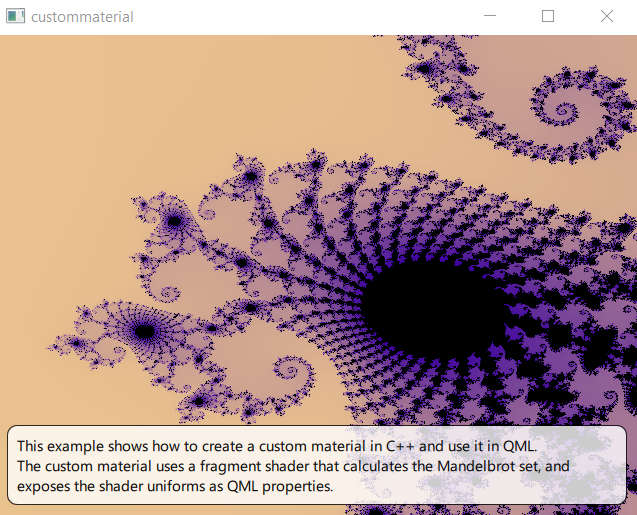
Shader et matériau
La fonctionnalité principale réside dans le shader de fragment
// Copyright (C) 2023 The Qt Company Ltd.
// SPDX-License-Identifier: LicenseRef-Qt-Commercial OR BSD-3-Clause

#version 440

layout(location = 0) in vec2 vTexCoord;

layout(location = 0) out vec4 fragColor;

// uniform block: 84 bytes
layout(std140, binding = 0) uniform buf {
    mat4 qt_Matrix; // offset 0
    float qt_Opacity; // offset 64
    float zoom; // offset 68
    vec2 center; // offset 72
    int limit; // offset 80
} ubuf;

void main()
{
    vec4 color1 = vec4(1.0, 0.85, 0.55, 1);
    vec4 color2 = vec4(0.226, 0.0, 0.615, 1);

    float aspect_ratio = -ubuf.qt_Matrix[0][0]/ubuf.qt_Matrix[1][1];
    vec2 z, c;

    c.x = (vTexCoord.x - 0.5) / ubuf.zoom + ubuf.center.x;
    c.y = aspect_ratio * (vTexCoord.y - 0.5) / ubuf.zoom + ubuf.center.y;

    int iLast;
    z = c;
    for (int i = 0; i < 1000000; i++) {
        if (i >= ubuf.limit)
        {
            iLast = i;
            break;
        }
        float x = (z.x * z.x - z.y * z.y) + c.x;
        float y = (z.y * z.x + z.x * z.y) + c.y;

        if ((x * x + y * y) > 4.0)
        {
            iLast = i;
            break;
        }
        z.x = x;
        z.y = y;
    }

    if (iLast == ubuf.limit) {
        fragColor = vec4(0.0, 0.0, 0.0, 1.0);
    } else {
        float f = (iLast * 1.0) / ubuf.limit;
        fragColor = mix(color1, color2, sqrt(f));
    }
}
Les shaders de fragment et de sommet sont regroupés dans une sous-classe de ` QSGMaterialShader `.
class CustomShader : public QSGMaterialShader
{
public:
    CustomShader()
    {
        setShaderFileName(VertexStage, QLatin1String(":/scenegraph/custommaterial/shaders/mandelbrot.vert.qsb"));
        setShaderFileName(FragmentStage, QLatin1String(":/scenegraph/custommaterial/shaders/mandelbrot.frag.qsb"));
    }
    bool updateUniformData(RenderState &state,
                           QSGMaterial *newMaterial, QSGMaterial *oldMaterial) override;
};
Une sous-classe de ` QSGMaterial ` encapsule le shader ainsi que l’état de rendu. Dans cet exemple, nous ajoutons des informations d’état correspondant aux uniformes du shader. Le matériau est chargé de créer le shader en réimplémentant la méthode ` QSGMaterial::createShader()`.
class CustomMaterial : public QSGMaterial
{
public:
    CustomMaterial();
    QSGMaterialType *type() const override;
    int compare(const QSGMaterial *other) const override;

    QSGMaterialShader *createShader(QSGRendererInterface::RenderMode) const override
    {
        return new CustomShader;
    }

    struct {
        float center[2];
        float zoom;
        int limit;
        bool dirty;
    } uniforms;
};
Pour mettre à jour les données des uniformes, nous réimplémentons la méthode QSGMaterialShader::updateUniformData().
bool CustomShader::updateUniformData(RenderState &state, QSGMaterial *newMaterial, QSGMaterial *oldMaterial)
{
    bool changed = false;
    QByteArray *buf = state.uniformData();
    Q_ASSERT(buf->size() >= 84);

    if (state.isMatrixDirty()) {
        const QMatrix4x4 m = state.combinedMatrix();
        memcpy(buf->data(), m.constData(), 64);
        changed = true;
    }

    if (state.isOpacityDirty()) {
        const float opacity = state.opacity();
        memcpy(buf->data() + 64, &opacity, 4);
        changed = true;
    }

    auto *customMaterial = static_cast<CustomMaterial *>(newMaterial);
    if (oldMaterial != newMaterial || customMaterial->uniforms.dirty) {
        memcpy(buf->data() + 68, &customMaterial->uniforms.zoom, 4);
        memcpy(buf->data() + 72, &customMaterial->uniforms.center, 8);
        memcpy(buf->data() + 80, &customMaterial->uniforms.limit, 4);
        customMaterial->uniforms.dirty = false;
        changed = true;
    }
    return changed;
}
Élément et nœud
Nous créons un élément personnalisé pour mettre en valeur notre nouveau matériau :
#include <QQuickItem>

class CustomItem : public QQuickItem
{
    Q_OBJECT
    Q_PROPERTY(qreal zoom READ zoom WRITE setZoom NOTIFY zoomChanged)
    Q_PROPERTY(int iterationLimit READ iterationLimit WRITE setIterationLimit NOTIFY iterationLimitChanged)
    Q_PROPERTY(QPointF center READ center WRITE setCenter NOTIFY centerChanged)
    QML_ELEMENT

public:
    explicit CustomItem(QQuickItem *parent = nullptr);

    qreal zoom() const
    {
        return m_zoom;
    }

    int iterationLimit() const
    {
        return m_limit;
    }

    QPointF center() const
    {
        return m_center;
    }

public slots:
    void setZoom(qreal zoom);

    void setIterationLimit(int iterationLimit);

    void setCenter(QPointF center);

signals:
    void zoomChanged(qreal zoom);

    void iterationLimitChanged(int iterationLimit);

    void centerChanged(QPointF center);

protected:
    QSGNode *updatePaintNode(QSGNode *, UpdatePaintNodeData *) override;
    void geometryChange(const QRectF &newGeometry, const QRectF &oldGeometry) override;

private:
    bool m_geometryChanged = true;
    qreal m_zoom;
    bool m_zoomChanged = true;
    int m_limit;
    bool m_limitChanged = true;
    QPointF m_center;
    bool m_centerChanged = true;
};
La déclaration CustomItem ajoute trois propriétés correspondant aux uniformes que nous souhaitons exposer à QML.
    Q_PROPERTY(qreal zoom READ zoom WRITE setZoom NOTIFY zoomChanged)
    Q_PROPERTY(int iterationLimit READ iterationLimit WRITE setIterationLimit NOTIFY iterationLimitChanged)
    Q_PROPERTY(QPointF center READ center WRITE setCenter NOTIFY centerChanged)
Comme pour tout élément personnalisé de type ` Qt Quick `, l’implémentation est divisée en deux : en plus de ` CustomItem`, qui réside dans le thread de l’interface graphique, nous créons une sous-classe de ` QSGNode ` qui réside dans le thread de rendu.
class CustomNode : public QSGGeometryNode
{
public:
CustomNode()
{
auto *m = new CustomMaterial;
setMaterial(m);
setFlag(OwnsMaterial, true);
QSGGeometry *g = new QSGGeometry(QSGGeometry::defaultAttributes_TexturedPoint2D(), 4);
QSGGeometry::updateTexturedRectGeometry(g, QRect(), QRect());
setGeometry(g);
setFlag(OwnsGeometry, true);
}
void setRect(const QRectF &bounds)
{
QSGGeometry::updateTexturedRectGeometry(geometry(), bounds, QRectF(0, 0, 1, 1));
markDirty(QSGNode::DirtyGeometry);
}
void setZoom(qreal zoom)
{
auto *m = static_cast<CustomMaterial *>(material());
m->uniforms.zoom = zoom;
m->uniforms.dirty = true;
markDirty(DirtyMaterial);
}
void setLimit(int limit)
{
auto *m = static_cast<CustomMaterial *>(material());
m->uniforms.limit = limit;
m->uniforms.dirty = true;
markDirty(DirtyMaterial);
}
void setCenter(const QPointF ¢er)
{
auto *m = static_cast<CustomMaterial *>(material());
m->uniforms.center[0] = center.x();
m->uniforms.center[1] = center.y();
m->uniforms.dirty = true;
markDirty(DirtyMaterial);
}
};Le nœud détient une instance du matériau et dispose d’une logique permettant de mettre à jour l’état de ce dernier. L’élément gère les propriétés QML correspondantes. Il doit dupliquer les informations provenant du matériau, car l’élément et le matériau s’exécutent sur des threads différents.
void CustomItem::setZoom(qreal zoom)
{
    if (qFuzzyCompare(m_zoom, zoom))
        return;

    m_zoom = zoom;
    m_zoomChanged = true;
    emit zoomChanged(m_zoom);
    update();
}

void CustomItem::setIterationLimit(int limit)
{
    if (m_limit == limit)
        return;

    m_limit = limit;
    m_limitChanged = true;
    emit iterationLimitChanged(m_limit);
    update();
}

void CustomItem::setCenter(QPointF center)
{
    if (m_center == center)
        return;

    m_center = center;
    m_centerChanged = true;
    emit centerChanged(m_center);
    update();
}
Les informations sont copiées de l’élément vers le graphe de scène dans une réimplémentation de la méthode ` QQuickItem::updatePaintNode()`. Les deux threads se trouvent à un point de synchronisation lorsque la fonction est appelée ; il est donc possible d’accéder en toute sécurité aux deux classes.
QSGNode *CustomItem::updatePaintNode(QSGNode *old, UpdatePaintNodeData *)
{
    auto *node = static_cast<CustomNode *>(old);

    if (!node)
        node = new CustomNode;

    if (m_geometryChanged)
        node->setRect(boundingRect());
    m_geometryChanged = false;

    if (m_zoomChanged)
        node->setZoom(m_zoom);
    m_zoomChanged = false;

    if (m_limitChanged)
        node->setLimit(m_limit);
    m_limitChanged = false;

    if (m_centerChanged)
        node->setCenter(m_center);
    m_centerChanged = false;

    return node;
}
La suite de l’exemple
L'application est une application QML simple, comportant un ` QGuiApplication ` et un ` QQuickView ` auxquels nous transmettons un fichier .qml.
Dans le fichier QML, nous créons le `customitem` que nous ancrons pour qu’il occupe l’espace de la racine.
    CustomItem {
        property real t: 1
        anchors.fill: parent
        center: Qt.point(-0.748, 0.1);
        iterationLimit: 3 * (zoom + 30)
        zoom: t * t / 10
        NumberAnimation on t {
            from: 1
            to: 60
            duration: 30*1000;
            running: true
            loops: Animation.Infinite
        }
    }
Pour rendre l’exemple un peu plus intéressant, nous ajoutons une animation permettant de modifier le niveau de zoom et la limite d’itération. Le centre reste fixe.
© 2026 The Qt Company Ltd. Documentation contributions included herein are the copyrights of their respective owners. The documentation provided herein is licensed under the terms of the GNU Free Documentation License version 1.3 as published by the Free Software Foundation. Qt and respective logos are trademarks of The Qt Company Ltd. in Finland and/or other countries worldwide. All other trademarks are property of their respective owners.
