
Feu tricolore
L'exemple « Feu tricolore » montre comment utiliser la vue d'ensemble d'Qt State Machine pour implémenter le flux de contrôle d'un feu tricolore.
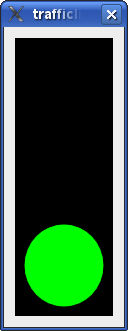
Dans cet exemple, nous créons une classe TrafficLightWidget. Le feu tricolore comporte trois feux : rouge, orange et vert. Il passe d'un feu à l'autre (rouge, puis orange, puis vert, puis orange, puis à nouveau rouge) à des intervalles réguliers.
class LightWidget : public QWidget
{
    Q_OBJECT
    Q_PROPERTY(bool on READ isOn WRITE setOn)
public:
    explicit LightWidget(const QColor &color, QWidget *parent = nullptr)
        : QWidget(parent), m_color(color)
    {
    }

    bool isOn() const { return m_on; }

    void setOn(bool on)
    {
        if (on == m_on)
            return;
        m_on = on;
        update();
    }

public slots:
    void turnOff() { setOn(false); }
    void turnOn() { setOn(true); }

protected:
    void paintEvent(QPaintEvent *) override
    {
        if (!m_on)
            return;
        QPainter painter(this);
        painter.setRenderHint(QPainter::Antialiasing);
        painter.setBrush(m_color);
        painter.drawEllipse(rect());
    }

private:
    QColor m_color;
    bool m_on = false;
};
La classe `LightWidget` représente un feu individuel du feu tricolore. Elle fournit une propriété ` on ` et deux slots, `turnOn()` et `turnOff()`, permettant respectivement d’allumer et d’éteindre le feu. Le widget s’affiche dans la couleur transmise au constructeur.
class TrafficLightWidget : public QWidget
{
    Q_OBJECT
public:
    explicit TrafficLightWidget(QWidget *parent = nullptr) : QWidget(parent)
    {
        auto vbox = new QVBoxLayout(this);
        m_red = new LightWidget(Qt::red);
        vbox->addWidget(m_red);
        m_yellow = new LightWidget(Qt::yellow);
        vbox->addWidget(m_yellow);
        m_green = new LightWidget(Qt::green);
        vbox->addWidget(m_green);
        auto pal = palette();
        pal.setColor(QPalette::Window, Qt::black);
        setPalette(pal);
        setAutoFillBackground(true);
    }

    LightWidget *redLight() const { return m_red; }
    LightWidget *yellowLight() const { return m_yellow; }
    LightWidget *greenLight() const { return m_green; }

private:
    LightWidget *m_red;
    LightWidget *m_yellow;
    LightWidget *m_green;
};
La classe `TrafficLightWidget` représente la partie visuelle du feu tricolore ; il s’agit d’un widget contenant trois feux disposés verticalement, et fournissant des fonctions d’accès à ceux-ci.
QState *createLightState(LightWidget *light, int duration, QState *parent = nullptr)
{
    auto lightState = new QState(parent);
    auto timer = new QTimer(lightState);
    timer->setInterval(duration);
    timer->setSingleShot(true);
    auto timing = new QState(lightState);
    QObject::connect(timing, &QAbstractState::entered, light, &LightWidget::turnOn);
    QObject::connect(timing, &QAbstractState::entered, timer, QOverload<>::of(&QTimer::start));
    QObject::connect(timing, &QAbstractState::exited, light, &LightWidget::turnOff);
    auto done = new QFinalState(lightState);
    timing->addTransition(timer, &QTimer::timeout, done);
    lightState->setInitialState(timing);
    return lightState;
}
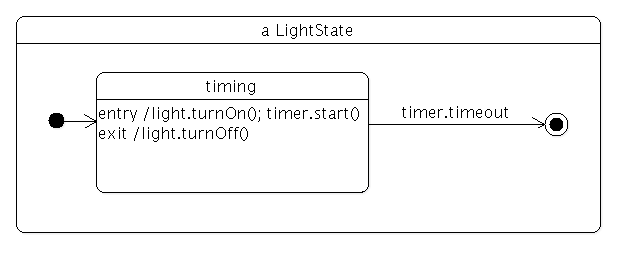
La fonction createLightState() crée un état qui allume un feu lorsque l’on entre dans cet état, et l’éteint lorsque l’on en sort. L’état utilise une minuterie et, comme nous le verrons, le délai d’expiration sert à passer d’un état LightState à un autre. Voici le diagramme d’états correspondant à l’état des feux :
class TrafficLight : public QWidget
{
    Q_OBJECT
public:
    explicit TrafficLight(QWidget *parent = nullptr) : QWidget(parent)
    {
        auto vbox = new QVBoxLayout(this);
        auto widget = new TrafficLightWidget;
        vbox->addWidget(widget);
        vbox->setContentsMargins(QMargins());

        auto machine = new QStateMachine(this);
        auto redGoingYellow = createLightState(widget->redLight(), 3000);
        redGoingYellow->setObjectName("redGoingYellow");
        auto yellowGoingGreen = createLightState(widget->yellowLight(), 1000);
        yellowGoingGreen->setObjectName("yellowGoingGreen");
        redGoingYellow->addTransition(redGoingYellow, &QState::finished, yellowGoingGreen);
        auto greenGoingYellow = createLightState(widget->greenLight(), 3000);
        greenGoingYellow->setObjectName("greenGoingYellow");
        yellowGoingGreen->addTransition(yellowGoingGreen, &QState::finished, greenGoingYellow);
        auto yellowGoingRed = createLightState(widget->yellowLight(), 1000);
        yellowGoingRed->setObjectName("yellowGoingRed");
        greenGoingYellow->addTransition(greenGoingYellow, &QState::finished, yellowGoingRed);
        yellowGoingRed->addTransition(yellowGoingRed, &QState::finished, redGoingYellow);

        machine->addState(redGoingYellow);
        machine->addState(yellowGoingGreen);
        machine->addState(greenGoingYellow);
        machine->addState(yellowGoingRed);
        machine->setInitialState(redGoingYellow);
        machine->start();
    }
};
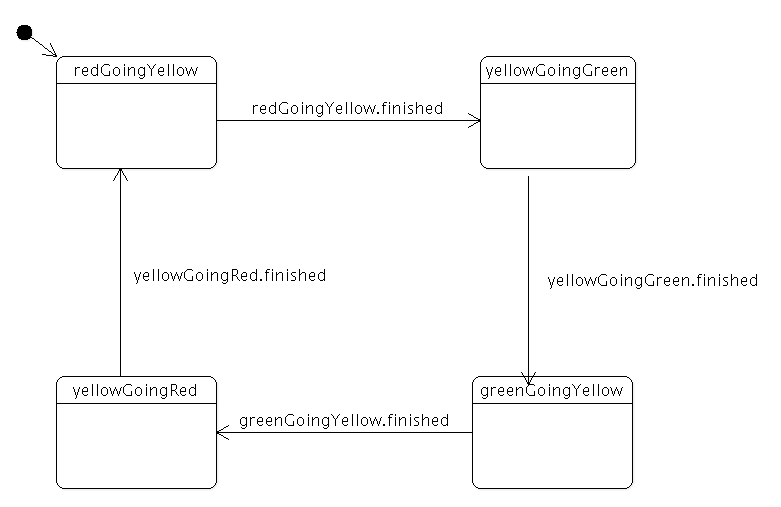
La classe TrafficLight combine le TrafficLightWidget avec une machine à états. Le graphe d’états comporte quatre états : rouge-jaune, jaune-vert, vert-jaune et jaune-rouge. L'état initial est « rouge-vers-jaune » ; lorsque le délai de la minuterie de cet état est écoulé, la machine à états passe à l'état « jaune-vers-vert ». Le même processus se répète pour les autres états. Voici à quoi ressemble le diagramme d'états :
int main(int argc, char **argv)
{
    QApplication app(argc, argv);

    TrafficLight widget;
    widget.resize(110, 300);
    widget.show();

    return app.exec();
}
La fonction main() construit un TrafficLight et l'affiche.
© 2026 The Qt Company Ltd. Documentation contributions included herein are the copyrights of their respective owners. The documentation provided herein is licensed under the terms of the GNU Free Documentation License version 1.3 as published by the Free Software Foundation. Qt and respective logos are trademarks of The Qt Company Ltd. in Finland and/or other countries worldwide. All other trademarks are property of their respective owners.
