
Qt pour Windows - SDK d'applications Windows
Configuration
Pour utiliser le SDK d'applications Windows dans les applications Qt, configurez le chemin d'accès au SDK.
Utilisation Qt Creator
Pour configurer le SDK d'applications Windows dans l'Qt Creator, accédez à « Preferences » > « SDKs ».
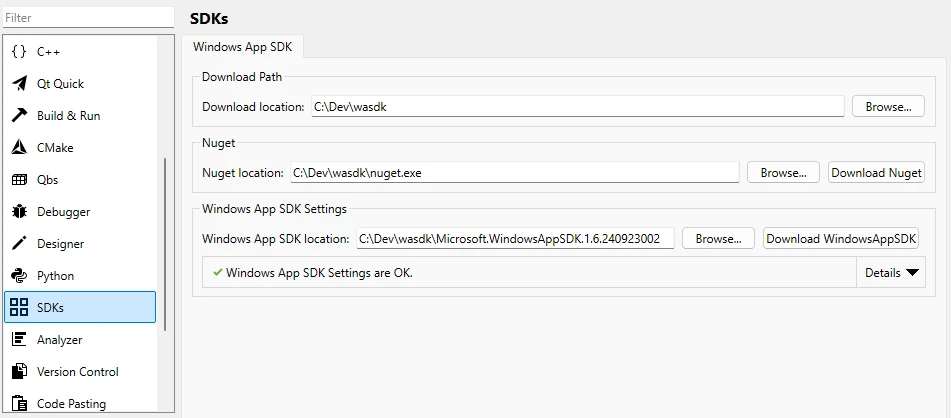
Pour plus d’informations, consultez la documentation d’Qt Creator .
Depuis la ligne de commande
- Accédez à un répertoire vide.
Exemple :
mkdir C:\Dev\wasdk cd C:\Dev\wasdk - Téléchargez NuGet dans ce répertoire.
Par exemple, pour effectuer le téléchargement avec PowerShell depuis la ligne de commande :
powershell.exe -Command "& {Invoke-WebRequest https://dist.nuget.org/win-x86-commandline/latest/nuget.exe -OutFile nuget.exe}" - Téléchargez le SDK Windows App avec NuGet.
nuget.exe install Microsoft.WindowsAppSDK -OutputDirectory ./ - Définissez la variable d'environnement `
WIN_APP_SDK_ROOT` sur le répertoire du SDK Windows App, généralement nommé `Microsoft.WindowsAppSDK.{Version}`.Par exemple, à l'aide de la ligne de commande :
cd Microsoft.WindowsAppSDK.*
set WIN_APP_SDK_ROOT=%cd%
setX WIN_APP_SDK_ROOT %cd%
Utilisation du SDK Windows App dans les applications Qt
Appelez la fonction CMake ` qt_add_win_app_sdk(ProjectName)` dans le fichier CMake du projet. Remplacez ` ProjectName ` par le nom de votre projet.
Utilisez une condition pour vous assurer que la compilation est réservée aux versions MSVC :
if (MSVC)
    qt_add_win_app_sdk(ProjectName)
endif()© 2026 The Qt Company Ltd. Documentation contributions included herein are the copyrights of their respective owners. The documentation provided herein is licensed under the terms of the GNU Free Documentation License version 1.3 as published by the Free Software Foundation. Qt and respective logos are trademarks of The Qt Company Ltd. in Finland and/or other countries worldwide. All other trademarks are property of their respective owners.
