
SCXML Invoke
コンパイル済みのネストされたステートマシンを呼び出します。
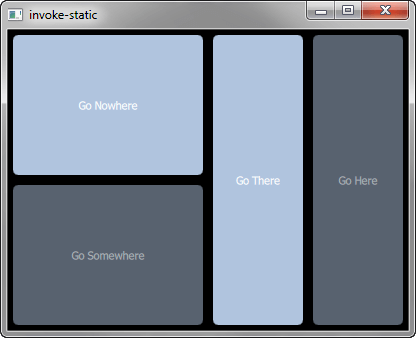
Invokeでは、生成されたネストされたステートマシン(SCXMLファイルがC++クラスにコンパイルされたもの)に対して、<invoke> 要素を使用する方法を示します。<invoke> 要素は、外部サービスのインスタンスを作成するために使用されます。
例の動作確認
サンプルは以下の手順で実行できます:
- Qt Creator
Welcome モードを開き、Examples からこの例を選択します。詳細については、Qt Creator の「チュートリアル:ビルドと実行」を参照してください。
- Qt Extension for Visual Studio Code
Command Palette から `Qt: Open Qt examples ` コマンドを実行し、リストからこのサンプルを選択します。詳細については、Qt Extension for Visual Studio Code の「チュートリアル:ビルドと実行」を参照してください。
ステートマシンの起動
statemachine.scxml 内で、呼び出すステートマシンとして、http://www.w3.org/TR/scxml/型の「DirectionsStateMachine」という名前のステートマシンを指定します:
<scxml
    xmlns="http://www.w3.org/2005/07/scxml"
    version="1.0"
    name="DirectionsStateMachine"
    initial="anyplace"
>
    <state id="anyplace">
        <transition event="goNowhere" target="nowhere"/>
        <transition event="goSomewhere" target="somewhere"/>

        <state id="nowhere"/>
        <state id="somewhere">
            <invoke type="http://www.w3.org/TR/scxml/">
                <content>
                    <scxml name="anywhere" version="1.0">
                        <state id="here">
                            <transition event="goThere" target="there"/>
                        </state>
                        <state id="there">
                            <transition event="goHere" target="here"/>
                        </state>
                    </scxml>
                </content>
            </invoke>
        </state>
    </state>
</scxml>
ステートマシンのコンパイル
例のビルドファイルに以下の行を追加して、Qt SCXML モジュールをリンク対象に指定します。
qmakeを使用する場合のinvoke.pro:
QT += qml scxml次に、コンパイルするステートマシンを指定します:
STATECHARTS = statemachine.scxmlcmake を使用する場合の `CMakeLists.txt`:
find_package(Qt6 REQUIRED COMPONENTS Core Gui Qml Scxml)

target_link_libraries(invoke PRIVATE
    Qt6::Core
    Qt6::Gui
    Qt6::Qml
    Qt6::Scxml
)
次に、コンパイルするステートマシンを指定します:
qt6_add_statecharts(invoke
    statemachine.scxml
)ステートチャートディレクティブであるSTATECHARTSまたはqt6_add_statechartsは、Qt SCXML コンパイラ(qscxmlc )を呼び出します。このコンパイラは自動的に実行され、statemachine.hおよびstatemachine.cpp を生成します。これらは、コンパイル用にヘッダーファイルおよびソースファイルとして適切に追加されます。
ステートマシンをQML要素として宣言する
ステートマシンは、次のように QML 要素として宣言されます:
struct DirectionsStateMachineRegistration
{
    Q_GADGET
    QML_FOREIGN(DirectionsStateMachine)
    QML_NAMED_ELEMENT(DirectionsStateMachine)
    QML_ADDED_IN_VERSION(1, 0)
};
ステートマシンのインスタンス化
生成されたDirectionsStateMachine 要素を、MainView.qmlファイル内で次のようにインスタンス化します:
    DirectionsStateMachine {
        id: stateMachine
        running: true
}© 2026 The Qt Company Ltd. Documentation contributions included herein are the copyrights of their respective owners. The documentation provided herein is licensed under the terms of the GNU Free Documentation License version 1.3 as published by the Free Software Foundation. Qt and respective logos are trademarks of The Qt Company Ltd. in Finland and/or other countries worldwide. All other trademarks are property of their respective owners.
