
Qt Canvas Painter - Compact Health 예제
QWindow 에서 QCanvasPainter 의 사용법을 보여줍니다.
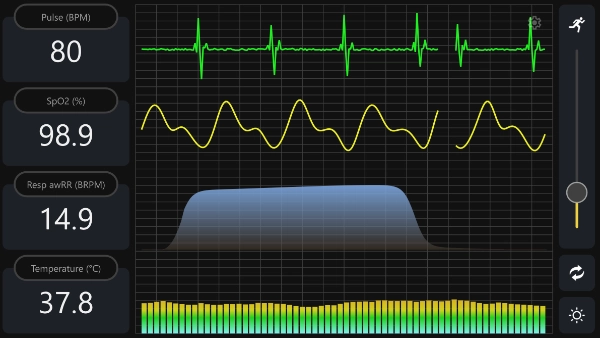
이 예제는 순수 QWindow 애플리케이션에서 Qt Canvas Painter를 사용하는 방법을 보여줍니다. 이 Qt Quick 그리고 Qt Widgets 스택은 사용되지 않습니다.
이 애플리케이션은 ` QCanvasPainter`을 사용하여 모든 콘텐츠를 QRhi 백엔드를 통해 렌더링합니다. 렌더링 및 ` QCanvasPainter`과 ` QRhi ` 간의 통합은 ` QCanvasRhiPaintDriver`을 통해 관리됩니다. 즉, 선택한 백엔드에서 하드웨어 가속을 사용할 수 있는 경우 이를 활용합니다.
참고: QRhi 는 Qt GUI Private의 일부입니다. 따라서 호환성에 대한 보장은 제한적입니다. 해당 클래스에 대해서는 소스 또는 바이너리 호환성이 보장되지 않으므로, API는 애플리케이션이 개발된 Qt 버전에서만 작동이 보장됩니다.
이 예제가 보여주는 내용
- QWindow 내에서 완전히 사용자 정의된 UI를 렌더링합니다.
- QRhi, 스왑체인(swapchain), 깊이-스텐실(depth-stencil) 리소스를 생성하고 관리하는 방법.
- QCanvasPainter 및 QCanvasRhiPaintDriver 를 통해 드로우 명령을 기록하는 방법.
- QWindow::requestUpdate()를 사용하여 연속적인 애니메이션을 구동하는 방법.
실습 안내
이 애플리케이션은 기본적으로 플랫폼에 따라 렌더링 API를 선택합니다. 명령줄 인수를 사용하여 특정 백엔드를 지정할 수도 있습니다:
--null--opengl--vulkan--d3d11--d3d12--metal
백엔드 생성에 실패할 경우, 이 예제는 가능한 경우 OpenGL ES 2로 대체하려고 시도합니다.
int main(int argc, char *argv[])
{
    QGuiApplication app(argc, argv);
    app.setAttribute(Qt::AA_SynthesizeTouchForUnhandledMouseEvents);

    QRhi::Implementation graphicsApi;
#if defined(Q_OS_WIN)
    graphicsApi = QRhi::D3D11;
#elif QT_CONFIG(metal)
    graphicsApi = QRhi::Metal;
#elif QT_CONFIG(vulkan)
    graphicsApi = QRhi::Vulkan;
#else
    graphicsApi = QRhi::OpenGLES2;
#endif

    QCommandLineParser cmdLineParser;
    cmdLineParser.addHelpOption();
    QCommandLineOption nullOption({ "n", "null" }, QLatin1String("Null"));
    cmdLineParser.addOption(nullOption);
    QCommandLineOption glOption({ "g", "opengl" }, QLatin1String("OpenGL"));
    cmdLineParser.addOption(glOption);
    QCommandLineOption vkOption({ "v", "vulkan" }, QLatin1String("Vulkan"));
    cmdLineParser.addOption(vkOption);
    QCommandLineOption d3d11Option({ "d", "d3d11" }, QLatin1String("Direct3D 11"));
    cmdLineParser.addOption(d3d11Option);
    QCommandLineOption d3d12Option({ "D", "d3d12" }, QLatin1String("Direct3D 12"));
    cmdLineParser.addOption(d3d12Option);
    QCommandLineOption mtlOption({ "m", "metal" }, QLatin1String("Metal"));
    cmdLineParser.addOption(mtlOption);

    cmdLineParser.process(app);

   if (cmdLineParser.isSet(nullOption))
        graphicsApi = QRhi::Null;
    if (cmdLineParser.isSet(glOption))
        graphicsApi = QRhi::OpenGLES2;
    if (cmdLineParser.isSet(vkOption))
        graphicsApi = QRhi::Vulkan;
    if (cmdLineParser.isSet(d3d11Option))
        graphicsApi = QRhi::D3D11;
    if (cmdLineParser.isSet(d3d12Option))
        graphicsApi = QRhi::D3D12;
    if (cmdLineParser.isSet(mtlOption))
        graphicsApi = QRhi::Metal;

#if QT_CONFIG(opengl)
    QSurfaceFormat fmt;
    fmt.setDepthBufferSize(24);
    fmt.setStencilBufferSize(8);
#  ifdef Q_OS_MACOS
    fmt.setVersion(4, 1);
    fmt.setProfile(QSurfaceFormat::CoreProfile);
#  endif
    QSurfaceFormat::setDefaultFormat(fmt);
#endif

#if QT_CONFIG(vulkan)
    QVulkanInstance vulkanInstance;
    if (graphicsApi== QRhi::Vulkan) {
        vulkanInstance.setExtensions(QRhiVulkanInitParams::preferredInstanceExtensions());
        if (!vulkanInstance.create()) {
#if QT_CONFIG(opengl)
            qWarning("Vulkan is not usable, falling back to OpenGL");
            graphicsApi = QRhi::OpenGLES2;
#else
            qWarning("Vulkan is not usable, falling back to the null backend");
            graphicsApi = QRhi::Null;
#endif
        }
    }
#endif

    MainWindow window(graphicsApi);

#if QT_CONFIG(vulkan)
    if (graphicsApi== QRhi::Vulkan)
        window.setVulkanInstance(&vulkanInstance);
#endif

    window.resize(1920 / 2, 1080 / 2);
    window.show();

    return app.exec();
}
MainWindow 는 PainterWindow 의 서브클래스이며, 는 QWindow 의 서브클래스입니다. PainterWindow 는 Qt의 그래픽 추상화 계층인 QRhi 를 통해 렌더링된 콘텐츠를 표시하는 창을 구현합니다. 이 클래스는 창이 노출될 때 QRhi 인스턴스를 초기화하고, 스왑체인 및 깊이-스텐실 버퍼를 관리하며, 크기 조정 이벤트를 처리하고, MainWindow 에서 구현된 가상 함수 paint() 를 호출합니다.
PainterWindow 구현을 더 잘 이해하려면 RHI Window 예제를 확인해 보는 것이 좋습니다. 본질적으로 이 예제의 RhiWindow 클래스와 매우 유사하기 때문입니다.
QCanvasPainter 에 특화된 단계 중 하나는 QRhi 가 초기화된 후 QCanvasPainterFactory 인스턴스를 가져오는 것입니다:
if (!m_factory) {
    m_factory = new QCanvasPainterFactory;
    m_factory->create(m_rhi.get());
}
새 프레임의 렌더링은 render() 함수에서 이루어지며, 이 함수는 창이 표시되거나 크기가 조정될 때, 그리고 requestUpdate()을 통해 예약된 업데이트 요청에 응답할 때 호출됩니다.
RHI Window 예제와 달리, QRhi API를 통해 버텍스 및 유니폼 버퍼나 그래픽 파이프라인을 생성하지 않고, 드로우 호출을 직접 발행하지 않습니다. 대신, QCanvasRhiPaintDriver 를 사용하여 QCanvasPainter 에서 생성된 렌더링 결과로 렌더 패스를 기록합니다.
void PainterWindow::render()
{
    if (!m_factory|| !m_factory->isValid()|| !m_rhi|| !m_sc)
        return;

    if (!m_hasSwapChain|| m_notExposed)
        return;

   if (m_sc->currentPixelSize() != m_sc->surfacePixelSize()|| m_newlyExposed) {
        resizeSwapChain();
       if (!m_hasSwapChain)
            return;
        m_newlyExposed = false;
    }

    QRhi::FrameOpResult r = m_rhi->beginFrame(m_sc.get());
    if (r== QRhi::FrameOpSwapChainOutOfDate) {
        resizeSwapChain();
        if (!m_hasSwapChain)
            return;
        r = m_rhi->beginFrame(m_sc.get());
    }
    if (r != QRhi::FrameOpSuccess) {
        qDebug("beginFrame failed with %d, retry", r);
        requestUpdate();
        return;
    }

    QRhiCommandBuffer*cb = m_sc->currentFrameCommandBuffer();
    QRhiRenderTarget*rt = m_sc->currentFrameRenderTarget();

    QCanvasRhiPaintDriver*pd = m_factory->paintDriver();
    QCanvasPainter*painter = m_factory->painter();

    pd->resetForNewFrame();
    pd->beginPaint(cb, rt, m_fillColor, size(), float(devicePixelRatio()));
    paint(painter);
    pd->endPaint();

    m_rhi->endFrame(m_sc.get());
}
MainWindow의 ` paint() ` 구현은 ` QCanvasPainter ` API를 사용하므로, 저수준 ` QRhi ` 세부 사항을 직접 처리할 필요가 없습니다.
먼저, 아직 수행되지 않았다면 이미지를 불러와 등록합니다:
void MainWindow::paint(QCanvasPainter *p)
{
    if (!m_initialized) {
        auto flags = QCanvasPainter::ImageFlag::GenerateMipmaps;
        m_b1ImageLight = p->addImage(QImage(":/images/icon_random_light.png"), flags);
        m_b1ImageDark = p->addImage(QImage(":/images/icon_random_dark.png"), flags);
        m_b2ImageLight = p->addImage(QImage(":/images/icon_theme_light.png"), flags);
        m_b2ImageDark = p->addImage(QImage(":/images/icon_theme_dark.png"), flags);
        m_b3ImageLight = p->addImage(QImage(":/images/icon_settings_light.png"), flags);
        m_b3ImageDark = p->addImage(QImage(":/images/icon_settings_dark.png"), flags);
        m_sImageLight = p->addImage(QImage(":/images/icon_run_light.png"), flags);
        m_sImageDark = p->addImage(QImage(":/images/icon_run_dark.png"), flags);
        m_initialized = true;
    }
그 다음에는 경로의 채우기 및 윤곽선 그리기, 텍스트 렌더링, 이미지 그리기 등이 포함된 실제 그리기 작업이 이어집니다. 예를 들면 다음과 같습니다:
// Highlight pressed button
if (m_selectedButton) {
    p->beginPath();
    p->roundRect(m_views[m_selectedButton].rect, viewRadius);
    p->setLineWidth(2.0f * m_px);
    p->setStrokeStyle(m_theme.highlight());
    p->stroke();
}
QCanvasPainter 그리기 명령어는 내부적으로 기하 구조, 상태 및 QRhi draw 작업을 준비합니다. PainterWindow::render() 에서 endPaint()가 호출되면 명령어 스트림이 플러시됩니다. 이때 관련 QRhiCommandBuffer 에 렌더링 패스가 기록됩니다.
MainWindow::paint() 는 반환하기 전에 QWindow 의 함수인 requestUpdate()를 호출하여, 디스플레이의 표시 속도와 동기화된 새 프레임을 요청합니다. 이를 통해 애니메이션에 필요한 콘텐츠가 지속적으로 업데이트됩니다.
구현 세부 사항에 대해서는 전체 예제 소스 코드를 참조하십시오.
© 2026 The Qt Company Ltd. Documentation contributions included herein are the copyrights of their respective owners. The documentation provided herein is licensed under the terms of the GNU Free Documentation License version 1.3 as published by the Free Software Foundation. Qt and respective logos are trademarks of The Qt Company Ltd. in Finland and/or other countries worldwide. All other trademarks are property of their respective owners.
