
Qt Canvas Painter - Hello 위젯 예제
QCanvasPainter 및 QCanvasPainterWidget 의 사용법을 보여줍니다.
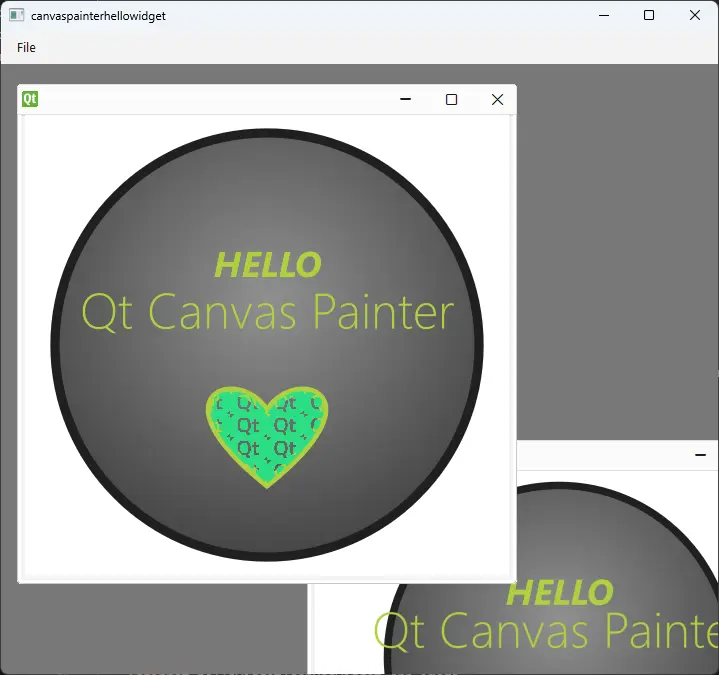
이 예제는 QCanvasPainterWidget 의 서브클래스를 구현합니다. 이후 QMainWindow 내부의 QMdiArea 에 이 위젯의 인스턴스를 하나 이상 추가할 수 있습니다.
QCanvasPainterWidget 이 위젯 자체는 QRhiWidget 를 상속받으며, 항상 QRhi 를 통해 가속화된 3D 렌더링을 사용합니다.
QCanvasPainterWidget 의 하위 클래스는 최소한 paint()을 구현해야 합니다. 이 예제에서는 PNG 파일에서 불러온 이미지도 사용합니다.
class CanvasWidget : public QCanvasPainterWidget
{
public:
    CanvasWidget();
    void initializeResources(QCanvasPainter *p) override;
    void paint(QCanvasPainter *p) override;
    void graphicsResourcesInvalidated() override;

private:
    QCanvasImage m_image;
};
paint() 함수는 제공자 QCanvasPainter 를 사용하여 즉시 그리기를 시작할 수 있습니다:
void CanvasWidget::paint(QCanvasPainter *p)
{
    const float size = std::min(width(), height());
    const float centerX = width() / 2;
    const float centerY = height() / 2;

    // Paint the background circle
    QCanvasRadialGradient gradient1(centerX, centerY - size * 0.1f, 0, size * 0.6f);
    gradient1.setStartColor(QColor(0x909090));
    gradient1.setEndColor(QColor(0x404040));
    p->beginPath();
    p->circle(QPointF(centerX, centerY), size * 0.46f);
    p->setFillStyle(gradient1);
    p->fill();
    p->setStrokeStyle(QColor(0x202020));
    p->setLineWidth(size * 0.02f);
    p->stroke();
이 예제에서 사용된 기능에 대한 자세한 내용은 QCanvasPainter, QCanvasBrush, QCanvasRadialGradient, QCanvasImagePattern, QCanvasImage 및 QFont 을 참조하십시오.
이 이미지는 하트 모양을 채우는 패턴으로 사용됩니다:
    // Paint heart
    QCanvasImagePattern pattern(m_image, centerX, centerY, size * 0.08f, size * 0.05f);
    p->setFillStyle(pattern);
QCanvasImage 및 QCanvasOffscreenCanvas 와 같은 리소스가 포함될 경우, 이들은 initializeResources() 및 graphicsResourcesInvalidated()에서 관리됩니다:
void CanvasWidget::initializeResources(QCanvasPainter *p)
{
    Q_ASSERT(m_image.isNull());
    const auto flags = QCanvasPainter::ImageFlag::Repeat | QCanvasPainter::ImageFlag::GenerateMipmaps;
    m_image = p->addImage(QImage(u":/qt-translucent.png"_s), flags);
}

void CanvasWidget::graphicsResourcesInvalidated()
{
    m_image = {};
}
initializeResources()는 단순히 편의성을 위한 것입니다. 이를 구현하는 대신, paint() 내에서 다음과 같이 작성할 수도 있습니다:
if (m_image.isNull())
    m_image = p->addImage(QImage(":/qt-translucent.png"), QCanvasPainter::ImageFlag::Repeat);
이 예제에서는 창 간에 위젯의 부모를 변경하지 않으므로 그래픽 리소스가 손실되지 않습니다. 그럼에도 불구하고 graphicsResourcesInvalidated() 내에서 모든 QCanvasImage 및 QCanvasOffscreenCanvas 변수에 기본값인 빈 객체를 할당하는 것은 좋은 패턴입니다.
main() 함수는 QMainWindow 와 QMdiArea 를 생성합니다. CanvasWidget 클래스의 여러 인스턴스를 하위 창으로 추가할 수 있습니다. hasSharedPainter()가 기본적으로 true로 설정되어 있고, 동일한 최상위 위젯 내에 배치되어 있기 때문에, 모든 페인터 위젯은 전용 리소스를 생성하는 대신 동일한 QCanvasPainter 와 관련 렌더링 인프라를 공유하게 됩니다.
© 2026 The Qt Company Ltd. Documentation contributions included herein are the copyrights of their respective owners. The documentation provided herein is licensed under the terms of the GNU Free Documentation License version 1.3 as published by the Free Software Foundation. Qt and respective logos are trademarks of The Qt Company Ltd. in Finland and/or other countries worldwide. All other trademarks are property of their respective owners.
