
Android용 Qt 언어 간 호환성
Android 애플리케이션에서 Qt에서 Java 및 Kotlin 코드를 호출하고, Java 및 Kotlin에서 Qt 코드를 호출하는 방법을 보여줍니다.
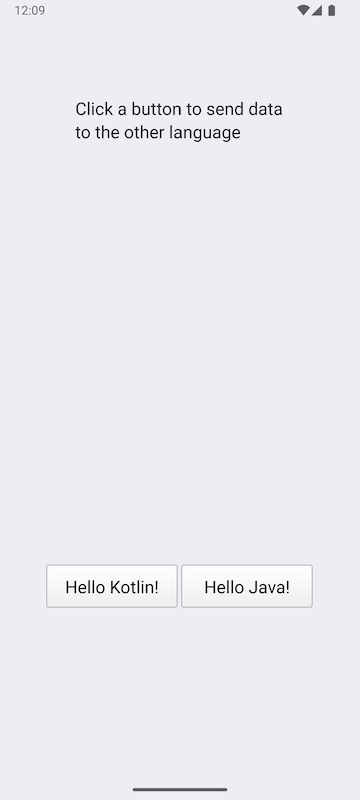
버튼 중 하나를 클릭하여 Java 및 Kotlin 클래스에 문자열을 전송하고, 수정된 문자열을 반환받으세요.
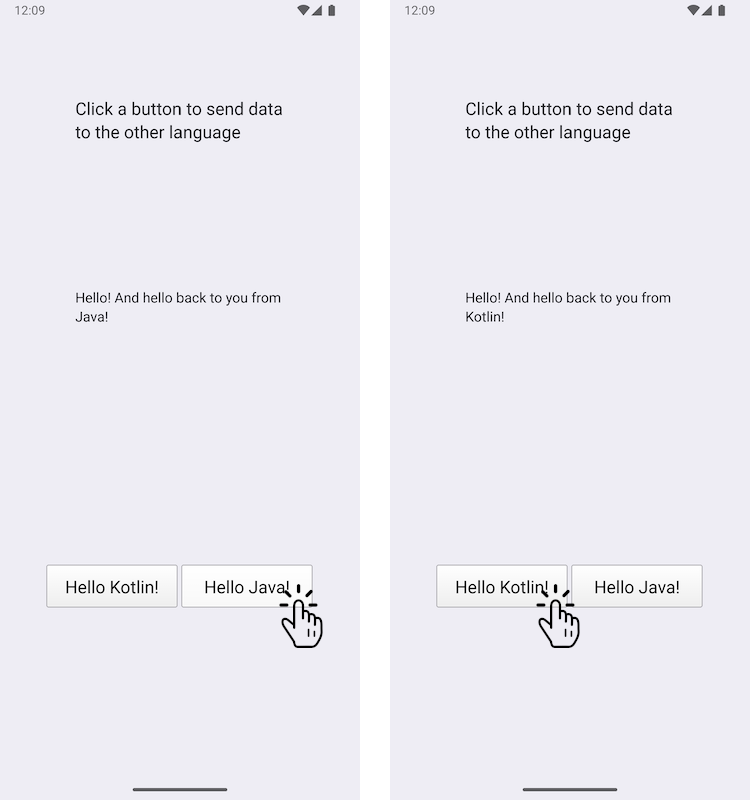
이 예제는 Android 애플리케이션에 사용자 정의 Java 클래스와 사용자 정의 Kotlin 클래스를 추가하는 방법과, Qt의 JNI 편의 API를 사용하여 이를 호출하는 방법을 보여줍니다. 반대로, Java 클래스와 Kotlin 클래스도 Qt 함수를 호출합니다.
예제 실행
다음 경로에서 예제를 실행할 수 있습니다.
- Qt Creator
Welcome 모드를 열고 Examples 에서 예제를 선택하십시오. 자세한 내용은 Qt Creator: 튜토리얼: 빌드 및 실행을 참조하십시오.
- Qt Extension for Visual Studio Code
Command Palette 에서 Qt: Open Qt examples 명령을 실행하고 목록에서 예제를 선택하십시오. 자세한 내용은 Qt Extension for Visual Studio Code: 튜토리얼: 빌드 및 실행을 참조하십시오.
참고: 이 예제는 Android 기기에서만 실행할 수 있습니다.
Qt 신호를 사용하여 C++과 Java/Kotlin 간 데이터 교환하기
JavaExchanger.java 파일에서 JavaExchanger 이라는 사용자 정의 Java 클래스를 정의합니다:
package org.qtproject.example.androidlanguageexchange;

public class JavaExchanger
{
    private long mCppExchanger;

    private native void connectToCppExchanger(long cppExchanger);
    private native void fromOther(long cppExchanger, String str);

    public JavaExchanger(long cppExchanger) {
        mCppExchanger = cppExchanger;
        connectToCppExchanger(cppExchanger);
    }
    public void fromCpp(int type, String str) {
        if (type == OtherLanguageType.Java.getCode()) {
            String msg = str + " And hello back to you from\nJava!";
            fromOther(mCppExchanger, msg);
        }
    }
}
KotlinExchanger.kt 파일에서 KotlinExchanger 라는 사용자 정의 Kotlin 클래스를 정의합니다:
package org.qtproject.example.androidlanguageexchange;

class KotlinExchanger(private val cppExchanger: Long) {

    private external fun connectToCppExchanger(cppExchanger: Long)
    private external fun fromOther(cppExchanger: Long, str: String)

    init {
        connectToCppExchanger(cppExchanger)
    }

    fun fromCpp(type: Int, str: String) {
        if (type == OtherLanguageType.Kotlin.code) {
            val msg = "$str And hello back to you from\nKotlin!"
            fromOther(cppExchanger, msg)
        }
    }
}
이 두 클래스 모두 QObject* 를 long으로 형변환한 long integer를 매개변수로 받으며, connectToCppExchanger 함수 호출의 결과로 fromCpp 함수가 호출되면, 들어오는 문자열을 수정하여 long int와 함께 fromOther 로 다시 보냅니다.
DataExchanger C++ 클래스 헤더 파일인 dataexchanger.h 에서는 C++과 Kotlin/Java 간에 데이터를 교환하기 위한 간단한 C++ API를 선언합니다. 이 API는 앞서 설명한 바와 같이, C++ 코드에서 버튼에 대한 응답으로 전송되는 ` fromCpp ` 신호를 가진 ` QObject `와, Java/Kotlin 코드에서 C++ 코드로 문자열을 전송하는 데 사용하는 ` fromOther ` 신호로 구성됩니다.
// A simple data exchanger. All this class does is convey semi-abstract data
// back and forth. For the purposes of this example, treat it as an opaque
// and not necessarily modifiable engine object that just happens to have
// a signal that's directly consumable by the code in other languages. The
// rest of the glue is done in OtherLanguageHandler.
class DataExchanger : public QObject
{
    Q_OBJECT
public:
    explicit DataExchanger(QObject *parent = nullptr);

    enum OtherLanguageType {Java, Kotlin};
signals:
    void fromCpp(OtherLanguageType type, const QString& str);
    void fromOther(const QString& str);
};
Java 메서드 호출은 Java/Kotlin과 통신하기 위해 Java Native Interface(JNI) API를 사용하는 ` QJniObject `를 활용합니다. long 정수 인자는 ` DataExchanger ` 유형으로 다시 형변환되며, ` fromCpp ` 신호는 Java/Kotlin의 ` fromCpp ` 함수를 호출하는 람다 표현식에 연결됩니다.
// We provide this function so that the Java/Kotlin objects can register themselves
// as signal observers. The C++ code doesn't decide where and when that happens.
void connectToCppExchanger(JNIEnv* /*env*/, jobject thiz, jlong cppExchanger)
{
    DataExchanger* exchanger = reinterpret_cast<DataExchanger*>(cppExchanger);
    QJniObject androidExchanger(thiz);
    QObject::connect(exchanger, &DataExchanger::fromCpp, exchanger,
                     // Intentional, and important capture by value of the QJniObject.
                     // This keeps the underlying Java/Kotlin object alive until the call
                     // to it is performed.
                     [androidExchanger](DataExchanger::OtherLanguageType type, const QString& str) {
                         androidExchanger.callMethod("fromCpp",
                                                     static_cast<int>(type), str);
                     });
}
Java/Kotlin 클래스의 네이티브 메서드 호출은 롱 정수를 다시 DataExchanger 로 변환한 후, 해당 타입의 fromOther 신호를 호출함으로써 DataExchanger 클래스로 전달됩니다.
// The Java/Kotlin code calls this. The C++ code doesn't decide where and when
// it is called.
// Note that the function must be registered with the Qt native method
// registration facilities because it relies on the Qt wrapping that knows how to
// convert a jstring to a QString.
void fromOther(JNIEnv* /*env*/, jobject /*thiz*/,
                       jlong cppExchanger, const QString &str)
{
    DataExchanger* exchanger = reinterpret_cast<DataExchanger*>(cppExchanger);
    exchanger->fromOther(str);
}
버튼이 의도한 대로 작동하는지 확인하기 위해, Java/Kotlin으로 문자열을 전송하고 수정된 문자열을 반환받도록 하는 다음 코드를 추가합니다:
    QObject::connect(&javaButton, &QPushButton::clicked, &javaButton, [&]() {
        dataExchanger.fromCpp(DataExchanger::Java, "Hello!");
    });

    QObject::connect(&kotlinButton, &QPushButton::clicked, &kotlinButton, [&]() {
        dataExchanger.fromCpp(DataExchanger::Kotlin, "Hello!");
    });
    QObject::connect(&dataExchanger, &DataExchanger::fromOther,
                     &dataExchanger, [&](const QString& str) {
        fromOtherLabel.setText(str);
});Qt for Android도 참조하십시오 .
© 2026 The Qt Company Ltd. Documentation contributions included herein are the copyrights of their respective owners. The documentation provided herein is licensed under the terms of the GNU Free Documentation License version 1.3 as published by the Free Software Foundation. Qt and respective logos are trademarks of The Qt Company Ltd. in Finland and/or other countries worldwide. All other trademarks are property of their respective owners.
