
TaskTree 데모
다양한 실행 모드와 워크플로 정책이 복잡한 TaskTree 실행에 어떤 영향을 미치는지 보여줍니다.
TaskTree 데모는 ` timeoutTask`를 사용하여 중첩된 TaskTree 레시피를 구성하는 방법을 보여주고, 다양한 ` execution modes ` 및 ` workflow policies`를 시연합니다. 이 애플리케이션은 TaskTree가 작업을 구성하는 다양한 작업 항목을 실행하는 동안 진행 상황을 그래픽으로 개괄적으로 보여줍니다.
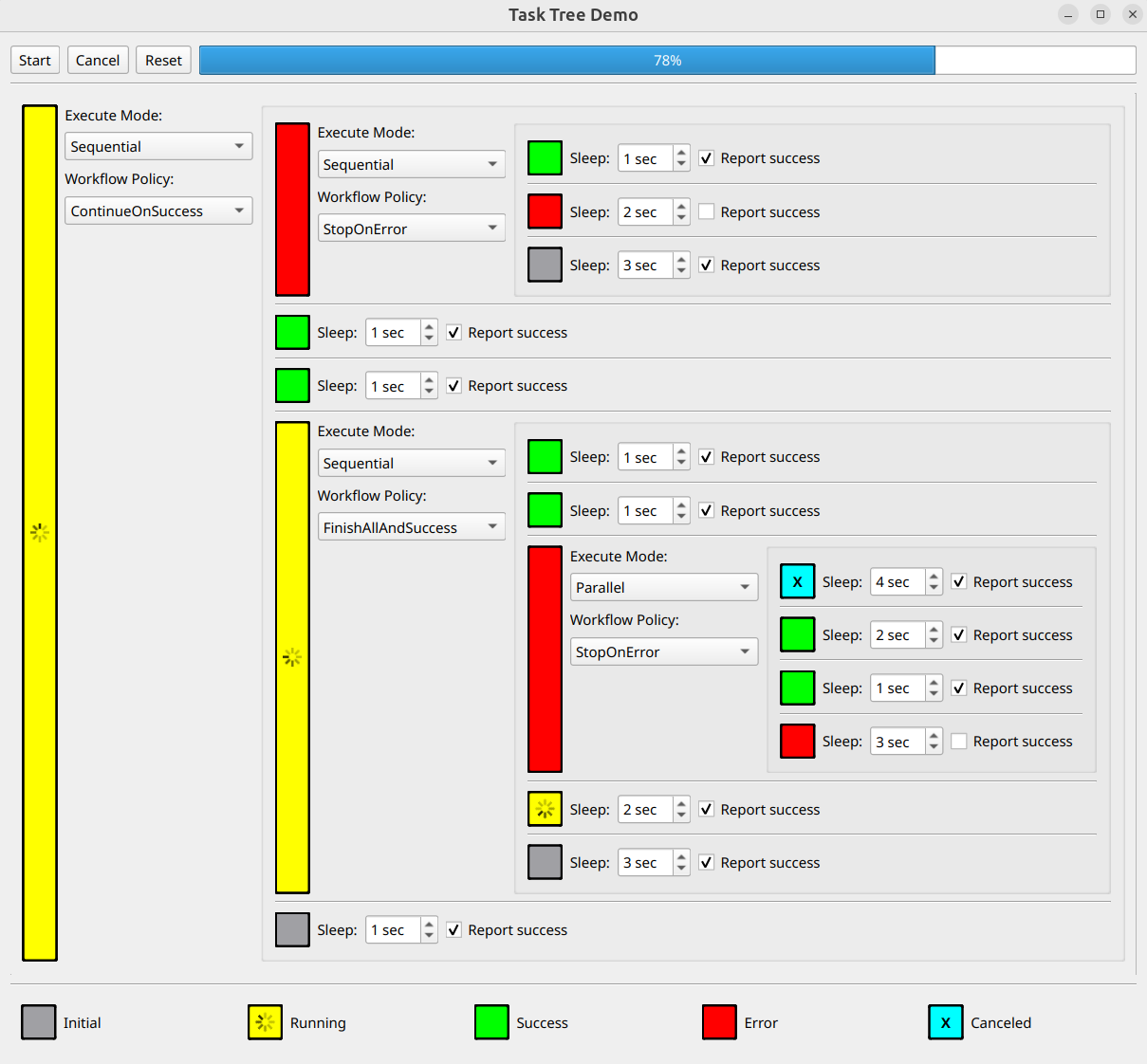
이 데모 애플리케이션은 단일 QWidget을 사용하여 TaskTree 계층 구조를 표시하고 관리합니다. 인터페이스에는 다음과 같은 요소들이 있습니다:
- 작업은 트리의 오른쪽에 리프 노드로 표시됩니다.
각 태스크에 대해 실행 기간을 설정하고, 성공 또는 오류 완료 상태를 구성할 수 있습니다.
- 그룹 노드는 트리의 왼쪽과 중앙에 표시됩니다.
각 그룹은 여러 개의 하위 태스크나 중첩된 그룹을 포함할 수 있습니다. 각 그룹에 대해 ' execution modes ' 및 ' workflow policies '를 구성할 수 있습니다.
- 색상 표시기는 각 노드의 현재 실행 상태를 나타냅니다.
다음 섹션에서는 예제 코드에 대해 더 자세히 설명합니다.
헬퍼 글루 클래스
GlueItem 추상 클래스는 사용자 인터페이스(UI) 구성 요소를 해당 TaskTree 레시피와 연결합니다. 이 디자인 패턴을 통해 UI와 작업 로직을 명확하게 분리할 수 있습니다.
class GlueItem
{
public:
    virtual ExecutableItem recipe() const = 0;
    virtual QWidget *widget() const = 0;
    virtual void reset() const = 0;

    virtual ~GlueItem() = default;
};
GlueItem 클래스는 세 가지 주요 가상 메서드를 정의합니다:
| 메서드 | 목적 |
|---|---|
recipe() | 항목의 동작을 정의하는 TaskTree 레시피를 생성하여 반환합니다 |
widget() | 연관된 UI 컴포넌트에 대한 액세스를 제공합니다 |
reset() | UI 컴포넌트를 초기 상태로 복원합니다 |
GroupGlueItem 클래스는 작업 계층 구조 내의 그룹( Group ) 요소를 관리합니다. 각 그룹은 중첩된 작업( GroupGlueItem)이나 그룹( TaskGlueItem)을 포함하여 다른 그룹( GlueItem ) 요소를 자식 요소로 가질 수 있습니다.
recipe() 메서드가 그룹을 생성하고 구성하는 방법은 다음과 같습니다:
ExecutableItem GroupGlueItem::recipe() const
{
    GroupItems childRecipes;
    for (GlueItem *child : m_children)
        childRecipes.append(child->recipe());

    return Group {
        m_groupWidget->executeModeItem(),
        m_groupWidget->workflowPolicyItem(),
        onGroupSetup([this] { m_groupWidget->setState(State::Running); }),
        childRecipes,
        onGroupDone([this](DoneWith result) { m_groupWidget->setState(resultToState(result)); })
    };
}
구현의 주요 구성 요소:
- 자식 레시피를 가진 새로운 ` Group ` 생성
- UI 설정에서 execution mode 및 workflow policy 를 적용합니다
- 실행이 시작되면 ` onGroupSetup()`를 사용하여 UI를 업데이트합니다
- onGroupDone()를 사용하여 실행 결과를 UI에 반영합니다
TaskGlueItem 클래스는 timeoutTask 를 사용하여 작업 트리의 리프 노드를 구현합니다.
다음은 태스크를 생성하는 ` recipe() ` 구현 예시입니다:
ExecutableItem TaskGlueItem::recipe() const
{
    return Group {
        onGroupSetup([this] { m_taskWidget->setState(State::Running); }),
        timeoutTask(seconds(m_taskWidget->busyTime()), m_taskWidget->desiredResult()),
        onGroupDone([this](DoneWith result) { m_taskWidget->setState(resultToState(result)); })
    };
}
구현 내용:
- 다음과 같은 Group 객체를 생성합니다. timeoutTask
- UI 설정을 사용하여 소요 시간과 예상 결과를 구성합니다
- onGroupSetup()을 통해 작업이 시작되면 UI 상태를 업데이트합니다
- onGroupDone()을 통해 작업 완료 상태를 반영합니다
작업 계층 구조 구축
다음 두 가지 헬퍼 메서드를 사용하면 작업 트리를 쉽게 생성할 수 있습니다:
static GlueItem *group(const GroupSetup &groupSetup, const QList<GlueItem *> children)
{
    return new GroupGlueItem(groupSetup, children);
}

static GlueItem *task(int busyTime = 1, DoneResult result = DoneResult::Success)
{
    return new TaskGlueItem(busyTime, result);
}group(): 새로운GroupGlueItemtask(): 새로운TaskGlueItem
트리 구조 정의
다음 코드는 완전한 작업 계층 구조를 구축하는 방법을 보여줍니다:
    std::unique_ptr<GlueItem> tree {
        group({WorkflowPolicy::ContinueOnSuccess}, {
            group({}, {
                task(),
                task(2, DoneResult::Error),
                task(3)
            }),
            task(),
            task(),
            group({WorkflowPolicy::FinishAllAndSuccess}, {
                task(),
                task(),
                group({WorkflowPolicy::StopOnError, ExecuteMode::Parallel}, {
                    task(4),
                    task(2),
                    task(1),
                    task(3, DoneResult::Error)
                }),
                task(2),
                task(3)
            }),
            task()
        })
    };
위의 구문을 수정하여 다양한 트리 구조를 생성할 수 있습니다.
UI와 TaskTree 연결
마지막 단계에서는 작업 트리를 애플리케이션의 UI 컨트롤에 연결합니다:
    QSingleTaskTreeRunner taskTreeRunner;

    const auto resetTaskTree = [&] {
        taskTreeRunner.reset();
        tree->reset();
        progressBar->setValue(0);
        cancelButton->setEnabled(false);
    };

    const auto cancelTaskTree = [&] { taskTreeRunner.cancel(); };

    const auto startTaskTree = [&] {
        resetTaskTree();
        cancelButton->setEnabled(true);

        const auto onTaskTreeSetup = [progressBar](QTaskTree &taskTree) {
            progressBar->setMaximum(taskTree.progressMaximum());
            QObject::connect(&taskTree, &QTaskTree::progressValueChanged,
                             progressBar, &QProgressBar::setValue);
        };

        const auto onTaskTreeDone = [cancelButton] { cancelButton->setEnabled(false); };

        taskTreeRunner.start({tree->recipe()}, onTaskTreeSetup, onTaskTreeDone);
    };

    QObject::connect(startButton, &QAbstractButton::clicked, &app, startTaskTree);
    QObject::connect(cancelButton, &QAbstractButton::clicked, &app, cancelTaskTree);
    QObject::connect(resetButton, &QAbstractButton::clicked, &app, resetTaskTree);

    mainWidget.show();

    return app.exec();
이 코드는:
- 작업 트리를 실행하기 위해 QSingleTaskTreeRunner를 생성합니다
- 시작, 취소, 재설정 버튼에 대한 핸들러를 설정합니다
- 작업 실행 진행 상황을 추적하기 위해 진행률 표시줄을 연결합니다
예제 실행
다음 경로에서 예제를 실행할 수 있습니다:
- Qt Creator
Welcome 모드를 열고 Examples 에서 예제를 선택합니다. 자세한 내용은 Qt Creator: 튜토리얼: 빌드 및 실행을 참조하십시오.
- Qt Extension for Visual Studio Code
Command Palette 에서 Qt: Open Qt examples 명령을 실행하고 목록에서 예제를 선택합니다. 자세한 내용은 Qt Extension for Visual Studio Code: 튜토리얼: 빌드 및 실행을 참조하십시오.
© 2026 The Qt Company Ltd. Documentation contributions included herein are the copyrights of their respective owners. The documentation provided herein is licensed under the terms of the GNU Free Documentation License version 1.3 as published by the Free Software Foundation. Qt and respective logos are trademarks of The Qt Company Ltd. in Finland and/or other countries worldwide. All other trademarks are property of their respective owners.
