
嵌入式 Linux 版 Qt 字体
Qt通常使用fontconfig 来访问系统字体。如果fontconfig 不可用(例如在空间极为有限的专用嵌入式系统中),Qt将回退到使用QBasicFontDatabase 。在这种情况下,Qt应用程序将在Qt的lib/fonts/ 目录中查找字体。Qt会自动检测预渲染字体和TrueType字体。
Qt 使用FreeType 2字体引擎来生成字体输出。支持的格式取决于本地安装的 FreeType 库版本。
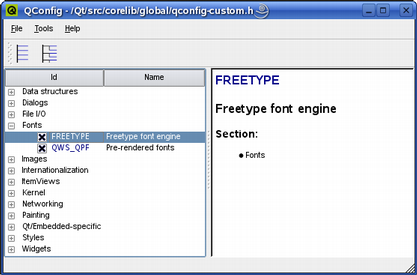
所有受支持的字体均采用 Unicode 字符编码。目前市面上大多数字体都采用这种编码,但通常并不包含所有的Unicode 字符。一个完整的 16 点 Unicode 字体会占用超过 1 MB 的内存。
FreeType 格式
FreeType 2库支持以下字体格式:
- TrueType (TTF)
- PostScript Type1 (PFA/PFB)
- 位图分发格式 (BDF)
- CID 键控 Type1
- 紧凑字体格式 (CFF)
- OpenType 字体
- 基于 SFNT 的位图字体
- 可移植编译格式 (PCF)
- Microsoft Windows 字体文件格式 (Windows FNT)
- 可移植字体资源 (PFR)
- Type 42(支持有限)
可以通过向FreeType 2字体引擎添加模块来支持其他类型的字体文件。有关详细信息,请参阅该字体引擎的官方网站:https://freetype.sourceforge.net/freetype2/index.html。
使用 FreeType 渲染的字形会在应用程序之间高效共享,从而降低内存需求并加快文本渲染速度。
© 2026 The Qt Company Ltd. Documentation contributions included herein are the copyrights of their respective owners. The documentation provided herein is licensed under the terms of the GNU Free Documentation License version 1.3 as published by the Free Software Foundation. Qt and respective logos are trademarks of The Qt Company Ltd. in Finland and/or other countries worldwide. All other trademarks are property of their respective owners.
