
MIME 类型浏览器
显示 MIME 类型的层次结构,可用于确定文件的 MIME 类型。
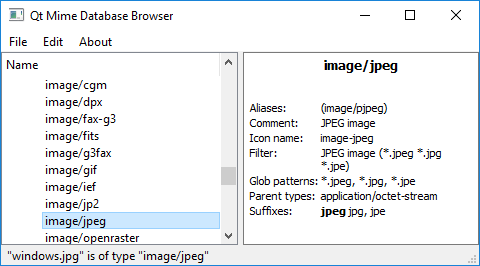
MIME 类型浏览器旨在作为探索 MIME 类型的工具,而非展示 Qt MIME API 典型用法的一个示例。
运行示例
您可以通过以下方式运行该示例:
- Qt Creator
打开“Welcome ”模式,并从“Examples ”中选择该示例。有关更多信息,请参阅Qt Creator :教程:构建与运行。
- Qt Extension for Visual Studio Code
在“Command Palette ”中运行Qt: Open Qt examples 命令,并从列表中选择该示例。有关更多信息,请参阅Qt Extension for Visual Studio Code :教程:构建和运行。
主窗口
主窗口由左侧的树形视图(基于继承自QStandardItemModel 的 MimetypeModel 模型,显示 MIME 类型的层次结构)和右侧的QTextBrowser 组成,用于显示所选 MIME 类型的详细信息。
它有一个主菜单,其中包含“File/Detect File Type ”选项,该选项允许您选择一个文件,然后显示其 MIME 类型。
有关更多信息,请参阅QMimeType 和QMimeDatabase 。
© 2026 The Qt Company Ltd. Documentation contributions included herein are the copyrights of their respective owners. The documentation provided herein is licensed under the terms of the GNU Free Documentation License version 1.3 as published by the Free Software Foundation. Qt and respective logos are trademarks of The Qt Company Ltd. in Finland and/or other countries worldwide. All other trademarks are property of their respective owners.
