
Qt for Android 语言互操作
演示在 Android 应用程序中,从 Qt 调用 Java 和 Kotlin 代码,以及从 Java 和 Kotlin 调用 Qt 代码。
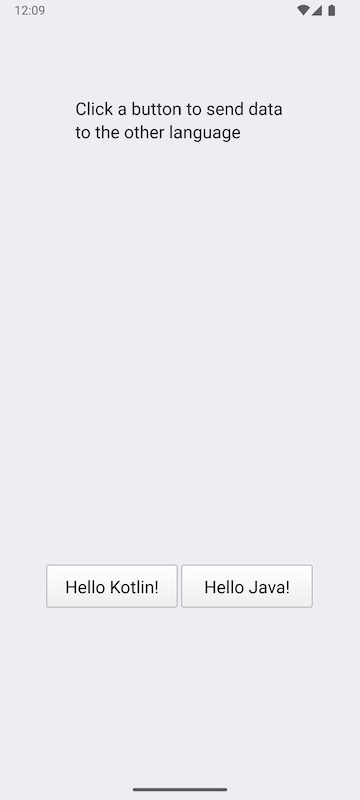
点击其中一个按钮,即可向 Java 和 Kotlin 类发送一个字符串,并获取修改后的字符串作为返回值。
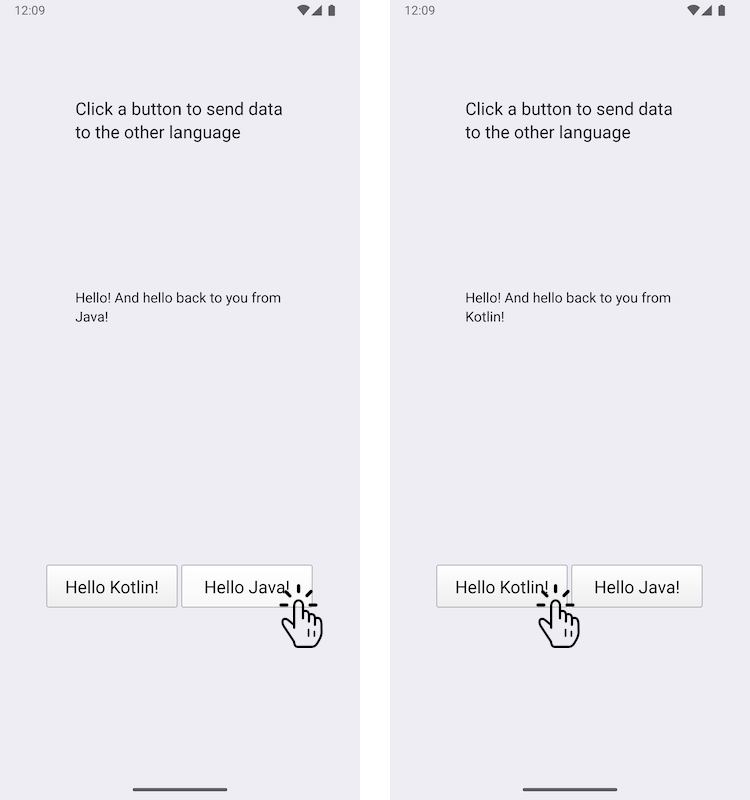
本示例演示了如何将自定义 Java 类和自定义 Kotlin 类添加到 Android 应用程序中,以及如何使用 Qt 中的 JNI 便捷 API 调用它们。反向操作中,Java 类和 Kotlin 类也会调用 Qt 函数。
运行示例
您可以通过以下方式运行该示例:
- Qt Creator
打开“Welcome ”模式,并从“Examples ”中选择该示例。有关更多信息,请参阅Qt Creator: 教程:构建和运行。
- Qt Extension for Visual Studio Code
在“Command Palette ”中运行Qt: Open Qt examples 命令,然后从列表中选择该示例。有关更多信息,请参阅Qt Extension for Visual Studio Code :教程:构建和运行。
注意:此 示例仅可在 Android 设备上运行。
使用 Qt 信号在 C++ 和 Java/Kotlin 之间交换数据
我们在JavaExchanger.java 文件中定义了一个名为JavaExchanger 的自定义 Java 类:
package org.qtproject.example.androidlanguageexchange;

public class JavaExchanger
{
    private long mCppExchanger;

    private native void connectToCppExchanger(long cppExchanger);
    private native void fromOther(long cppExchanger, String str);

    public JavaExchanger(long cppExchanger) {
        mCppExchanger = cppExchanger;
        connectToCppExchanger(cppExchanger);
    }
    public void fromCpp(int type, String str) {
        if (type == OtherLanguageType.Java.getCode()) {
            String msg = str + " And hello back to you from\nJava!";
            fromOther(mCppExchanger, msg);
        }
    }
}我们在KotlinExchanger.kt 文件中定义了一个名为KotlinExchanger 的自定义 Kotlin 类:
package org.qtproject.example.androidlanguageexchange;

class KotlinExchanger(private val cppExchanger: Long) {

    private external fun connectToCppExchanger(cppExchanger: Long)
    private external fun fromOther(cppExchanger: Long, str: String)

    init {
        connectToCppExchanger(cppExchanger)
    }

    fun fromCpp(type: Int, str: String) {
        if (type == OtherLanguageType.Kotlin.code) {
            val msg = "$str And hello back to you from\nKotlin!"
            fromOther(cppExchanger, msg)
        }
    }
}
这两个类都接受一个 long 整型参数,该参数实际上是将QObject* 强制转换为 long 类型所得。当调用connectToCppExchanger 函数导致fromCpp 函数被调用时,它们会修改传入的字符串,并将其与 long int 参数一起发回给fromOther 。
在 DataExchanger C++ 类头文件dataexchanger.h 中,我们声明了一个简单的 C++ API,用于在 C++ 和 Kotlin/Java 之间交换数据。 它包括QObject ,其中包含一个fromCpp 信号(由C++代码作为对按钮操作的响应发送),以及一个fromOther 信号(Java/Kotlin代码用于向C++代码发送字符串,如前所述)。
// A simple data exchanger. All this class does is convey semi-abstract data
// back and forth. For the purposes of this example, treat it as an opaque
// and not necessarily modifiable engine object that just happens to have
// a signal that's directly consumable by the code in other languages. The
// rest of the glue is done in OtherLanguageHandler.
class DataExchanger : public QObject
{
    Q_OBJECT
public:
    explicit DataExchanger(QObject *parent = nullptr);

    enum OtherLanguageType {Java, Kotlin};
signals:
    void fromCpp(OtherLanguageType type, const QString& str);
    void fromOther(const QString& str);
};
对 Java 方法的调用使用 `QJniObject `,该方法依赖于 Java 本机接口(JNI)API 与 Java/Kotlin 进行通信。长整型参数会被强制转换回 `DataExchanger ` 类型,随后 `fromCpp ` 信号会被连接到一个 lambda 表达式,该表达式会调用 Java/Kotlin 中的 `fromCpp ` 函数。
// We provide this function so that the Java/Kotlin objects can register themselves
// as signal observers. The C++ code doesn't decide where and when that happens.
void connectToCppExchanger(JNIEnv* /*env*/, jobject thiz, jlong cppExchanger)
{
    DataExchanger* exchanger = reinterpret_cast<DataExchanger*>(cppExchanger);
    QJniObject androidExchanger(thiz);
    QObject::connect(exchanger, &DataExchanger::fromCpp, exchanger,
                     // Intentional, and important capture by value of the QJniObject.
                     // This keeps the underlying Java/Kotlin object alive until the call
                     // to it is performed.
                     [androidExchanger](DataExchanger::OtherLanguageType type, const QString& str) {
                         androidExchanger.callMethod("fromCpp",
                                                     static_cast<int>(type), str);
                     });
}
对 Java/Kotlin 类中本机方法的调用会被转发至 `DataExchanger ` 类,具体实现是再次将 long 整数转换为 `DataExchanger `,然后调用该类型的 `fromOther ` 信号。
// The Java/Kotlin code calls this. The C++ code doesn't decide where and when
// it is called.
// Note that the function must be registered with the Qt native method
// registration facilities because it relies on the Qt wrapping that knows how to
// convert a jstring to a QString.
void fromOther(JNIEnv* /*env*/, jobject /*thiz*/,
                       jlong cppExchanger, const QString &str)
{
    DataExchanger* exchanger = reinterpret_cast<DataExchanger*>(cppExchanger);
    exchanger->fromOther(str);
}
为了确保按钮能按预期工作,我们添加以下代码来触发向 Java/Kotlin 发送字符串,并获取修改后的字符串:
    QObject::connect(&javaButton, &QPushButton::clicked, &javaButton, [&]() {
        dataExchanger.fromCpp(DataExchanger::Java, "Hello!");
    });

    QObject::connect(&kotlinButton, &QPushButton::clicked, &kotlinButton, [&]() {
        dataExchanger.fromCpp(DataExchanger::Kotlin, "Hello!");
    });
    QObject::connect(&dataExchanger, &DataExchanger::fromOther,
                     &dataExchanger, [&](const QString& str) {
        fromOtherLabel.setText(str);
});另请参阅 Qt for Android。
© 2026 The Qt Company Ltd. Documentation contributions included herein are the copyrights of their respective owners. The documentation provided herein is licensed under the terms of the GNU Free Documentation License version 1.3 as published by the Free Software Foundation. Qt and respective logos are trademarks of The Qt Company Ltd. in Finland and/or other countries worldwide. All other trademarks are property of their respective owners.
