
应用内购买演示
一个完整演示应用内产品购买功能的移动应用程序。
注意: Qt Purchasing模块是 Qt 6.0 中被移除的模块之一,其代码现已包含在此示例中,旨在指导您如何使用 Qt 与常见应用商店进行集成。
本演示是什么?
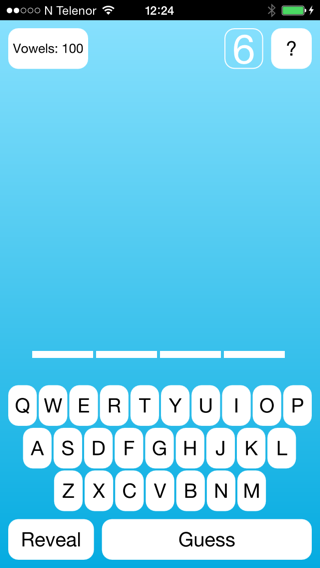
本演示是一个基于经典猜词游戏“猜字母”(Hangman)的移动游戏应用,玩家可通过演示内的商店购买元音字母。在游戏中,您会看到一排破折号,代表待猜单词中的字母。 若猜中目标单词中出现的正确字母,该字母将被填入单词中对应的横线位置。只要在任何时候猜中单词中的所有字母,或直接猜中整个单词,游戏即告结束,您即获胜。若猜错,系统将绘制一个被吊起的棒人图案的一个组成部分。 一旦该人物绘制完成,即表示您已用尽猜测次数,游戏结束且您失败。
该演示展示了如何在Qt应用程序中为Android和iOS平台提供应用内购产品。若要在演示中测试应用内购功能,你必须先在外部应用商店中注册该应用程序及其产品。有关具体操作方法的介绍,请分别参阅Google Play 和App Store的指南。
第三方应用商店
应用内产品必须先在目标应用商店中注册,才能在应用程序中进行查询或购买。我们建议在每个应用商店中为产品使用相同的标识符,这样可以简化查询和购买产品的代码。
演示程序的工作原理
该演示是一个 QML 应用程序,它通过注册 QML 类型来访问应用内产品的信息,并请求购买这些产品。这些产品已在目标平台的外部应用商店中注册
要将应用内购买功能添加到应用程序中,首先需要添加一个 Store 对象。在演示中,该 Store 对象由 MainView 组件创建,该组件在应用程序启动时加载。
Store {
    id: iapStore
}
该演示定义了一个组件,用于显示可购买的应用内产品的商店。这些产品必须先在 MainView 中向上述创建的 Store 对象进行注册。目前提供两种产品,第一种是消耗型产品。
Product {
    id: product100Vowels
    store: iapStore
    type: Product.Consumable
    identifier: "qt.io.demo.hangman.100vowels"

    onPurchaseSucceeded: {
        console.log(identifier + " purchase successful");
        //Add 100 Vowels
        applicationData.vowelsAvailable += 100;
        transaction.finalize();
        pageStack.pop();
    }

    onPurchaseFailed: {
        console.log(identifier + " purchase failed");
        console.log("reason: "
                    + transaction.failureReason === Transaction.CanceledByUser ? "Canceled" : transaction.errorString);
        transaction.finalize();
    }
}
该消耗型产品可提供 100 个额外的元音,用于在游戏中猜词。成功购买后,我们会更新应用程序的状态,将其中的元音数量增加 100 个。随后,我们调用交易对象的 finalize() 方法,向平台商店确认该消耗型产品已提供。
第二种产品属于非消耗品类型,将来将永久解锁元音。除了在购买时更新应用状态外,我们还必须确保提供一种方式,以便在最终用户使用的其他设备上恢复此次购买。在此情况下,我们为 onPurchaseRestored 创建了一个信号处理程序。
Product {
    id: productUnlockVowels
    type: Product.Unlockable
    store: iapStore
    identifier: "qt.io.demo.hangman.unlockvowels"

    onPurchaseSucceeded: {
        console.log(identifier + " purchase successful");
        applicationData.vowelsUnlocked = true;
        transaction.finalize();
        pageStack.pop();
    }

    onPurchaseFailed: {
        console.log(identifier + " purchase failed");
        console.log("reason: "
                    + transaction.failureReason === Transaction.CanceledByUser ? "Canceled" : transaction.errorString);
        transaction.finalize();
    }

    onPurchaseRestored: {
        console.log(identifier + " purchase restored");
        applicationData.vowelsUnlocked = true;
        console.log("timestamp: " + transaction.timestamp);
        transaction.finalize();
        pageStack.pop();
    }
}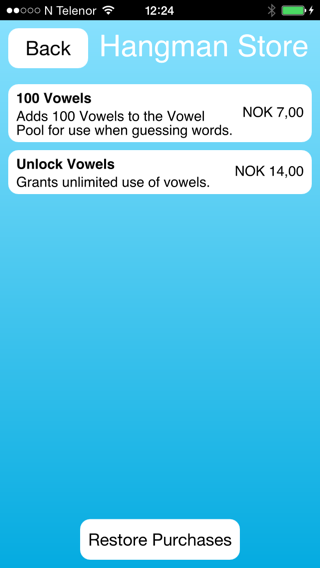
除了注册产品外,该演示还提供了一个用于实际购买已注册产品的界面。演示中定义了一个名为StoreItem 的自定义组件,用于显示并处理购买交互。
Product {
    id: productUnlockVowels
    type: Product.Unlockable
    store: iapStore
    identifier: "qt.io.demo.hangman.unlockvowels"

    onPurchaseSucceeded: {
        console.log(identifier + " purchase successful");
        applicationData.vowelsUnlocked = true;
        transaction.finalize();
        pageStack.pop();
    }

    onPurchaseFailed: {
        console.log(identifier + " purchase failed");
        console.log("reason: "
                    + transaction.failureReason === Transaction.CanceledByUser ? "Canceled" : transaction.errorString);
        transaction.finalize();
    }

    onPurchaseRestored: {
        console.log(identifier + " purchase restored");
        applicationData.vowelsUnlocked = true;
        console.log("timestamp: " + transaction.timestamp);
        transaction.finalize();
        pageStack.pop();
    }
}
StoreItem 组件将显示从平台商店查询到的商品数据,并在用户点击商品时调用该商品的 purchase() 方法。
Text {
    id: titleText
    text: product.title
    font.bold: true
    anchors.right: priceText.left
    anchors.rightMargin: topLevel.globalMargin
    anchors.top: parent.top
    anchors.topMargin: topLevel.globalMargin
    anchors.left: parent.left
    anchors.leftMargin: topLevel.globalMargin
}

Text {
    id: descriptionText
    text: product.description
    anchors.right: priceText.left
    anchors.rightMargin: topLevel.globalMargin
    anchors.left: parent.left
    anchors.leftMargin: topLevel.globalMargin
    anchors.top: titleText.bottom
    anchors.topMargin: topLevel.globalMargin / 2
    wrapMode: Text.WordWrap
}

Text {
    id: priceText
    text: product.price
    anchors.right: parent.right
    anchors.rightMargin: topLevel.globalMargin
    anchors.verticalCenter: parent.verticalCenter
}

MouseArea {
    anchors.fill: parent
    onClicked: {
        pendingRect.visible = true;
        spinBox.visible = true;
        statusText.text = "Purchasing...";
        storeItem.state = "PURCHASING";
        product.purchase();
    }
    onPressed: {
        storeItem.state = "PRESSED";
    }
    onReleased: {
        storeItem.state = "NORMAL";
    }
}
Android 和 iOS 均使用基类。基于这些基类,分别衍生出了适用于 Android 和 iOS 的子类:
应用内购买
应用内购买是实现应用变现的一种方式。这些购买在应用内部进行,内容涵盖从解锁内容到虚拟物品等各类项目。 本演示使用了应用内购的系统API,这意味着购买流程对用户而言更为熟悉,且可以利用平台已存储的信息(例如信用卡信息)来简化购买流程。
许可与署名
关于在 Android 上部署该演示,请参阅《AndroidGNU C++ 运行时许可》以获取更多信息。
© 2026 The Qt Company Ltd. Documentation contributions included herein are the copyrights of their respective owners. The documentation provided herein is licensed under the terms of the GNU Free Documentation License version 1.3 as published by the Free Software Foundation. Qt and respective logos are trademarks of The Qt Company Ltd. in Finland and/or other countries worldwide. All other trademarks are property of their respective owners.
