
音频输出示例
使用QAudioSink 类启用音频播放。
“音频输出”演示了QAudioSink 的基本用法。
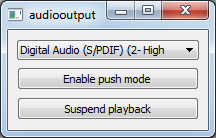
本示例提供了一个音调发生器,用于实现连续的音频播放。用户界面允许用户选择音频输出设备、暂停和恢复播放、在不同的操作模式之间切换、调节音量以及更改音频格式参数。
运行示例
您可以通过以下方式运行该示例:
- Qt Creator
打开Welcome 模式,并从Examples 中选择该示例。有关更多信息,请参阅Qt Creator :教程:构建和运行。
- Qt Extension for Visual Studio Code
在Command Palette 中运行Qt: Open Qt examples 命令,并从列表中选择该示例。有关详细信息,请参阅Qt Extension for Visual Studio Code :教程:构建和运行。
© 2026 The Qt Company Ltd. Documentation contributions included herein are the copyrights of their respective owners. The documentation provided herein is licensed under the terms of the GNU Free Documentation License version 1.3 as published by the Free Software Foundation. Qt and respective logos are trademarks of The Qt Company Ltd. in Finland and/or other countries worldwide. All other trademarks are property of their respective owners.
