
Qt Quick Particles 示例 - 发射器
这是一组关于在 QML 粒子系统中使用发射器的示例。
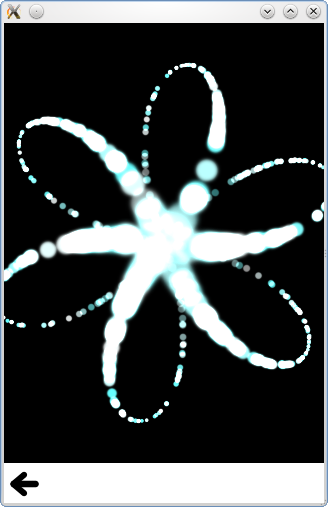
这是一组与粒子系统中使用发射器相关的小型 QML 示例。每个示例都是一个小型 QML 文件,重点展示特定类型或功能。
通过“运动”生成的速度效果,主要通过移动发射器来实现强烈的粒子运动:
Emitter {
    id: trailsNormal
    system: sys1

    emitRate: 500
    lifeSpan: 2000

    y: mouseArea.pressed ? mouseArea.mouseY : circle.cy
    x: mouseArea.pressed ? mouseArea.mouseX : circle.cx

    velocity: PointDirection {xVariation: 4; yVariation: 4;}
    acceleration: PointDirection {xVariation: 10; yVariation: 10;}
    velocityFromMovement: 8

    size: 8
    sizeVariation: 4
}
“Burst”和“pulse”分别调用两个相同发射器的 burst 和 pulse 方法。
    if (root.lastWasPulse) {
        burstEmitter.burst(500);
        root.lastWasPulse = false;
    } else {
        pulseEmitter.pulse(500);
        root.lastWasPulse = true;
    }
请注意,“burst”方法接受要发射的粒子数量作为参数,而“pulse”方法接受发射持续时间(以毫秒为单位)作为参数。这会产生略有不同的行为,在该示例中很容易观察到。
“自定义发射器”通过连接到 emitParticles 信号,在粒子发射时对其数据设置任意值;
onEmitParticles: (particles) => {
    for (var i=0; i<particles.length; i++) {
        let particle = particles[i];
        particle.startSize = Math.max(02,Math.min(492,Math.tan(particle.t/2)*24));
        let theta = Math.floor(Math.random() * 6.0);
        particle.red = theta == 0 || theta == 1 || theta == 2 ? 0.2 : 1;
        particle.green = theta == 2 || theta == 3 || theta == 4 ? 0.2 : 1;
        particle.blue = theta == 4 || theta == 5 || theta == 0 ? 0.2 : 1;
        theta /= 6.0;
        theta *= 2.0*Math.PI;
        theta += sys.convert(sys.petalRotation);//Convert from degrees to radians
        particle.initialVX = sys.petalLength * Math.cos(theta);
        particle.initialVY = sys.petalLength * Math.sin(theta);
        particle.initialAX = particle.initialVX * -0.5;
        particle.initialAY = particle.initialVY * -0.5;
    }
}
此功能用于发射沿六个旋转辐条轨迹运动的曲线粒子。
“发射遮罩”可在发射器上设置图像遮罩,以任意形状发射粒子。
shape: MaskShape {
    source: "images/starfish_mask.png"
}
“最大发射量”功能可确保每次发射的粒子数量不超过特定数值。通过本示例,可以直观地观察到达到限制时会发生什么情况。
“形状与方向”功能利用TargetDirection
shape: EllipseShape {fill: false}
velocity: TargetDirection {
    targetX: root.width/2
    targetY: root.height/2
    proportionalMagnitude: true
    magnitude: 0.5
}
这会使粒子以比例速度朝椭圆中心移动,并在移动过程中保持椭圆轮廓。
TrailEmitter 使用该类型在场景中为火焰粒子添加尾随的烟雾粒子。
onEmitParticles: (particles) => {
    for (var i=0; i<particles.length; i++) {
        let particle = particles[i];
        particle.startSize = Math.max(02,Math.min(492,Math.tan(particle.t/2)*24));
        let theta = Math.floor(Math.random() * 6.0);
        particle.red = theta == 0 || theta == 1 || theta == 2 ? 0.2 : 1;
        particle.green = theta == 2 || theta == 3 || theta == 4 ? 0.2 : 1;
        particle.blue = theta == 4 || theta == 5 || theta == 0 ? 0.2 : 1;
        theta /= 6.0;
        theta *= 2.0*Math.PI;
        theta += sys.convert(sys.petalRotation);//Convert from degrees to radians
        particle.initialVX = sys.petalLength * Math.cos(theta);
        particle.initialVY = sys.petalLength * Math.sin(theta);
        particle.initialAX = particle.initialVX * -0.5;
        particle.initialAY = particle.initialVY * -0.5;
    }
}© 2026 The Qt Company Ltd. Documentation contributions included herein are the copyrights of their respective owners. The documentation provided herein is licensed under the terms of the GNU Free Documentation License version 1.3 as published by the Free Software Foundation. Qt and respective logos are trademarks of The Qt Company Ltd. in Finland and/or other countries worldwide. All other trademarks are property of their respective owners.
