
QML 预览器示例
演示了如何使用QWidget::createWindowContainer() 将Qt Quick 与Qt Widgets 应用程序进行集成。
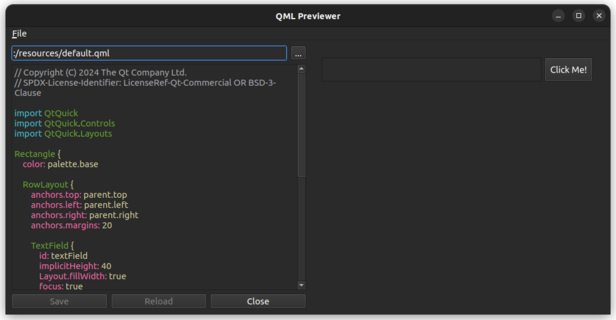
该示例演示了如何将Qt Quick 场景嵌入到Qt Widgets 应用程序中,以及Qt Widgets 与Qt Quick 之间如何在不同的UI方面进行集成。这包括:
- Qt Widgets 与Qt Quick
- Qt Widgets 之间的标签页焦点切换Qt Quick
- 在嵌入式 QML 文件中定义的快捷键
- 将QQuickView 嵌入到QLayout
运行示例
您可以通过以下方式运行示例:
- Qt Creator
打开Welcome 模式,并从Examples 中选择该示例。有关更多信息,请参阅Qt Creator :教程:构建和运行。
- Qt Extension for Visual Studio Code
在Command Palette 中运行Qt: Open Qt examples 命令,并从列表中选择该示例。有关更多信息,请参阅Qt Extension for Visual Studio Code :教程:构建和运行。
界面导览
该示例的主窗口左侧包含一个文件浏览器,可用于选择要预览的 QML 文件。右侧则通过QQuickWidget 显示 QML 内容。您可以与 QML 内容进行交互,包括点击按钮、输入文本以及使用 QML 文件中定义的快捷键。
该示例还演示了如何在Qt Widgets 和Qt Quick 组件之间处理焦点和输入事件,以确保流畅的用户体验。
另请参阅 QWidget::createWindowContainer()。
© 2026 The Qt Company Ltd. Documentation contributions included herein are the copyrights of their respective owners. The documentation provided herein is licensed under the terms of the GNU Free Documentation License version 1.3 as published by the Free Software Foundation. Qt and respective logos are trademarks of The Qt Company Ltd. in Finland and/or other countries worldwide. All other trademarks are property of their respective owners.
