
Qt Quick 示例 - 着色器效果
一个演示着色器效果的Qt Quick 示例。
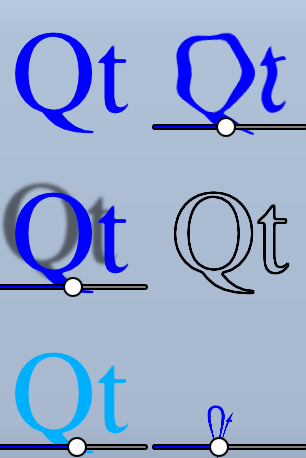
本示例演示了在Qt Quick 中使用着色器可以实现的几种视觉效果。它对一段文本和几张图像应用了五种不同的效果。如需了解更多信息,请访问《Qt Quick 中的重要概念》——Graphical Effects
运行示例
您可以通过以下方式运行该示例:
- Qt Creator
打开Welcome 模式,并从Examples 中选择该示例。有关更多信息,请参阅Qt Creator :教程:构建和运行。
- Qt Extension for Visual Studio Code
在Command Palette 中运行Qt: Open Qt examples 命令,然后从列表中选择该示例。有关更多信息,请参阅Qt Extension for Visual Studio Code :教程:构建和运行。
使用 ShaderEffect
ShaderEffect 类型通常通过ShaderEffectSource 对其他类型进行操作:
ShaderEffectSource {
    id: theSource
    sourceItem: theItem
}在上面的代码片段中,theItem 是文件中一个复杂 QML 对象的 ID。
ShaderEffect 可以在其片段着色器中将此ShaderEffectSource 用作纹理:
fragmentShader: "content/shaders/wobble.frag.qsb"为了支持多种图形 API(而不仅仅是 OpenGL),着色器源代码并未嵌入到 QML 中。所引用的.qsb 文件是一个预生成的着色器包,其中包含着色器代码的多种变体。 随后,Qt Quick 会根据运行时使用的图形 API(Vulkan、Metal、Direct3D 11 或 OpenGL)在运行时选择合适的着色器。该 .qsb 文件是在离线状态下生成的,并通过 Qt 资源系统与可执行文件打包在一起。
您可以在着色器中使用ShaderEffect 上的任何自定义属性。这使得动画着色器代码的编写变得非常简单:
property variant source: theSource
property real bend
property real minimize
property real side: genieSlider.value
SequentialAnimation on bend {
    loops: Animation.Infinite
    NumberAnimation { to: 1; duration: 700; easing.type: Easing.InOutSine }
    PauseAnimation { duration: 1600 }
    NumberAnimation { to: 0; duration: 700; easing.type: Easing.InOutSine }
    PauseAnimation { duration: 1000 }
}
SequentialAnimation on minimize {
    loops: Animation.Infinite
    PauseAnimation { duration: 300 }
    NumberAnimation { to: 1; duration: 700; easing.type: Easing.InOutSine }
    PauseAnimation { duration: 1000 }
    NumberAnimation { to: 0; duration: 700; easing.type: Easing.InOutSine }
    PauseAnimation { duration: 1300 }
}
ShaderEffects 还可以拥有自定义顶点着色器。通过设置 `ShaderEffect ` 上的网格属性,您可以获得更多顶点进行操作,从而实现更多特效。
mesh: Qt.size(10, 10)
vertexShader: "content/shaders/genie.vert.qsb"© 2026 The Qt Company Ltd. Documentation contributions included herein are the copyrights of their respective owners. The documentation provided herein is licensed under the terms of the GNU Free Documentation License version 1.3 as published by the Free Software Foundation. Qt and respective logos are trademarks of The Qt Company Ltd. in Finland and/or other countries worldwide. All other trademarks are property of their respective owners.
