
TaskTree 图像缩放
演示如何利用 TaskTree 并行执行 for 循环迭代,以异步下载并调整图像大小。
本示例演示了如何使用 Qt TaskTree 类从网络下载一组图像并对其进行缩放,同时不阻塞用户界面。它展示了如何使用 `For ` 元素,针对 `QList ` 项在并行循环中运行子任务,以及如何使用 `Storage ` 元素在任务之间共享数据。
本示例为 Qt Concurrent中的图像缩放示例的另一种实现方案。
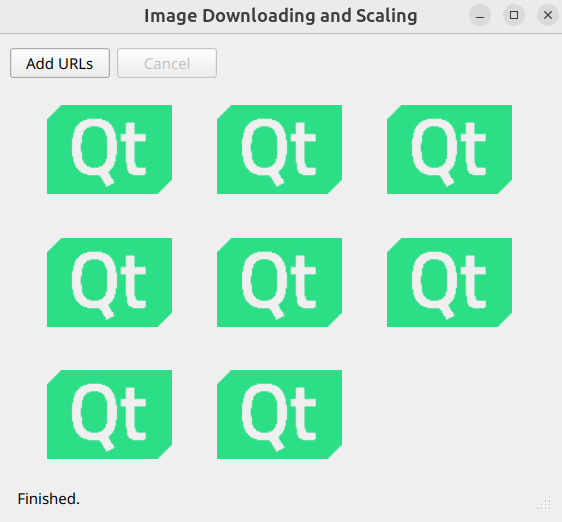
应用程序工作流
当用户点击Add URLs 按钮时,将执行以下方法:
    DownloadDialog dialog(this);
    if (dialog.exec() != QDialog::Accepted)
        return;

    const QList<QUrl> urls = dialog.getUrls();
initLayout(urls.size());该方法会执行DownloadDialog 操作。当用户确认对话框后,该方法会获取选中的URL列表,清除已显示的图像,并通过调用initLayout(urls.size()) 方法为新图像准备网格。
对于urls 列表中的每一项,应用程序会:
- 使用QNetworkReplyWrapper 下载指定地址的图片,并将接收到的QByteArray 数据本地存储。
- 在单独的线程中,使用QThreadFunction 将QByteArray 数据转换为QImage ,并将其缩放为缩略图。
- 在网格中显示生成的缩略图。
为了遍历urls 列表,该应用使用了一个类型为ListIterator 的iterator 元素。下载后接收到的QByteArray 数据存储在类型为Storage<QByteArray>的storage 元素中,该元素用于将数据传递给缩放函数。
    const ListIterator iterator(urls);
const Storage<QByteArray> storage;描述该工作流的recipe 如下所示:
    const Group recipe = For (iterator) >> Do {
        finishAllAndSuccess,
        parallel,
        onGroupSetup(onRootSetup),
        Group {
            storage,
            QNetworkReplyWrapperTask(onDownloadSetup, onDownloadDone),
            QThreadFunctionTask<QImage>(onScaleSetup, onScaleDone)
        },
        onGroupDone(onRootDone)
    };
    taskTreeRunner.start(recipe);
以下是该配方中所有元素的汇总:
| 元素 | 用途 |
|---|---|
| For | 顶级循环,用于遍历urls 列表。 |
| Do | 描述每次迭代的主体。 |
| finishAllAndSuccess | 指示任务树即使出现错误仍继续运行,并在完成后报告成功。 |
| parallel | 使Do 主体的所有直接子元素并行运行,包括顶级For 元素的所有迭代。 这意味着所有迭代都将同时开始。 |
| onGroupSetup(onRootSetup) | 在即将执行第一个迭代时调用onRootSetup 处理程序。 |
| onGroupDone(onRootDone) | 当所有迭代都完成后,调用onRootDone 处理程序。 |
| Group | 一个子组,在每次迭代中都会被执行。默认情况下,其所有子节点按顺序执行。 |
storage | 指示正在运行的任务树在进入子组时实例化底层的QByteArray 实例。 这意味着运行中的任务树会为每次迭代实例化一个独立的QByteArray 实例。 |
| QNetworkReplyWrapperTask | 在每次迭代中按顺序运行的第一个异步任务。 开始下载给定 下载完成后,将调用 |
| QThreadFunctionTask<QImage> | 每个迭代中按顺序执行的第二个异步任务。该任务仅在第一个任务成功执行后才会被执行。 在单独的线程中执行一个函数,并传入已下载图像中存储的QByteArray 数据。当函数即将开始时,会调用 执行完成后,将调用 |
更新状态栏
以下展示了所有处理程序的实现方式:
    const auto onRootSetup = [this] {
        statusBar->showMessage(tr("Downloading and Scaling..."));
        cancelButton->setEnabled(true);
    };
    const auto onRootDone = [this](DoneWith result) {
        const QString message = result == DoneWith::Cancel ? tr("Canceled.") : tr("Finished.");
        statusBar->showMessage(message);
        cancelButton->setEnabled(false);
};当第一次迭代开始时,onRootSetup 处理程序会更新状态栏消息并启用“Cancel ”按钮。当最后一次迭代结束时,onRootDone 处理程序会更新状态栏消息并禁用“Cancel ”按钮。
下载并缩放图片
每次迭代都与其他迭代并行运行,并由两个顺序执行的任务组成。每次迭代中的第一个任务是QNetworkReplyWrapperTask 。以下是其 setup 和 done 处理程序的实现方式:
    const auto onDownloadSetup = [this, iterator](QNetworkReplyWrapper &task) {
        task.setNetworkAccessManager(&qnam);
        task.setRequest(QNetworkRequest(*iterator));
    };
    const auto onDownloadDone = [this, storage, iterator](const QNetworkReplyWrapper &task,
                                                          DoneWith result) {
        const int it = iterator.iteration();
        if (result == DoneWith::Success)
            *storage = task.reply()->readAll();
        else if (result == DoneWith::Error)
            labels[it]->setText(tr("Download\nError.\nCode: %1.").arg(task.reply()->error()));
        else
            labels[it]->setText(tr("Canceled."));
};当QNetworkReplyWrapper 即将开始时,onDownloadSetup 处理程序会运行。它会初始化网络访问管理器和网络请求。该处理程序捕获iterator ,从而获取urls 列表中的当前地址。
onDownloadDone 处理程序在QNetworkReplyWrapper 完成时运行。它捕获storage 和iterator 。如果任务成功,它将收到的QByteArray 数据存储在storage 中。任务树为每次迭代创建一个独立的QByteArray 实例。解引用storage 可访问当前迭代的QByteArray 实例。如果任务失败或被取消,处理程序会立即显示该标签的错误消息。 当前迭代的索引由iterator.iteration() 返回。
每次迭代中的第二个任务是QThreadFunctionTask<QImage>。其 setup 和 done 处理程序如下:
    const auto onScaleSetup = [storage](QThreadFunction<QImage> &task) {
        task.setThreadFunctionData(&scale, *storage);
    };
    const auto onScaleDone = [this, iterator](const QThreadFunction<QImage> &task,
                                              DoneWith result) {
        const int it = iterator.iteration();
        if (result == DoneWith::Success)
            labels[it]->setPixmap(QPixmap::fromImage(task.result()));
        else if (result == DoneWith::Error)
            labels[it]->setText(tr("Image\nData\nError."));
        else
            labels[it]->setText(tr("Canceled."));
};在onScaleSetup 内部,处理程序会调度对scale 函数的调用,并将从第一个任务接收到的QByteArray 数据作为参数传递。这是通过解引用捕获的storage 来实现的。scale 函数在单独的线程中运行。
当scale 函数执行完毕时,onScaleDone 处理程序会运行。onScaleDone 由主线程调用。如果缩放成功,处理程序将缩放后的图像分配给相应的标签;否则,处理程序会显示一条错误消息。
以下展示了scale 函数的实现方式:
static void scale(QPromise<QImage> &promise, const QByteArray &data)
{
    const auto image = QImage::fromData(data);
    if (image.isNull())
        promise.future().cancel();
    else
        promise.addResult(image.scaled(100, 100, Qt::KeepAspectRatio));
}该函数接受一个指向结果类型的QPromise 作为参数。promise 用于返回最终结果,或通过取消该Promise的Future来触发错误。
运行示例
您可以通过以下方式运行示例:
- Qt Creator
打开“Welcome ”模式,并从Examples 中选择该示例。有关更多信息,请参阅Qt Creator :教程:构建和运行。
- Qt Extension for Visual Studio Code
在Command Palette 中运行Qt: Open Qt examples 命令,并从列表中选择该示例。有关更多信息,请参阅Qt Extension for Visual Studio Code :教程:构建和运行。
© 2026 The Qt Company Ltd. Documentation contributions included herein are the copyrights of their respective owners. The documentation provided herein is licensed under the terms of the GNU Free Documentation License version 1.3 as published by the Free Software Foundation. Qt and respective logos are trademarks of The Qt Company Ltd. in Finland and/or other countries worldwide. All other trademarks are property of their respective owners.
