
Gradite s GN-om
GN (Generate Ninja) je meta-sustav za izgradnju koji generira datoteke za izgradnju za Ninja.
Napomena: Aktivirajte ekstenziju GN da biste je koristili.
Otvaranje GN projekata
Za otvaranje GN projekata idite na File > Open Project, a zatim odaberite datoteku BUILD.gn iz vašeg projekta.
Dodaj GN alate
Za navođenje putova do GN izvršnih datoteka:
- Odaberite Preferences > GN > Tools > Add.
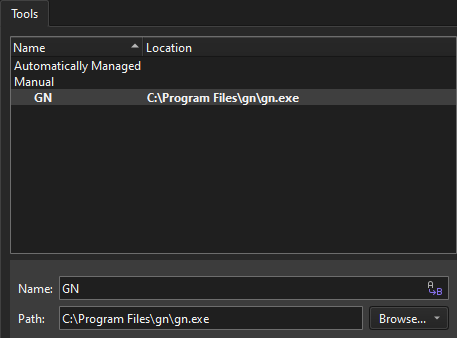
- U Name u navedite naziv alata.
- U Path u navedite putanju do GN izvršne datoteke.
- Odaberite Apply da spremite promjene.
Dodajte GN alate u kitove
Za korištenje GN-a za izgradnju projekata:
- Idite na Preferences > Kits > Kits.
- Odaberite komplet za uređivanje.
- U GN Tool odaberite GN alat.
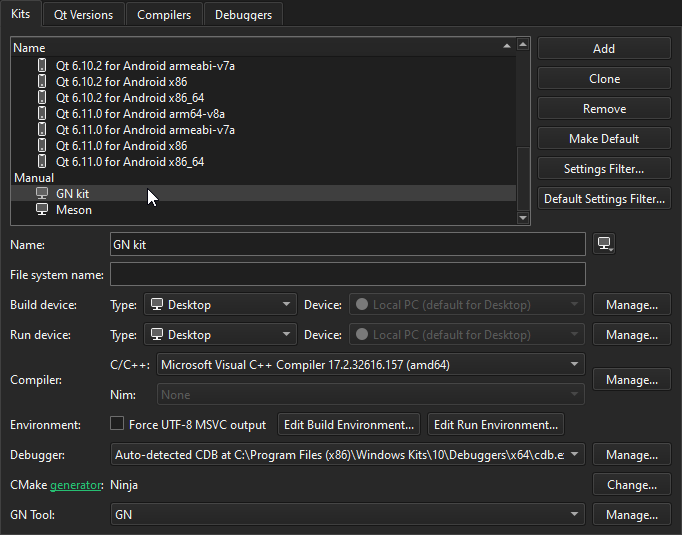
- Aktivirajte komplet za projekt.
Za više informacija pogledajte Upravljanje setovima.
Vidi također Aktivirajte ekstenzije i Aktivirajte komplete za projekt.
Copyright © The Qt Company Ltd. and other contributors. Documentation contributions included herein are the copyrights of their respective owners. The documentation provided herein is licensed under the terms of the GNU Free Documentation License version 1.3 as published by the Free Software Foundation. Qt and respective logos are trademarks of The Qt Company Ltd in Finland and/or other countries worldwide. All other trademarks are property of their respective owners.
