
Dodaj resurse
Assets prikazuje slike i druge datoteke koje dodajete u mapu projekta povlačenjem vanjskih datoteka s resursima u Qt Quick Designer ili odabirom  .
.
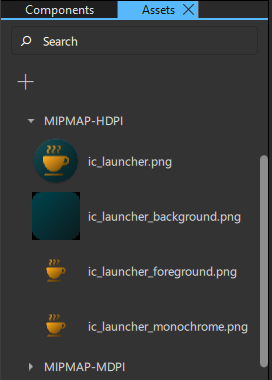
Da biste dodali resurse u svoj UI, povucite ih iz Assets u prikaz Navigator ili 2D.
Da biste istovremeno dodali više resursa u svoj UI, prvo ih višestruko odaberite držeći tipku Ctrl i klikajući na datoteke resursa koje želite odabrati.
Kada povučete resurse iz Assets u prikaz Navigator ili 2D, automatski se za vas stvaraju instance komponenti odgovarajuće vrste. Na primjer, za grafičke datoteke stvorit će se instance komponente Image.
Vidi također Kako: dizajnirati UI-je za Qt Quick , dizajn UI-ja zaQt Quick i dizajn UI-ja za Qt Quick .
Copyright © The Qt Company Ltd. and other contributors. Documentation contributions included herein are the copyrights of their respective owners. The documentation provided herein is licensed under the terms of the GNU Free Documentation License version 1.3 as published by the Free Software Foundation. Qt and respective logos are trademarks of The Qt Company Ltd in Finland and/or other countries worldwide. All other trademarks are property of their respective owners.
