
チュートリアル:C++のデバッグ
このチュートリアルでは、TextFinderのサンプルを用いて、Debug モードで Qt C++ アプリケーションをデバッグする方法を説明します。
TextFinderはテキストファイルをQString に取り込み、QTextEdit で表示します。TextFinderクラスを確認し、格納されているデータを表示するには:
textfinder.cppで、カーソル位置を変更してブレークポイントを設定する行の、行番号とウィンドウの境界線の間の領域をクリックします。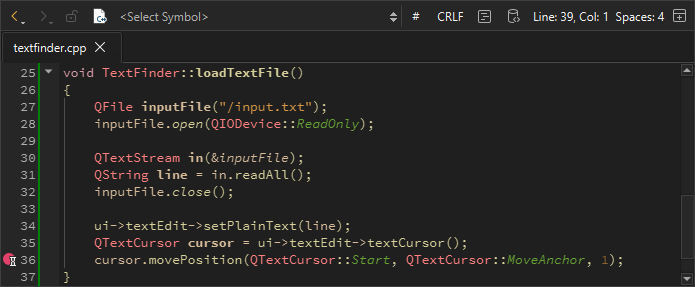
- 「Debug 」>「Start Debugging 」>「Start Debugging of Startup Project 」に移動するか、F5キーを押します。
- ブレークポイントに関する情報を表示するには、[Breakpoints ] ビューに移動します。

- ブレークポイントを削除するには、ブレークポイントを右クリックして、[Delete Breakpoint] を選択します。
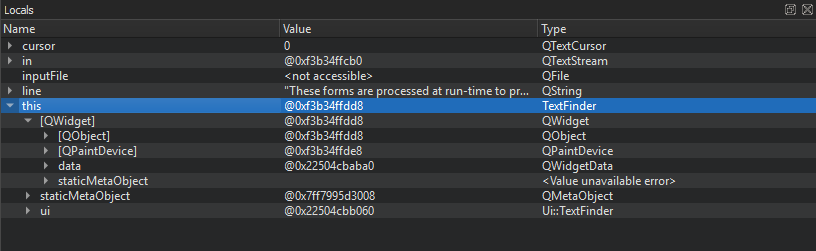
- TextFinder クラスの基底クラスとデータメンバーを表示するには、[Locals ] ビューに移動します。
on_findButton_clicked() 関数を変更し、カーソルがドキュメントの末尾に到達したら、ドキュメントの先頭に戻って検索を続行するようにします。次のコードスニペットを追加してください:
void TextFinder::on_findButton_clicked()
{
    QString searchString = ui->lineEdit->text();

    QTextDocument *document = ui->textEdit->document();
    QTextCursor cursor = ui->textEdit->textCursor();
    cursor = document->find(searchString, cursor,
        QTextDocument::FindWholeWords);
    ui->textEdit->setTextCursor(cursor);

    bool found = cursor.isNull();

    if (!found && previouslyFound) {
        int ret = QMessageBox::question(this, tr("End of Document"),
        tr("I have reached the end of the document. Would you like "
        "me to start searching from the beginning of the document?"),
        QMessageBox::Yes | QMessageBox::No, QMessageBox::Yes);

        if (ret == QMessageBox::Yes) {
            cursor = document->find(searchString,
                QTextDocument::FindWholeWords);
            ui->textEdit->setTextCursor(cursor);
        } else
            return;
    }
    previouslyFound = found;
}
ただし、上記のコードをコンパイルして実行しても、論理エラーのためアプリケーションは正しく動作しません。この論理エラーを特定するには、次のボタンを使用してコードをステップ実行してください: (Stop Debugger)、
 (Step Over)、
 (Step Into)、および
 (Step Out)。
「チュートリアル:Qt Widgets アプリケーション」、「デバッグ」、「デバッガ」も参照してください 。
Copyright © The Qt Company Ltd. and other contributors. Documentation contributions included herein are the copyrights of their respective owners. The documentation provided herein is licensed under the terms of the GNU Free Documentation License version 1.3 as published by the Free Software Foundation. Qt and respective logos are trademarks of The Qt Company Ltd in Finland and/or other countries worldwide. All other trademarks are property of their respective owners.
