
コミットに対して操作を実行する
ディレクトリやコミット履歴を閲覧し、コミットに対して操作を適用するには、Tools >Git >Actions on Commits にアクセスします。
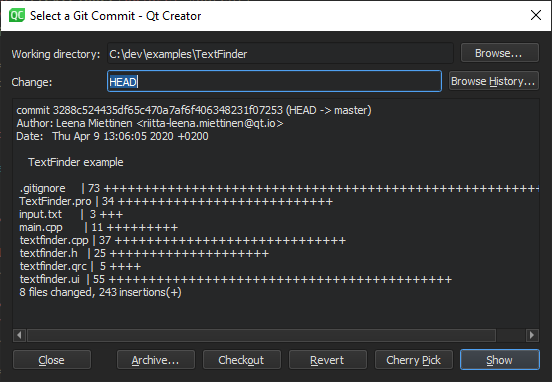
「Git コミットを選択」ダイアログ
コミットに対して以下の操作を実行できます:
| メニュー項目 | 説明 |
|---|---|
| Archive | コミットを ZIP または tarball としてパッケージ化します。 |
| Checkout | 変更内容をデタッチド HEAD 状態でチェックアウトします。 |
| Cherry Pick | 選択した変更をローカルリポジトリにチェリーピックします。 |
| Revert | そのコミットによって導入された変更を元に戻します。その他のコミットはすべて変更されません。 |
| Show | diff エディタでコミットを表示します。 |
「Git の使い方」および「 Git の利用方法」も参照してください 。
Copyright © The Qt Company Ltd. and other contributors. Documentation contributions included herein are the copyrights of their respective owners. The documentation provided herein is licensed under the terms of the GNU Free Documentation License version 1.3 as published by the Free Software Foundation. Qt and respective logos are trademarks of The Qt Company Ltd in Finland and/or other countries worldwide. All other trademarks are property of their respective owners.
