
Android SDK パッケージの管理
Android SDK Tools バージョン 25.3.0 以降、Android では SDK パッケージの管理にコマンドラインツール「sdkmanager」のみが使用されています。SDK 管理を簡素化するため、Qt Creator には、SDK パッケージのインストール、更新、削除を行うための SDK マネージャーが搭載されています。高度な SDK 管理には、引き続きsdkmanager を使用できます。
インストール済みのAndroid SDKパッケージを確認するには、[Preferences ] > [SDKs ] > [Android ] > [SDK Manager] の順に選択します。
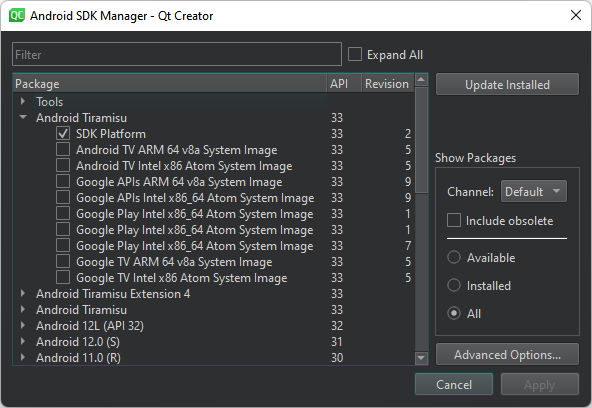
SDK パッケージの表示
Package でリリースチャネルのパッケージを表示するには、Show Packages >Channel でそのチャネルを選択します。一般的なチャネル ID には、Stable 、Beta 、Dev 、Canary などがあります。
廃止されたパッケージを表示するには、Include obsolete を選択してください。
パッケージをフィルタリングするには、「Available 」、「Installed 」、または「All 」を選択します。
SDK パッケージの更新
インストール済みの Android SDK パッケージを更新するには:
- 「Update Installed 」を選択します。
- 更新するパッケージを選択します。
- 「Apply 」を選択します。
sdkmanager のオプションを設定する
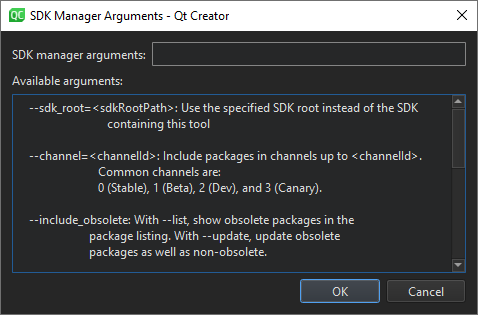
sdkmanager の詳細オプションを設定するには:
- 「Advanced Options 」を選択します。
- 「SDK Manager arguments 」で、Available arguments に記載されている sdkmanager オプションを入力します。
「Android 向け開発の手順」および「Android 向け開発」も参照してください 。
Copyright © The Qt Company Ltd. and other contributors. Documentation contributions included herein are the copyrights of their respective owners. The documentation provided herein is licensed under the terms of the GNU Free Documentation License version 1.3 as published by the Free Software Foundation. Qt and respective logos are trademarks of The Qt Company Ltd in Finland and/or other countries worldwide. All other trademarks are property of their respective owners.
