
UIテーマを切り替える
テーマを使用すると、UIの外観を、例えばダークモードからライトモードに変更することができます。
テーマを切り替えるには:
- 「Preferences 」>「Environment 」>「Interface 」を選択します。
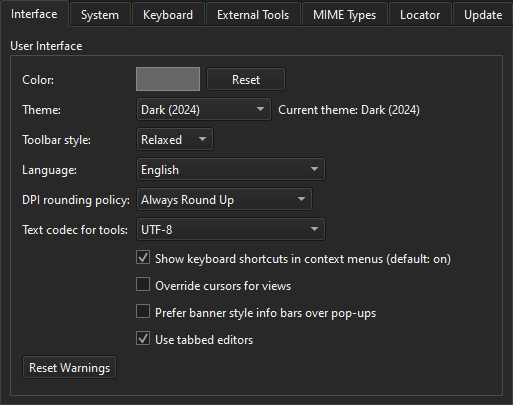
- 「Theme 」で、テーマを選択します。
「手順:UIのカスタマイズ」および「UIのカスタマイズ」も参照してください 。
Copyright © The Qt Company Ltd. and other contributors. Documentation contributions included herein are the copyrights of their respective owners. The documentation provided herein is licensed under the terms of the GNU Free Documentation License version 1.3 as published by the Free Software Foundation. Qt and respective logos are trademarks of The Qt Company Ltd in Finland and/or other countries worldwide. All other trademarks are property of their respective owners.
