
Windowsでのジャンクションポイントの使用
Windows では、プロジェクトのパスが長すぎるとビルドが失敗する可能性があります。
この問題を回避するには:
- ソースディレクトリ名には、短い絶対パスを使用してください。たとえば、
C:\Users\My Name\Projectsではなく、C:\devを使用します。 - ビルドディレクトリのパスは短くしてください。
- CMake には Ninja ジェネレータを使用してください。
- Windows では、ソースディレクトリとビルドディレクトリにジャンクションポイントを使用してください。
ジャンクションポイント
ジャンクションポイントでは、あるディレクトリがコンピュータ上の別のディレクトリへのエイリアスとして機能します。
CMake の設定、ビルド、およびインストール操作でジャンクションポイントを使用するには、Preferences >CMake >General に移動し、「Use junctions for CMake configuration and build operations 」を選択してください。
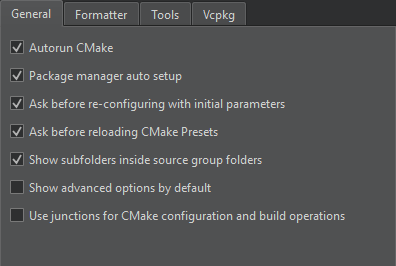
ビルドシステムは、ジャンクションポイントを介してプロジェクトの設定、コンパイル、およびインストールを行うため、コマンドラインコマンドが簡潔になります。
環境変数の設定
Qt Creator ジャンクションポイントはC:\ProgramData\QtCreator\Links に保存されます。別のパスを使用するには、QTC_CMAKE_JUNCTIONS_DIR 環境変数の値としてそのパスを設定してください。
QTC_CMAKE_JUNCTIONS_HASH_LENGTH 環境変数を設定することで、MD5 ハッシュキーの長さをデフォルトの 32 文字から短縮できます。
「CMake でのビルド方法」も参照してください 。
Copyright © The Qt Company Ltd. and other contributors. Documentation contributions included herein are the copyrights of their respective owners. The documentation provided herein is licensed under the terms of the GNU Free Documentation License version 1.3 as published by the Free Software Foundation. Qt and respective logos are trademarks of The Qt Company Ltd in Finland and/or other countries worldwide. All other trademarks are property of their respective owners.
