
디스어셈블된 코드 보기
디스어셈블러는 사람이 읽기 쉽도록 기계어를 어셈블리어로 변환합니다.
' Disassembler ' 뷰는 현재 함수에 대한 디스어셈블된 코드를 표시합니다. 이는 ` Step Into ` 및 ` Step Over`과 같이 단일 명령어를 확인하는 저수준 명령어에 유용합니다.
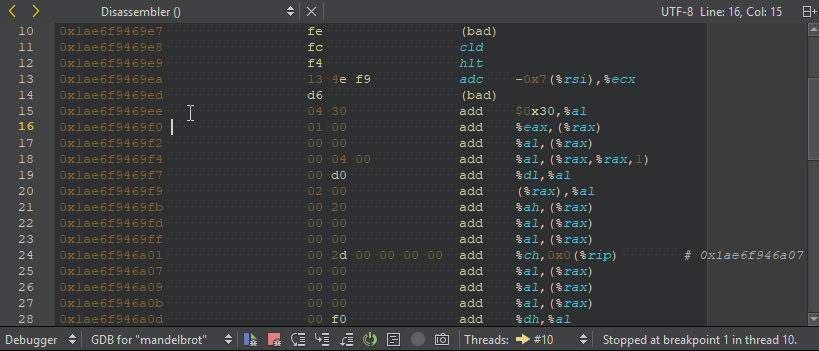
기본적으로 GDB는 AT&T 스타일의 디스어셈블리 결과를 표시합니다. 인텔 스타일로 전환하려면 [ Preferences ] > [ Debugger ] > [ GDB ] > [ Use Intel style disassembly]로 이동하십시오.
Disassembler 보기를 열려면:
- 디버거가 실행 중인 상태에서 Debug > Operate by Instruction 로 이동합니다.
- 디버거 도구 모음에서 ‘
 (Operate by Instruction)’를 선택합니다.
 - 레지스터(Registers) 뷰에서 값을 선택한 다음, 컨텍스트 메뉴에서 '레지스터 분석기( Open Disassembler at <value> )'를 선택합니다.
디스어셈블러 시작
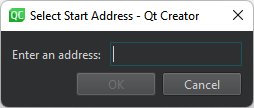
' Registers ' 보기에서 디스어셈블러를 시작하려면 ' Open Disassembler '를 선택하고 디스어셈블러 주소를 설정하십시오:
Copyright © The Qt Company Ltd. and other contributors. Documentation contributions included herein are the copyrights of their respective owners. The documentation provided herein is licensed under the terms of the GNU Free Documentation License version 1.3 as published by the Free Software Foundation. Qt and respective logos are trademarks of The Qt Company Ltd in Finland and/or other countries worldwide. All other trademarks are property of their respective owners.
